
As an Amazon Associate I earn from qualifying purchases.
The AIPER EcoSurfer S2 is a solar-powered robotic pool skimmer designed to cruise your pool’s surface around the clock, scooping up leaves, pollen, bugs, and other floating debris before they sink and clog your filter. It pairs with a smartphone app, charges via both solar panels and a USB-C dock, and uses smart navigation sensors to avoid walls and obstacles. Setting it up correctly from the start is the key to trouble-free operation — and it’s easier than you might expect. This guide walks you through every step, from cracking open the box to watching the S2 glide across your pool on its first run.
Best for: Pool owners who want hands-off debris removal without running their main filtration system constantly
What’s in the Box
Before you start, lay everything out on a clean, dry surface and verify nothing is missing. According to AIPER’s documentation, the EcoSurfer S2 package should include:
- 1 × EcoSurfer S2 skimmer unit (with integrated solar panels on top)
- 1 × USB-C charging dock / cable
- 1 × debris basket (pre-installed inside the unit)
- 1 × user manual / quick-start card
- 1 × cleaning tool for basket maintenance
Inspect the solar panels on the top of the unit for any shipping damage or protective film that needs to be peeled off. Several verified buyers have noted that a thin protective film covers the solar cells — removing it is essential for proper solar charging. Also confirm the debris basket clicks securely into place inside the skimmer body.
Step 1: Initial Charge Before First Use
AIPER recommends giving the EcoSurfer S2 a full charge before its maiden voyage. The unit features dual charging modes, which is one of its standout features:
USB-C Dock Charging
1. Locate the USB-C charging port on the underside or rear of the unit (check your manual for the exact position on your production model). 2. Connect the included USB-C cable to a standard USB power adapter (5V/2A or higher is typical). 3. The LED indicator should illuminate to show charging status — typically a solid or blinking light that turns steady green when full. 4. A full charge from empty takes roughly 3–4 hours via USB-C, based on manufacturer specs.
Solar Charging
Once the S2 is floating in your pool, the integrated solar panels on the top surface continuously trickle-charge the battery during daylight hours. This is what enables the advertised 24/7 continuous cleaning — the solar panels extend runtime so the skimmer rarely (if ever) needs to be pulled out for dock charging under normal sunny conditions.
Pro tip from verified users: On overcast days or in heavily shaded pools, the solar panels may not generate enough power to keep up with motor consumption. In those conditions, supplement with a USB-C charge overnight so the S2 is ready for the next day.

Step 2: Download and Set Up the AIPER App
The EcoSurfer S2 supports app connectivity for scheduling, status monitoring, and firmware updates. Here’s how to get connected:
1. Download the AIPER app from the Apple App Store (iOS) or Google Play Store (Android). Search for “Aiper” — the official app icon features the AIPER logo. 2. Create an account or log in if you already have one (for example, if you own an AIPER Seagull SE robotic pool cleaner, you may already have an account). 3. Tap the “+” or “Add Device” button on the app’s home screen. 4. Select the EcoSurfer S2 from the list of available AIPER products. 5. Enable Bluetooth on your phone when prompted. The S2 uses Bluetooth for initial pairing (some AIPER products also use Wi-Fi for cloud features — follow the on-screen prompts for your specific firmware version). 6. Power on the S2 by pressing and holding the power button on the unit. The skimmer should enter pairing mode automatically on first boot — look for a rapidly blinking LED indicator. 7. Confirm the connection in the app once it discovers the device. You may be prompted to connect the S2 to your home Wi-Fi network for remote monitoring and firmware updates.
Troubleshooting App Pairing
Verified buyers report a few common hiccups during pairing:
- Bluetooth won’t discover the device: Make sure you’re within 3–5 feet of the skimmer. Restart both the app and the skimmer, then retry.
- Wi-Fi connection fails: The S2 typically supports 2.4 GHz Wi-Fi only (not 5 GHz). If your router broadcasts a combined network, try temporarily disabling the 5 GHz band or creating a dedicated 2.4 GHz SSID.
- App crashes or freezes: Update to the latest app version. AIPER has pushed several updates since launch that address early stability issues, according to user feedback.
Step 3: Configure Cleaning Settings in the App
Once paired, the app gives you access to several useful controls:
- Cleaning schedule: Set specific times for the S2 to activate and rest. Some owners program it to run during peak debris hours (morning and late afternoon when wind blows leaves in) and rest overnight to conserve battery.
- Cleaning mode: Depending on firmware, you may have options for standard cleaning or an intensive mode that increases motor speed for heavier debris loads.
- Battery and solar status: Monitor real-time charge level and solar input so you know whether a USB-C top-up is needed.
- Firmware updates: Accept any available updates during initial setup — these often include navigation improvements and bug fixes.
Step 4: Place the EcoSurfer S2 in Your Pool
Now for the satisfying part — launching it.
1. Ensure the debris basket is properly seated. Open the basket compartment, confirm the basket clicks into place, and close the compartment securely. A loose basket can cause the unit to take on water or fail to collect debris effectively. 2. Power on the unit if it isn’t already on. 3. Gently place the S2 on the water surface near the center of your pool. Don’t drop it or toss it — set it down flat so it settles evenly. 4. The S2’s smart navigation sensors will activate, and it should begin moving within a few seconds, steering itself around the pool perimeter and across the surface.
What to Expect on the First Run
The EcoSurfer S2 uses onboard sensors to detect pool walls, steps, and obstacles. On its first few laps, it’s essentially “learning” the pool’s boundaries. Verified users commonly report:
- It may bump into walls gently at first — this is normal. The sensors calibrate as the unit operates.
- It handles rectangular pools best. Irregularly shaped pools, kidney shapes, or pools with lots of water features may cause the S2 to get momentarily stuck in corners. Most users say it frees itself within a few seconds.
- Wind and water flow affect its path. If your return jets are angled upward and creating strong surface currents, the S2 may drift. Some owners angle their jets slightly downward to reduce surface turbulence.

Step 5: Ongoing Maintenance Tips
Setting up the S2 is only half the equation. Keeping it running smoothly requires minimal but consistent maintenance:
- Empty the debris basket after each cleaning cycle (or daily, at minimum). A full basket reduces suction efficiency and adds drag.
- Rinse the unit with fresh water after removing it from a chlorinated or saltwater pool. This prevents chemical buildup on the sensors and solar panels.
- Wipe the solar panels weekly with a soft, damp cloth. Pollen, sunscreen residue, and mineral deposits can reduce solar charging efficiency significantly.
- Inspect the drive motors and wheels/propellers monthly for tangled hair or string.
- Store indoors or in shade during extended periods of non-use. Prolonged UV exposure when the unit isn’t floating (and therefore not being cooled by water) can degrade plastics over time.
Common Questions From Verified Buyers
Does it work in saltwater pools? AIPER’s documentation indicates the EcoSurfer S2 is compatible with both chlorine and saltwater pools. Multiple verified buyers confirm successful use in saltwater setups, though they emphasize the importance of freshwater rinsing after each session.
How large a pool can it handle? The S2 is designed for residential pools. Manufacturer specs and user reports suggest it works well in pools up to approximately 1,600 square feet of surface area. Larger pools may require longer run times or multiple units.
Does it replace my pool’s main filter system? No. The EcoSurfer S2 is a surface skimmer only — it collects floating debris before it sinks. You still need your pool’s circulation and filtration system for water chemistry, subsurface particles, and wall/floor cleaning. If you’re weighing solar-powered pool equipment against electric alternatives, the S2 is best understood as a supplement, not a replacement.
What about rain? The S2 is designed to float on water, so rain itself isn’t a problem. However, heavy rainstorms can overwhelm the debris basket quickly and may push the unit against walls. Most owners pull it out during severe weather as a precaution.
Full Product Review: AIPER EcoSurfer S2 Solar Pool Skimmer
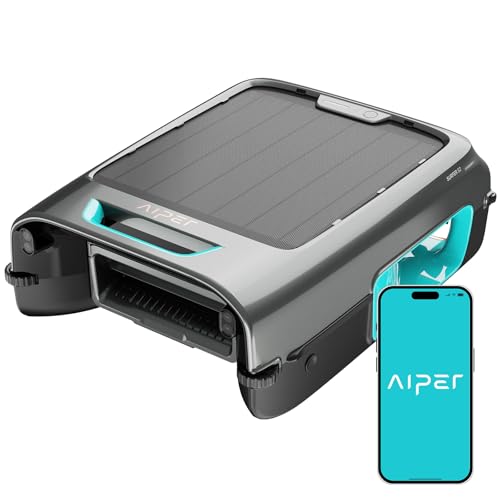
The AIPER EcoSurfer S2 occupies a growing niche: autonomous solar-powered surface skimmers that work around the clock without adding to your electricity bill. Its dual charging system — solar panels for daytime trickle charging plus USB-C for overnight top-ups — is genuinely clever and, according to numerous verified buyers, delivers on the promise of near-continuous operation in sunny climates. The app integration adds real convenience, letting you check battery status, set schedules, and receive notifications without walking out to the pool.
On the positive side, verified reviewers consistently praise the S2’s quiet operation, effective debris collection for leaves and pollen, and the satisfaction of a visibly cleaner pool surface each morning. The setup process is described as straightforward by most buyers, with the app pairing taking under five minutes in ideal conditions.
On the negative side, the most common complaints involve navigation in irregularly shaped pools (occasional corner-sticking), reduced effectiveness on overcast days when solar charging can’t keep pace, and a debris basket that some users wish were larger for heavy leaf-fall seasons. A few buyers also report that the initial Bluetooth pairing can be finicky, requiring a restart of both the app and the device.
The EcoSurfer S2 is best suited for pool owners with moderate debris loads who want a set-it-and-forget-it surface cleaner. If you’re comparing it against manual skimmer nets or cheaper pool skimmer alternatives, the S2’s solar autonomy and app control justify the premium for anyone who values convenience.
Final Thoughts
The AIPER EcoSurfer S2 setup process is refreshingly simple: charge it, pair it with the app, drop it in the pool, and let it work. The dual charging system means you’ll rarely need to intervene once it’s running, and the app gives you just enough control without overcomplicating things. Pay attention to the basics — full initial charge, clean solar panels, regular basket emptying — and the S2 should keep your pool surface clear with minimal effort on your part.
If you’re new to robotic pool equipment in general, you might also find our AIPER Seagull SE setup guide helpful for understanding AIPER’s app ecosystem and general approach to pool robotics.
How We Research
This guide was compiled by synthesizing AIPER’s official product documentation, manufacturer specifications, and verified customer reviews from major retail platforms. We have not personally tested, owned, or handled the AIPER EcoSurfer S2. All claims about performance, setup procedures, and common issues are attributed to manufacturer materials or patterns observed across multiple verified buyer reports. Our goal is to provide the most accurate, honest, and comprehensive setup walkthrough possible based on publicly available information.


Leave a Reply