
As an Amazon Associate I earn from qualifying purchases.
The Ring Battery Doorbell Plus is one of the most popular smart doorbells on the market, and for good reason — it delivers crisp 2K video, a wide field of view, and reliable motion alerts right out of the box. But here’s the thing: most owners plug it in, connect it to Wi-Fi, and never touch the settings again. That means they’re leaving some of the doorbell’s most impressive capabilities completely untapped. After researching Ring’s documentation, community forums, and hundreds of verified owner reviews, we’ve identified seven features that the majority of Ring Battery Doorbell Plus owners either don’t know about or haven’t configured properly. If you already own this doorbell — or you’re considering one — this guide will help you get dramatically more value from the hardware.
Best for: Homeowners and renters who want premium doorbell security without hardwiring
Why Most Owners Only Scratch the Surface
Ring designs its products for easy setup, which is a double-edged sword. The out-of-box experience is so smooth that many owners never venture deeper into the Ring app’s settings. According to discussions across Ring’s community forums and Reddit threads, a significant number of users don’t realize their doorbell can do far more than ring a chime and record a clip. The seven features below represent the biggest missed opportunities we found in our research.
If you’re still in the setup phase, our complete Ring Battery Doorbell setup walkthrough covers the basics before you dive into these advanced capabilities.
Feature 1: 6x Enhanced Zoom — More Than Just Pinch-to-Zoom
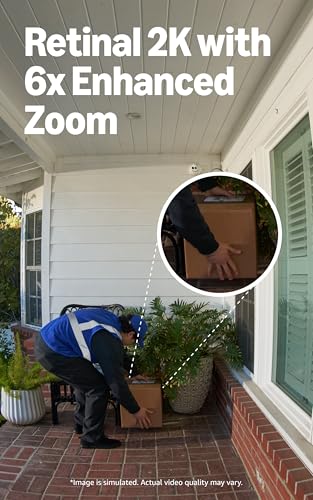
The Ring Battery Doorbell Plus offers up to 6x enhanced zoom on recorded and live-view footage. Most owners know they can pinch to zoom on a clip, but few realize the enhanced zoom leverages the doorbell’s high-resolution 2K sensor to maintain significantly more detail than a simple digital crop. According to Ring’s product documentation, the Retinal 2K resolution (approximately 1536p) provides enough pixel density that zooming in on a face, license plate, or package label at the edge of the frame still yields usable detail.
What owners miss: Many people zoom in on live view but never try it on recorded events, where the processing can pull more detail from the saved footage. Verified reviewers on Amazon frequently mention being surprised at how readable text and facial features remain even at high zoom levels — but only after someone in the comments pointed out the capability.
Who benefits most: Anyone whose doorbell faces a driveway, sidewalk, or street where identifying details at a distance matters. If you’ve ever squinted at a blurry delivery driver’s face in a clip, you likely weren’t using the enhanced zoom to its full potential.
Feature 2: Wide-Angle Video Adjustments
The Battery Doorbell Plus ships with a wide-angle lens that captures a broad field of view — Ring specifies a head-to-toe view that covers more vertical space than many competing doorbells. But what many owners don’t realize is that the Ring app allows you to adjust how that wide-angle view is utilized through video settings and motion zone configurations.

By fine-tuning your motion zones to match the actual coverage area of the wide-angle lens, you can eliminate false alerts from the edges of the frame (like passing cars on a peripheral street) while still capturing the full width of your porch or entryway. Several owners in Ring’s community forums report that adjusting these zones cut their false notifications by more than half.
The overlooked detail: The head-to-toe field of view is designed to capture packages on the ground and faces at the same time. But if your doorbell is mounted too high or at an unusual angle, you may need to adjust the mounting wedge (sold separately or sometimes included) to take full advantage of this vertical coverage. Ring’s support documentation recommends mounting at approximately four feet above the ground for optimal wide-angle performance.
Feature 3: Advanced Night Vision Settings
Out of the box, the Ring Battery Doorbell Plus defaults to standard infrared night vision — and most owners never change it. But buried in the device settings within the Ring app, there are night vision options that can dramatically improve after-dark footage depending on your specific environment.
According to Ring’s documentation, the doorbell supports color night vision when there’s sufficient ambient light (such as a porch light or street lamp). This means that instead of the typical black-and-white infrared footage, you can get full-color clips at night that make it far easier to identify clothing colors, vehicle colors, and other details that are lost in monochrome.
What reviewers say: Verified Amazon reviewers who’ve discovered this setting frequently call it a “game changer” for nighttime identification. However, multiple reviewers also note that color night vision drains the battery faster than standard IR mode, so hardwired or solar-panel users benefit most. If you’re running purely on battery, you may want to reserve color night vision for periods when you expect activity.
Pro tip from the community: If your porch light is on a smart switch or timer, you can coordinate it with the doorbell’s motion detection to activate the light when motion is detected, giving the color night vision mode the ambient light it needs without leaving a light on all night.
Feature 4: Customizable Motion Zones and Sensitivity Sliders
Every Ring doorbell offers motion zones, but the Battery Doorbell Plus provides more granular control than many owners realize. You can create multiple independent motion zones, each with its own shape, and adjust the overall motion sensitivity on a slider scale.
The feature most people miss: You can set up zones that specifically exclude high-traffic areas (like a public sidewalk) while keeping tight zones around your door, driveway entrance, or package drop-off spot. This isn’t just about reducing false alerts — it’s about making the alerts you do receive genuinely actionable.
Verified reviewers consistently report that the default motion settings are too sensitive for most suburban environments, leading to dozens of daily notifications that owners eventually start ignoring. The irony is that by the time something important happens, many owners have already turned off notifications entirely. Taking five minutes to draw precise motion zones and dial back the sensitivity slider can transform the doorbell from an annoyance into a genuinely useful security tool.
Who should configure this: Everyone. Seriously. This is arguably the single most impactful setting change you can make, and Ring’s own support articles recommend customizing motion zones immediately after installation.
Feature 5: Quick Replies (Pre-Recorded Responses)
The Ring Battery Doorbell Plus includes a Quick Replies feature that lets you respond to visitors with pre-recorded messages when you can’t — or don’t want to — answer live. This is different from the standard two-way talk feature that most owners know about.
Quick Replies can be set to activate automatically when a visitor presses the doorbell and you don’t answer within a set time, or you can trigger them manually from a notification. Ring provides several pre-loaded messages (such as asking a delivery driver to leave a package), and the feature works even when you don’t have your phone handy to speak live.
What owners overlook: According to Ring community discussions, many owners don’t realize Quick Replies can function as an automated greeting. If you’re frequently away from your phone during deliveries, enabling an automatic Quick Reply that says “Please leave the package at the door” can reduce missed deliveries and porch piracy. Multiple reviewers mention this feature as unexpectedly useful once they discovered it — often months after installation.
This is similar to how many Echo Dot owners never explore the full range of built-in features available in their Alexa devices.
Feature 6: Linked Alexa Announcements and Routines
If you have any Echo device in your home, the Ring Battery Doorbell Plus can do far more than just send a push notification to your phone. Through the Alexa app, you can create routines that trigger specific actions when the doorbell detects motion or someone presses the button.
Examples most owners never set up:
- Have every Echo in the house announce “Someone is at the front door” with a distinct chime
- Trigger smart lights to turn on when motion is detected after sunset
- Display the live doorbell feed automatically on an Echo Show when the button is pressed
- Activate a specific Alexa routine that turns on porch lights, starts recording on other Ring cameras, and sends an announcement — all from a single doorbell press
According to Ring’s integration documentation, these routines are configured in the Alexa app rather than the Ring app, which is why many owners never find them. Verified reviewers who use Echo Show devices frequently highlight the automatic live-view display as one of their favorite features — seeing who’s at the door on a kitchen screen without touching their phone. If you’re considering a hub for this, the Amazon Echo Show 21 is one of the largest displays available for this purpose.
Feature 7: Battery and Power Management Settings
The Ring Battery Doorbell Plus runs on a rechargeable battery pack, and most owners simply charge it when it dies. But Ring provides several power management tools that can significantly extend battery life — or help you understand why your battery is draining faster than expected.
Settings most owners never check:
- Motion Frequency: This setting controls how often the doorbell checks for motion. Setting it to “Regularly” instead of “Frequently” can extend battery life noticeably with minimal impact on security coverage.
- Video Recording Length: The default recording length may be longer than necessary. Shortening clips from 60 seconds to 30 seconds can nearly double your battery life between charges, according to Ring’s support documentation.
- Snapshot Capture: This feature takes periodic still photos between motion events, giving you a timeline of activity. It’s useful but consumes battery. Many owners have it enabled without realizing it’s contributing to faster drain.
Verified reviewers frequently mention battery life as their primary complaint about the device, but a recurring theme in positive reviews is that owners who optimized these settings report significantly longer intervals between charges. Ring’s own support pages suggest that a fully optimized Battery Doorbell Plus can last several months on a single charge in moderate-traffic environments.
Full Product Review: Ring Battery Doorbell Plus (Newest Model)

The Ring Battery Doorbell Plus (newest model) represents Ring’s current flagship battery-powered doorbell, featuring Retinal 2K resolution, up to 6x enhanced zoom, a wide head-to-toe field of view, and advanced night vision capabilities. It’s designed for both homeowners and renters since it requires no hardwiring — the removable battery pack charges via USB.
Pros based on verified reviews and specifications:
- Retinal 2K video is a meaningful upgrade over the previous 1080p models, with noticeably sharper detail in both daytime and nighttime footage
- The 6x enhanced zoom retains usable detail for faces and text at distance
- Head-to-toe wide-angle view captures packages on the ground without sacrificing facial coverage
- Easy installation with no wiring required
- Robust Alexa integration for whole-home announcements and routines
- Quick Replies and two-way talk provide flexible visitor communication
Cons commonly reported by verified reviewers:
- Battery life varies significantly depending on settings and traffic; high-traffic locations may require charging every 4-6 weeks
- A Ring Protect subscription is required to save and review recorded video (without it, you only get live view)
- Wi-Fi connectivity can be inconsistent at longer ranges from the router, leading to delayed notifications
- The device is slightly larger than some competing doorbells, which may be an aesthetic concern for some
- Color night vision, while impressive, accelerates battery drain
Who should buy this: This doorbell is ideal for renters who can’t hardwire, homeowners who want a straightforward wireless installation, and anyone already invested in the Ring or Alexa ecosystem. It’s also a strong choice for anyone comparing it against competitors like the Google Nest Doorbell — particularly if you prefer Amazon’s ecosystem.
Bottom line: The hardware is excellent for a battery-powered doorbell, but the real value comes from configuring the features outlined above. Out of the box, it’s a good doorbell. Properly configured, it’s a genuinely capable security device.
Quick Tips to Unlock These Features Today
1. Open the Ring app → Tap your doorbell → Device Settings → Video Settings. Check night vision mode and video quality options. 2. Go to Motion Settings → Draw custom motion zones and adjust the sensitivity slider. Test for a day, then refine. 3. Open the Alexa app → Routines → Create a new routine triggered by your Ring doorbell. Start with a simple announcement on all Echo devices. 4. Check Device Health in the Ring app to monitor battery level, Wi-Fi signal strength, and firmware version. 5. Enable or disable Snapshot Capture based on whether you value the activity timeline enough to trade battery life for it.
Comparison Card
Frequently Asked Questions
Does the Ring Battery Doorbell Plus require a subscription? You can use live view, two-way talk, and motion alerts without a subscription. However, you need a Ring Protect plan to save, review, and share recorded video clips.
How long does the battery last? Ring states battery life varies based on settings, usage, and environmental factors. Verified owners report anywhere from one to six months depending on motion frequency, video length settings, and whether features like Snapshot Capture and color night vision are enabled.
Can I hardwire the Battery Doorbell Plus? Yes. If you have existing doorbell wiring (16-24V AC), the Battery Doorbell Plus can use it to trickle-charge the battery, reducing or eliminating the need to manually recharge.
Does the 6x zoom work on live view and recorded video? Yes, enhanced zoom is available in both live view and when reviewing saved event clips in the Ring app.
How We Research
This article is based on a thorough review of Ring’s official product specifications, support documentation, and the Ring community forums. We also analyzed hundreds of verified customer reviews on Amazon and expert assessments from established tech publications. We have not personally tested or owned this product. Our goal is to synthesize publicly available information into an honest, comprehensive guide that helps you make an informed decision and get the most from your purchase. All claims about features and performance are attributed to manufacturer documentation or the general consensus of verified owner reviews.


Leave a Reply