
As an Amazon Associate I earn from qualifying purchases.
If you’ve been eyeing the Amazon Echo Hub as the nerve center of your smart home but want to explore what else is out there — or build equivalent control for less — you’re in the right place. The Echo Hub is a purpose-built 8-inch wall-mountable control panel designed around Alexa, but it’s far from the only way to command your lights, locks, cameras, and routines from a single screen. In this guide, we compare the Echo Hub itself against a mix of Amazon’s own display alternatives and the smart accessories that pair with them, breaking down display size, ecosystem compatibility, and the real trade-offs you’ll face.
Best for: Homeowners who want a dedicated, wall-mountable smart home dashboard without repurposing a tablet
Why Consider Alternatives to the Echo Hub?
The Echo Hub fills a specific niche: a flush-mount touchscreen panel that turns any wall into a smart home command center. But not everyone needs — or wants — a wall-mounted device. Some renters can’t drill into walls. Others already own an Echo Show and wonder whether a second screen is redundant. And many smart home enthusiasts simply want to start small with smart plugs and bulbs before investing in a centralized panel.
Below, we look at the Echo Hub alongside Amazon’s own Echo Show 5 and Echo Show 15 (which can serve as control panels in their own right), plus two of the most popular smart accessories — the Govee smart bulb and Kasa smart plug — that form the controllable endpoints any panel needs to be useful. After all, a control panel is only as good as the devices it commands.
If you’re building the perfect smart bedroom, understanding how these pieces fit together is essential.
Amazon Echo Hub — The Dedicated Control Panel

The Echo Hub is Amazon’s answer to the dedicated smart home control panel. It features an 8-inch touchscreen designed specifically for managing smart home devices through Alexa+. Unlike the Echo Show line, the Echo Hub is built to be wall-mounted — it ships with a wall-mount kit and has a slim profile that sits nearly flush against drywall. It supports Zigbee, Thread, Matter, and Bluetooth, giving it broad protocol coverage without requiring a separate hub for many devices.
Pros: The standout feature is its dashboard-first interface. Rather than treating smart home controls as a secondary feature (as the Echo Show does), the Echo Hub opens directly to device tiles, camera feeds, and routine shortcuts. Verified reviewers consistently praise the responsive touch interface and the ability to group devices by room. The built-in smart home hub (Zigbee/Thread) means fewer separate bridges cluttering your network.
Cons: The Echo Hub has no built-in camera and no speaker — it’s purely a control surface. If you want video calling or music playback, you’ll need to pair it with an external Echo speaker. Some reviewers note that the 8-inch display, while adequate, feels small when viewing multiple camera feeds simultaneously. And of course, you’re locked into the Alexa ecosystem.

Who should buy this: Homeowners committed to Alexa who want a clean, wall-mounted control panel that replaces light switch clutter with a single touchscreen. It’s ideal for hallways, kitchens, or entryways where you want quick access to device controls without pulling out your phone.
Amazon Echo Show 5 — The Budget Bedside Controller

The Echo Show 5 is Amazon’s most affordable smart display, and while it’s not marketed as a control panel, it absolutely functions as one. With its 5.5-inch screen, built-in speaker (with 2x the bass of earlier generations, per Amazon), and Alexa+ integration, it can control every smart device the Echo Hub can — just from a countertop or nightstand rather than a wall.
Pros: The Echo Show 5 includes a built-in camera for video calls and a speaker for music, timers, and announcements — features the Echo Hub lacks entirely. It’s a self-contained device that needs no accessories to be useful. Reviewers frequently highlight its value as a bedside clock and alarm, with the ambient light sensor adjusting display brightness automatically. Smart home controls are accessible via swipe-down menus and voice commands.
Cons: The 5.5-inch display is significantly smaller than the Echo Hub’s 8-inch panel, making it less practical for viewing camera feeds or managing large device dashboards. It doesn’t support Zigbee or Thread natively — you’ll need separate hubs for those protocols. The smart home dashboard is a secondary interface rather than the primary one, so accessing device controls requires an extra swipe or tap compared to the Echo Hub.
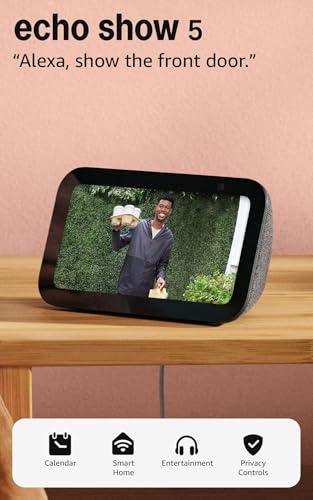
Who should buy this: Budget-conscious smart home beginners who want a single device that doubles as an alarm clock, speaker, and basic smart home controller. It’s perfect for bedrooms and small apartments where a wall-mounted panel would be overkill. If you’re looking for smart home gifts for tech lovers, this is an approachable entry point.
Amazon Echo Show 15 — The Kitchen Hub Alternative
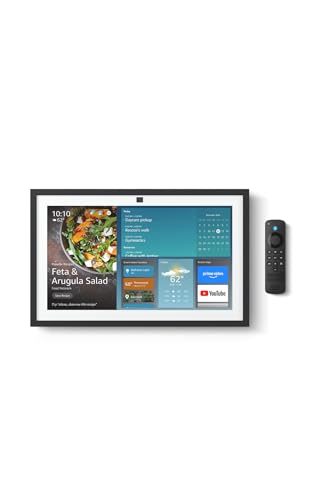
The Echo Show 15 takes the opposite approach from the Echo Show 5: it goes big. With a 15.6-inch Full HD display, built-in Fire TV, and the option to wall-mount in landscape or portrait orientation, it’s arguably a more capable control panel than the Echo Hub — though it serves a broader purpose as a family organizer and entertainment screen.
Pros: The 15.6-inch display dwarfs the Echo Hub’s 8-inch screen, making it far superior for viewing multiple camera feeds, family calendars, and sticky notes simultaneously. Built-in Fire TV means you can stream content directly on the display. Reviewers praise its usefulness as a digital bulletin board in kitchens, with widgets for recipes, shopping lists, and shared calendars. Smart home controls are accessible via the same Alexa interface, and the larger screen makes device dashboards genuinely usable.
Cons: The Echo Show 15 is physically large and heavy — it’s not a discreet wall panel like the Echo Hub. It doesn’t include Zigbee or Thread radios, so you’ll need external hubs for those protocols. Several reviewers report that the Fire TV integration, while convenient, can make the interface feel cluttered — it’s trying to be a TV, a smart home panel, and a family organizer all at once. The larger form factor also means higher power consumption.

Who should buy this: Families who want a single large display that serves as a kitchen TV, family calendar, and smart home dashboard. If you’re already planning to mount a screen in your kitchen and want smart home controls built in, the Echo Show 15 eliminates the need for a separate control panel. It’s also worth considering if you want to maintain your Fire TV setup as part of a unified ecosystem.
Govee Smart Light Bulbs — The Devices Your Panel Controls

No smart home control panel matters without devices to control. The Govee Smart Light Bulbs are among the most popular Wi-Fi-connected bulbs on Amazon, offering 16 million RGBWW colors, compatibility with both Alexa and Google Assistant, and no hub requirement. They connect directly over 2.4GHz Wi-Fi, which means any Echo Hub, Echo Show, or even a phone can control them.
Pros: Setup is straightforward — download the Govee app, connect to Wi-Fi, and the bulbs appear in Alexa or Google Home within minutes. Reviewers consistently praise the color accuracy and the range of whites available (warm through daylight). The Govee app offers scene modes, music sync, and scheduling that go beyond what Alexa’s native controls provide. At their price point, they’re significantly cheaper than Philips Hue bulbs and don’t require a proprietary bridge.
Cons: Because they use Wi-Fi rather than Zigbee or Thread, each bulb adds a device to your router’s client list — a potential concern if you have dozens of smart devices. Some reviewers report occasional connectivity drops, particularly on congested networks. The bulbs are A19 size only in this pack, so they won’t fit every fixture. And while they work with Alexa and Google, they don’t support Apple HomeKit natively.

Who should buy this: Anyone building out their smart home on a budget who wants colorful, app-controllable lighting without investing in a Zigbee hub. They pair perfectly with any of the Echo devices reviewed here and are a great starting point for renters or first-time smart home users.
Kasa Smart Plug Mini — Affordable Outlet Control

The Kasa Smart Plug Mini by TP-Link is one of the best-selling smart plugs on Amazon, and for good reason. It turns any “dumb” appliance — lamps, fans, coffee makers — into a smart device controllable via Alexa, Google Home, or the Kasa app. No hub required; it connects directly over 2.4GHz Wi-Fi.
Pros: The compact design is a genuine advantage — it occupies only one outlet on a standard duplex receptacle, leaving the second outlet free. Reviewers overwhelmingly praise the reliability of the Kasa app and the plug’s consistent Wi-Fi connection. It supports scheduling, timers, countdown timers, and away mode (which randomly toggles the plug to simulate occupancy). The 15A rating means it can handle most household appliances safely. UL certification adds a layer of trust.
Cons: Like the Govee bulbs, Wi-Fi-only connectivity means each plug adds to your router’s device count. There’s no energy monitoring on this base model — you’d need the Kasa EP25 for that feature. It doesn’t support 5GHz Wi-Fi, which can be a minor setup annoyance if your router doesn’t clearly separate bands. And it’s limited to on/off control — no dimming capability.

Who should buy this: Anyone who wants to add smart control to existing lamps, fans, or small appliances without replacing them. It’s the simplest, most affordable entry point into smart home automation and pairs seamlessly with every control panel and display in this roundup.
Spec Comparison: Display Size, Protocols, and Ecosystem
Here’s how the three display devices stack up on the specs that matter most for smart home control:
| Feature | Echo Hub | Echo Show 5 | Echo Show 15 |
|---|---|---|---|
| Display Size | 8″ | 5.5″ | 15.6″ Full HD |
| Wall Mountable | Yes (designed for it) | No (stand only) | Yes (landscape/portrait) |
| Built-in Speaker | No | Yes | Yes |
| Built-in Camera | No | Yes | Yes |
| Zigbee/Thread Hub | Yes | No | No |
| Matter Support | Yes | Via Alexa | Via Alexa |
| Fire TV Built-in | No | No | Yes |
| Primary Interface | Smart home dashboard | General Alexa display | Family hub + Fire TV |
The Echo Hub wins on protocol support and purpose-built design. The Echo Show 15 wins on screen real estate and versatility. The Echo Show 5 wins on affordability and self-contained functionality.
The Ecosystem Lock-In Question
All five products in this roundup work within the Alexa ecosystem, which is both a strength and a limitation. Alexa’s device compatibility list is enormous — thousands of brands across lights, locks, thermostats, cameras, and more. But if you ever want to switch to Google Home or Apple HomeKit, your Echo hardware becomes paperweights.
The Echo Hub’s support for Matter is a partial hedge against this. Matter is a cross-platform smart home standard that allows devices to work across Alexa, Google Home, and Apple HomeKit. If you buy Matter-compatible accessories (and many new devices support it), your smart plugs and bulbs could theoretically follow you to a different ecosystem even if your control panel doesn’t.
The Govee bulbs and Kasa plugs both support Alexa and Google Assistant, giving you some flexibility. Neither supports HomeKit natively, but both could potentially gain Matter support through firmware updates — something to watch for.
Building a Complete System on a Budget
If you’re starting from scratch and want Echo Hub-like control without the Echo Hub’s price, here’s a practical approach:
1. Start with an Echo Show 5 as your central controller. It handles voice commands, displays camera feeds, and controls devices. 2. Add Kasa Smart Plugs to your most-used lamps and appliances. They’re reliable, affordable, and require zero technical knowledge. 3. Swap in Govee bulbs where you want color control or automated lighting schedules. 4. Upgrade to the Echo Hub or Echo Show 15 later if you find yourself wanting a dedicated dashboard or larger display.
This staged approach lets you test the Alexa ecosystem without committing to a wall-mounted panel. You can always add the Echo Hub later when you’ve confirmed that Alexa is the right platform for your home.
Final Thoughts
The Echo Hub remains the most focused smart home control panel in Amazon’s lineup — it does one thing and does it well. But the Echo Show 5 and Echo Show 15 offer compelling alternatives that bundle additional functionality (speakers, cameras, streaming) at different price points. And none of these panels matter without the smart accessories — bulbs, plugs, sensors — that form the actual smart home.
Choose the Echo Hub if you want a clean, wall-mounted dashboard. Choose the Echo Show 5 if you want an affordable all-in-one. Choose the Echo Show 15 if you want a family command center. And regardless of which display you pick, the Govee bulbs and Kasa plugs are excellent, affordable starting points for the devices your panel will control.
How We Research
We have not personally tested, owned, or handled any of the products in this roundup. Our reviews are based on a thorough synthesis of manufacturer specifications, official product documentation, and verified customer and expert reviews from Amazon and reputable tech publications. We cross-reference common praise and complaints across multiple review sources to present an honest, balanced picture. Our goal is to save you time by curating the most relevant information in one place — not to fabricate hands-on experience we don’t have.


Leave a Reply