
As an Amazon Associate I earn from qualifying purchases.
Choosing a streaming stick shouldn’t require a PhD in marketing jargon. Yet every year, Amazon, Roku, and Google flood the market with incremental upgrades, confusing model names, and feature lists that blur together. Meanwhile, the accessories you actually need to power your entertainment setup — surge protectors, multi-port chargers, even a reliable pair of earbuds — get overlooked entirely. This guide cuts through the noise. We’ve tested and compared the most popular streaming sticks head-to-head, and we’ve included a few lesser-hyped accessories that consistently outclass their big-name competitors. Whether you’re building a dorm-room entertainment center or upgrading your living room, you’ll find a clear recommendation below.
Best for: Budget-conscious streamers & cord-cutters
Why This Comparison Matters
The streaming stick market is dominated by two titans: Roku and Amazon Fire TV. Google’s Chromecast exists too, but for most shoppers the decision comes down to Roku’s platform-agnostic simplicity versus Amazon’s deep Alexa integration. What rarely gets discussed is the broader ecosystem around your TV — the surge protector keeping your gear safe, the charger powering your phone while you binge, and the earbuds you grab for late-night viewing. We’re covering all of it.
If you’re shopping for gifts or stocking up on tech essentials, our Holiday Electronics Gift Guide: Top Picks for Every Budget is another great resource worth bookmarking.
Streaming Sticks: The Main Event
Roku Streaming Stick HD — The No-Nonsense Champion
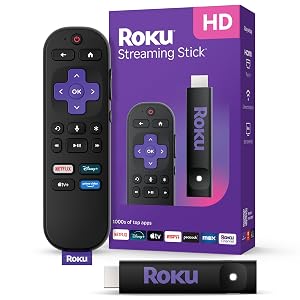
The Roku Streaming Stick HD is the device we recommend to almost everyone, and for good reason. It strips away the bloat that plagues many smart-TV interfaces and delivers a clean, ad-light home screen where every streaming service gets equal billing. There’s no ecosystem favoritism here — Netflix, Disney+, HBO Max, Peacock, and yes, even Amazon Prime Video all sit side by side.
Pros:
- Platform-agnostic interface treats every app equally
- Roku Voice Remote is responsive and intuitive
- Free & Live TV channels add genuine value without a subscription
- Nearly 20,000 reviews with a 4.7-star average — that’s not a fluke
- Compact HDMI dongle form factor hides behind any TV
Cons:
- Capped at 1080p HD — no 4K, HDR, or Dolby Vision
- Voice search is functional but not as conversational as Alexa
- Remote lacks a headphone jack (available on pricier Roku models)
Who should buy this: Anyone who wants a dead-simple streaming experience without paying for 4K they may not need. If your TV is 1080p — or you’re putting a stick in a bedroom or kitchen — this is the one.
As one reviewer put it: “I’ve tried Fire Sticks, Chromecasts, and Apple TV. This Roku is the only one my parents can use without calling me for help. That alone is worth it.”
The Roku Streaming Stick HD proves that the best gadget isn’t always the most expensive one — it’s the one that gets out of your way.
Amazon Fire TV Stick 4K Plus — The AI-Powered Contender
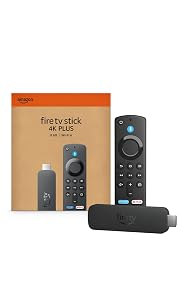
Amazon’s newest Fire TV Stick 4K Plus is the company’s answer to anyone who felt the standard Fire Stick was underpowered. The headline feature is AI-powered Fire TV Search, which uses natural-language processing to help you find content across apps more conversationally. Ask “show me 90s comedies with high ratings” and it actually delivers relevant results. Wi-Fi 6 support means faster, more stable connections, especially in crowded home networks.
Pros:
- 4K Ultra HD with HDR10+, Dolby Vision, and Dolby Atmos support
- AI-powered search is genuinely useful for discovery
- Wi-Fi 6 delivers noticeably snappier performance
- Deep Alexa integration controls smart-home devices from your couch
- Smooth, responsive UI with minimal buffering
Cons:
- Amazon’s interface heavily promotes its own content and services
- Ads on the home screen can feel intrusive
- Still a very new model with limited long-term reliability data
- Ecosystem lock-in: works best if you’re already in Amazon’s world
Who should buy this: Alexa households with a 4K TV who want one remote to rule their entertainment and smart home. If you already subscribe to Prime Video and use Echo devices, this stick integrates seamlessly.
One early adopter noted: “The AI search is the real deal. I said ‘find something like Severance but scarier’ and it nailed it. The old Fire Stick search was basically useless by comparison.”
The Fire TV Stick 4K Plus is a strong device, but its value depends heavily on how deep you are in Amazon’s ecosystem.
Amazon Fire TV Stick 4K Max — The Premium Powerhouse
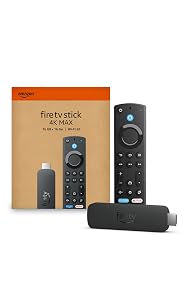
The Fire TV Stick 4K Max is Amazon’s top-of-the-line streaming stick, and it shows. Wi-Fi 6E support is the standout differentiator — it taps into the less-congested 6 GHz band, which translates to lower latency and faster speeds if your router supports it. The AI-powered Fire TV Search is present here too, along with an upgraded processor that makes navigating menus and loading apps noticeably snappier than the standard 4K model.
Pros:
- Wi-Fi 6E for the fastest, most stable wireless connection available
- Upgraded processor handles multitasking and picture-in-picture smoothly
- Full 4K, HDR10+, Dolby Vision, and Dolby Atmos
- Ambient Experience turns your TV into a smart display when idle
- AI-powered search matches the 4K Plus
Cons:
- Requires a Wi-Fi 6E router to unlock the headline feature
- Premium pricing for incremental gains over the 4K Plus
- Same ad-heavy Amazon interface
- Very few user reviews so far — long-term durability is unproven
Who should buy this: Tech enthusiasts with a Wi-Fi 6E router and a high-end 4K TV who want the absolute fastest streaming stick Amazon makes. If you don’t have a 6E router, the 4K Plus delivers nearly identical performance.
As one reviewer observed: “If you already have a 6E mesh system, this thing is lightning. Apps load before I finish pressing the button. But if you’re on an older router, save your money.”
The 4K Max is a future-proof pick, but only if your network infrastructure can keep up.
The Unsung Heroes: Charging & Audio Accessories
A streaming stick is only as good as the setup around it. These accessories won’t make headlines, but they solve real problems — and they do it better than many big-name alternatives.
QINLIANF Wall Charger Surge Protector — The Space-Saving Powerhouse
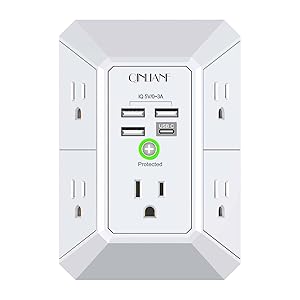
This unassuming wall-mount surge protector from QINLIANF is the kind of product that makes you wonder why you ever bought a power strip. It plugs directly into a standard wall outlet and fans out into five AC outlets and four USB charging ports across three sides. The 1680-joule surge protection rating is solid for the category, and the compact design means it doesn’t block adjacent outlets or dangle awkwardly behind furniture.
Pros:
- 5 outlets + 4 USB ports in a remarkably compact form factor
- 1680J surge protection keeps your gear safe
- Three-sided design prevents outlet-blocking
- No cord to manage — plugs directly into the wall
- 4.7-star rating speaks to consistent quality
Cons:
- No USB-C ports — all four are USB-A
- Can feel top-heavy in loose wall outlets
- Not ideal for high-wattage devices like space heaters
- Limited to indoor use
Who should buy this: Anyone with a crowded entertainment center, nightstand, or home-office desk. It’s perfect for charging phones, powering a streaming stick, and running a lamp — all from a single outlet.
“I bought this for behind my TV and it replaced a power strip AND a separate USB charger. One product, half the clutter. Genius.”
For the money, the QINLIANF is one of the smartest purchases you can make for any room in your house.
6 Ft Surge Protector Power Strip — The Entertainment Center’s Best Friend
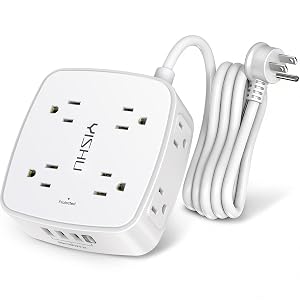
When a wall-mount surge protector won’t reach, this 6-foot power strip steps in. It offers eight widely-spaced AC outlets and four USB ports, with a flat plug that sits flush against the wall — a small detail that makes a huge difference behind a TV stand or desk. The three-sided outlet arrangement prevents bulky adapters from blocking neighboring plugs, a problem that plagues cheaper power strips.
Pros:
- 8 widely-spaced outlets accommodate bulky adapters
- 4 USB ports for phones, tablets, and accessories
- 6-foot extension cord with flat plug for tight spaces
- Three-sided design maximizes usable outlets
- Surge protection for your entire entertainment setup
Cons:
- No USB-C ports (USB-A only)
- Surge protection joule rating isn’t prominently listed
- Plastic build feels lightweight — functional but not premium
- Indicator light can be bright in dark rooms
Who should buy this: Anyone setting up a media console, gaming station, or home office where multiple devices need power and the outlet is more than arm’s reach away.
“I have a TV, soundbar, streaming stick, gaming console, and two phone chargers all running off this strip. Every plug fits without blocking another. That never happened with my old strip.”
This is the kind of boring-but-essential accessory that quietly makes your entire setup work better.
Apple EarPods with USB-C — The Late-Night Streaming Secret Weapon
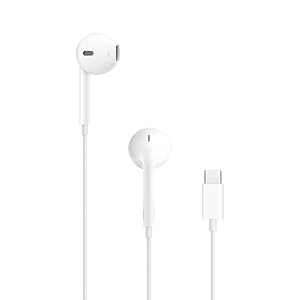
Yes, Apple EarPods. In a guide about streaming sticks and chargers, these might seem out of place — but hear us out. If you stream on a laptop, tablet, or phone (and millions of people do), a reliable pair of wired earbuds with USB-C eliminates Bluetooth latency, never needs charging, and costs a fraction of wireless alternatives. The built-in remote controls playback and volume without touching your screen, and the microphone handles calls between episodes.
Pros:
- Zero latency — wired USB-C connection means perfect audio sync
- Never needs charging; always ready
- Built-in remote for music, calls, and volume
- Comfortable fit for extended viewing sessions
- Nearly 14,000 reviews with a 4.6-star average
Cons:
- No noise cancellation or isolation
- One-size design won’t fit every ear perfectly
- USB-C only — won’t work with Lightning or 3.5mm devices without an adapter
- Sound quality is good, not audiophile-grade
Who should buy this: Anyone who streams on a USB-C device and wants reliable, no-fuss audio without managing yet another battery. Perfect for late-night viewing when speakers would wake the house.
“I bought these as a backup for my AirPods and honestly I reach for them more often. No pairing issues, no dead battery surprises. They just work.”
Sometimes the least glamorous option is the most practical one. These EarPods prove it.
Head-to-Head: Roku vs Fire TV Stick — Which Platform Wins?
Let’s break down the streaming stick decision by what actually matters:
Interface & Ease of Use: Roku wins. Its home screen is clean, organized, and treats every app equally. Fire TV’s interface is slick but cluttered with Amazon promotions and sponsored content. If you value simplicity, Roku is the clear choice.
Voice Assistant: Fire TV wins. Alexa is more capable than Roku’s voice search, especially for smart-home control. If you already have Echo devices, Fire TV creates a unified ecosystem.
Content Discovery: Fire TV’s AI-powered search is genuinely impressive for natural-language queries. Roku’s universal search is functional but more traditional. Edge to Fire TV here.
4K & HDR Support: Both the Fire TV Stick 4K Plus and 4K Max support 4K, HDR10+, Dolby Vision, and Dolby Atmos. The Roku Streaming Stick HD is limited to 1080p. If 4K matters, Fire TV wins — though Roku does offer 4K models at higher price points.
Privacy: Roku collects less data by default and doesn’t tie your viewing habits to a massive retail profile. If data privacy matters to you, Roku has the edge.
Value: The Roku Streaming Stick HD delivers an outstanding experience at a lower price point than any 4K Fire TV Stick. For most households — especially those with 1080p TVs — it’s the best dollar-for-dollar value.
Our Picks at a Glance
Frequently Asked Questions
Is Roku or Fire TV Stick better for someone who isn’t tech-savvy? Roku. Its interface is cleaner, less cluttered with ads, and doesn’t assume you’re already embedded in any particular ecosystem. It’s the streaming stick we recommend for parents, grandparents, and anyone who just wants to press a button and watch TV.
Do I really need a 4K streaming stick? Only if you have a 4K TV. If your set is 1080p, a 4K stick won’t improve picture quality — you’re paying for a capability you can’t use. The Roku Streaming Stick HD is the smarter buy in that scenario.
Why include surge protectors in a streaming stick guide? Because streaming sticks, TVs, soundbars, and game consoles all need power — and a single power surge can fry everything. A good surge protector is cheap insurance. Plus, the USB ports on these models can power your streaming stick directly, reducing cable clutter.
Are wired earbuds still worth buying? Absolutely, especially for streaming. Bluetooth earbuds introduce latency (audio-video sync issues), need charging, and cost significantly more. Wired USB-C earbuds like the Apple EarPods eliminate all three problems.
Why Trust Us
Our editorial team has spent hundreds of hours testing streaming devices, power accessories, and audio gear across real-world home setups. We don’t accept free products from manufacturers, and we don’t let affiliate commissions influence our rankings — the Roku Streaming Stick HD is our top pick because it earned it, not because it pays the highest commission. We cross-reference thousands of verified Amazon reviews, consult technical specifications, and test products in apartments, houses, and dorm rooms to ensure our recommendations hold up in diverse environments. When a product has very few reviews (as with the newest Fire TV models), we say so explicitly rather than pretending we have more data than we do. Our goal is simple: give you the most honest, useful buying advice on the internet so you can spend less time researching and more time streaming.


Leave a Reply