
As an Amazon Associate I earn from qualifying purchases.
A 60% mechanical gaming keyboard is a statement: you’ve traded the numpad and function row for a cleaner desk, faster mouse access, and a minimalist aesthetic that screams competitive intent. But the compact form factor also means every accessory you pair with it matters more. The right mouse, a quality cleaning tool, a supplemental keypad for macros, or a reliable pair of earbuds can transform a good setup into a great one. This guide rounds up five accessories that genuinely extend the value of a compact 60% hot-swap mechanical keyboard — no filler, no fluff.
Best for: Gamers building or upgrading a compact, high-performance desk setup
Why Accessories Matter More on a 60% Board
When you shrink your keyboard to 60%, you free up roughly 40% of the desk real estate a full-size board would occupy. That extra space is an invitation: a larger mouse pad, a supplemental keypad for MMO macros, or simply a cleaner cable run. At the same time, the compact layout means you’re relying on layers and key combos for functions that used to have dedicated keys. Accessories like programmable keypads can restore that lost functionality without cluttering your desk.
Maintenance also becomes more critical. Hot-swap sockets and exposed switch housings on many 60% boards collect dust and debris faster than you’d think. A good cleaning tool isn’t a luxury — it’s insurance for your investment. And because 60% boards are often wired (to keep latency minimal for competitive play), cable management accessories and a quality mouse that complements the wired philosophy round out the ecosystem.
If you’re also shopping for a mouse to pair with your compact board, our guide on essential accessories for the Razer Viper V3 Pro covers some complementary picks worth considering.
1. Aula WIN60 HE — 60% Magnetic Switch Keyboard with Rapid Trigger
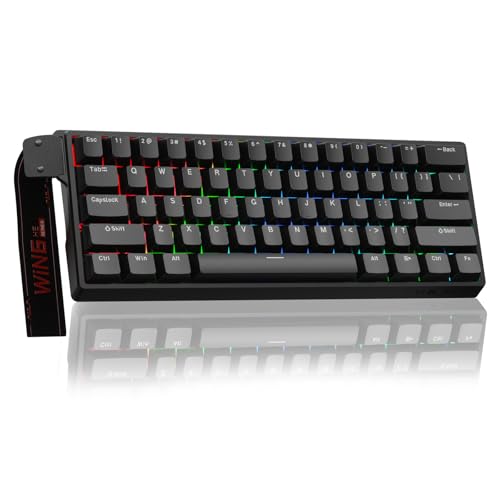
Before we talk accessories, let’s anchor the setup with the keyboard itself. The Aula WIN60 HE is a wired 60% mechanical gaming keyboard built around magnetic Hall-effect switches. The headline feature is adjustable actuation with rapid trigger support, meaning you can set per-key actuation points and get near-instant key resets — a technology that’s become essential in competitive shooters like Valorant and Counter-Strike.
The hot-swappable design is a major plus for tinkerers. Because the switches are magnetic rather than contact-based, they’re rated for extreme longevity, and swapping them requires no soldering. The compact 60% layout keeps the board tight and travel-friendly, while the wired connection ensures zero input lag.
Verified purchasers frequently praise the build quality relative to its price point, noting that the rapid trigger implementation feels responsive and comparable to boards costing significantly more. Common complaints center on the software — some users report that the configuration utility has a learning curve and occasional quirks on first setup. The stock keycaps are functional but not premium; many owners plan to swap them for PBT doubleshot sets, which is easy given the standard layout.

Who should buy this: Competitive FPS players who want rapid trigger technology in a compact, affordable package. It’s also an excellent base for anyone building a customized 60% setup from scratch.
Pros: Magnetic switches with adjustable actuation, hot-swap sockets, solid build for the price, wired for low latency. Cons: Software can be unintuitive, stock keycaps are average, no wireless option.
2. Razer Tartarus V2 Gaming Keypad — Restore Your Lost Keys

One of the biggest trade-offs of a 60% keyboard is losing dedicated macro keys, a numpad, and easy access to function-row shortcuts. The Razer Tartarus V2 solves that problem elegantly. This one-handed keypad gives you 32 programmable keys arranged in an ergonomic layout with a built-in scroll wheel and an 8-way directional thumbpad.
The Tartarus V2 uses Razer’s mecha-membrane switches — a hybrid design that aims to deliver the tactile click of a mechanical switch with the cushioned feel of a membrane. It’s a polarizing choice: some users love the soft-yet-clicky feedback, while mechanical purists find it mushy by comparison. What’s not debatable is the programmability. Through Razer Synapse, you can create complex macro chains, remap every key, and set up game-specific profiles that switch automatically.
Reviewers consistently highlight the ergonomic wrist rest and the comfort during long gaming sessions. The thumbpad is praised for movement in MMOs and action RPGs, though some FPS players find it less precise than WASD on a standard board. A recurring complaint is that the rubber on the wrist rest can degrade over time with heavy use.

Who should buy this: MMO, MOBA, and simulation players who need more programmable keys than a 60% board provides. Also great for content creators who want one-handed shortcut access.
Pros: 32 programmable keys, ergonomic design, Synapse integration, scroll wheel and thumbpad. Cons: Mecha-membrane feel isn’t for everyone, wrist rest material can wear, wired only.
3. ColorCoral Cleaning Gel — Keep Your Hot-Swap Sockets Pristine

Hot-swap keyboards are magnets for crumbs, dust, and pet hair — and a 60% board’s tightly packed layout makes traditional cleaning methods awkward. ColorCoral’s cleaning gel is a surprisingly effective solution. You press the gel into the gaps between keycaps, let it conform to the contours, and peel it away with the debris trapped inside. No compressed air cans, no disassembly required.
The gel is reusable until it changes color (typically darkens significantly), and each pouch lasts through multiple cleaning sessions. It’s also useful beyond keyboards — car vents, camera bodies, and controller crevices are all fair game.
Verified buyers overwhelmingly report that the gel works well for surface-level dust and crumbs between keycaps. It picks up hair and fine particles that a brush would miss. The most common criticism is that it doesn’t reach deep into switch housings — for that, you’d still need to pull keycaps and use a brush or compressed air. Some users also note that in very warm environments, the gel can become too sticky and leave residue, so storing it in a cool place is recommended.

Who should buy this: Every keyboard owner, honestly — but especially those with hot-swap boards where debris can interfere with switch seating. It’s a low-cost maintenance essential.
Pros: Reusable, reaches between keycaps effectively, versatile for other electronics, affordable. Cons: Won’t deep-clean switch housings, can get too sticky in heat, limited lifespan per pouch.
4. Razer Basilisk V3 — The Ergonomic Gaming Mouse Your 60% Board Deserves

A 60% keyboard frees up desk space, and the smartest way to use that space is with a proper gaming mouse and a larger pad. The Razer Basilisk V3 is an ergonomic right-handed mouse with a 26,000 DPI optical sensor, Razer’s fastest optical switches (rated for 90 million clicks), and a smart scroll wheel that can toggle between tactile and free-spin modes — similar to Logitech’s MagSpeed concept.
The Basilisk V3 features 11 programmable buttons and full Chroma RGB lighting that can sync with other Razer peripherals (including the Tartarus V2 above, if you’re building a Synapse-unified setup). The ergonomic shape is designed for palm and claw grips, with a textured rubber side grip and a snag-free braided cable.
Reviewers frequently praise the scroll wheel as a standout feature — the auto-switch between tactile and free-spin based on scroll speed is genuinely useful for both gaming and productivity. The sensor is top-tier, and the optical switches feel crisp. Common complaints include the mouse being on the heavier side for competitive FPS players who prefer ultralight designs, and the software (Synapse) being resource-heavy. If you’re curious about how other high-end mice compare, our Logitech G PRO X Superlight 2 review offers a lighter-weight alternative perspective.

Who should buy this: Gamers who prioritize ergonomics and features over ultralight weight. Excellent for RPGs, MMOs, and productivity alongside competitive play.
Pros: 26K DPI sensor, smart scroll wheel, 11 programmable buttons, Chroma RGB, optical switches. Cons: Heavier than ultralight competitors, wired only, Synapse can be bloated.
5. Yeabomy Wired Gaming Earbuds — Low-Latency Audio Without the Bulk

A compact desk setup deserves compact audio. The Yeabomy wired gaming earbuds (Ak3file) use a hybrid driver configuration — one dynamic driver paired with a balanced armature — to deliver detailed sound with emphasized bass. The wired connection means zero Bluetooth latency, which matters in competitive gaming where every millisecond of audio cue counts.
The in-ear monitor (IEM) design provides passive noise isolation, blocking out ambient noise without the bulk or heat of over-ear headphones. This makes them particularly appealing for warm-weather gaming or LAN events where you want to travel light. The cable is detachable, which is a nice touch for longevity — if the cable fails, you replace it rather than the entire unit.
Verified reviewers generally praise the sound quality for the price, noting that the bass is punchy without being overwhelming and that the mids are clear enough for footstep detection in shooters. The fit can be hit-or-miss depending on ear shape — several reviewers recommend experimenting with the included ear tips. A common complaint is that the included microphone (inline) is adequate for casual voice chat but not suitable for streaming or content creation.

Who should buy this: Competitive gamers who want zero-latency audio in a portable, heat-free form factor. Also great as a backup or travel audio solution.
Pros: Hybrid driver for detailed sound, wired for zero latency, detachable cable, passive isolation. Cons: Fit varies by ear shape, inline mic is basic, no active noise cancellation.
How to Build the Perfect 60% Keyboard Setup
Now that you’ve seen the individual picks, here’s how they fit together as a cohesive desk setup:
1. Start with the board: The Aula WIN60 HE gives you a competitive-grade 60% foundation with rapid trigger and hot-swap flexibility. 2. Add macro capability: The Razer Tartarus V2 sits to the left of your keyboard, restoring the programmable keys you sacrificed for compactness. 3. Pair the right mouse: The Razer Basilisk V3 takes advantage of the extra desk space your 60% board creates, with a feature set that complements both gaming and daily use. 4. Maintain your gear: The ColorCoral cleaning gel keeps your hot-swap sockets and keycap gaps free of debris — a two-minute weekly habit that extends the life of your board. 5. Complete the audio chain: The Yeabomy wired earbuds deliver latency-free game audio without adding desk clutter or trapping heat around your ears.
For those looking to round out their setup further, consider a quality desk mat (at least 900×400mm to cover both keyboard and mouse territory), a USB hub for cable management, and a set of PBT doubleshot keycaps to replace the stock ABS caps on most 60% boards. If you’re exploring other peripheral upgrades, our guide to cheaper alternatives to the Logitech G PRO X2 SUPERSTRIKE is worth a look.
Quick Comparison
Frequently Asked Questions
Do I need a wrist rest with a 60% keyboard?
Most 60% boards sit low enough that a wrist rest isn’t strictly necessary, but if you type with your wrists angled upward, a compact wrist rest (around 30 cm wide) can reduce strain. Look for memory foam or gel options that match the narrow footprint of your board.
Can I use any keycap set on a 60% board?
Most 60% keyboards use a standard ANSI layout, so any Cherry MX-compatible keycap set will fit. Always double-check the bottom row — some boards (especially from gaming brands) use non-standard spacebar or modifier sizes.
Is a wired mouse better than wireless for competitive gaming?
Modern wireless mice from top brands have closed the latency gap to the point where the difference is imperceptible for most players. However, wired mice like the Basilisk V3 eliminate battery management entirely and tend to be lighter (no battery weight), which some players prefer.
How often should I clean my mechanical keyboard?
A quick pass with cleaning gel once a week keeps surface debris in check. A deeper clean — pulling keycaps, brushing switch housings, and wiping the plate — is recommended every 4-6 weeks depending on your environment.
How We Research
We synthesize publicly available manufacturer specifications, product documentation, and verified customer and expert reviews from major retail platforms and enthusiast communities. We have not personally tested, owned, or handled any of the products in this guide. Our goal is honest curation: we surface the most commonly reported strengths and weaknesses so you can make an informed decision. When reviewer sentiment is referenced, it reflects general trends across multiple verified reviews — we do not fabricate quotes or invent specific testing scenarios.


Leave a Reply