
As an Amazon Associate I earn from qualifying purchases.
If you’ve been researching high-wattage portable chargers for laptops, the Anker 25000mAh 165W power bank has almost certainly landed on your shortlist. With 165W total output, three USB-C ports, and a 25,000mAh capacity, it sits at the top of the portable laptop-charging food chain. But owning a premium power bank is only part of the equation — you also need the right accessories to get the most out of your mobile workstation. In this guide, we review the Anker power bank itself and then walk through four carefully chosen companion products — a laptop stand, a USB-C hub, a lap desk, and a webcam cover — that round out a complete, portable productivity kit.
Best for: Remote workers, digital nomads, and frequent travelers who need to charge laptops, tablets, and phones simultaneously
Why the Anker 165W Power Bank Is the Benchmark
Before we dive into accessories, it’s worth understanding why this particular power bank has become the reference point for laptop portable charging. At 25,000mAh (roughly 92.5Wh), it carries enough juice to recharge most ultrabooks once and many USB-C laptops to at least 70–80%. The 165W total output — with each of the three USB-C ports capable of delivering up to 100W individually — means it can handle power-hungry machines like the MacBook Pro 16″ or Dell XPS 15 without throttling. The built-in retractable USB-C cable is a thoughtful touch that eliminates cable clutter. And at roughly 1.2 pounds, it’s airline-friendly (under the 100Wh carry-on limit when measured by watt-hours).
The challenge? It’s a premium product at a premium price. If you’re looking for guidance on Anker’s smaller MagGo power banks, we’ve covered those separately in our Anker MagGo Power Bank setup guide. But for laptop-class charging, the 165W model is the one to beat. Below, we review it in full and then cover the accessories that make it even more useful.
Anker 25000mAh 165W Laptop Power Bank — Full Review

The Anker 25000mAh 165W Portable Charger is designed for people who need serious portable power. According to Anker’s specifications, it delivers 165W of total output across three USB-C ports, each capable of up to 100W. That’s a significant advantage over competitors that cap individual ports at 60W or 65W — it means you can charge a full-size laptop at near-maximum speed while simultaneously topping off a phone and tablet.
The built-in retractable USB-C cable is one of the standout features. Verified reviewers frequently praise this design choice, noting that it eliminates the need to carry a separate cable for quick top-ups. The LED display shows remaining capacity as a percentage rather than vague dots, which users appreciate for planning their charging sessions.
On the downside, some reviewers note that the unit is heavier than expected for a power bank, and the retractable cable — while convenient — is relatively short, which can be awkward if your laptop’s USB-C port is on the far side. A few users also report that when all three ports are in use simultaneously, the per-port wattage drops significantly (as expected with shared output), which can slow laptop charging if you’re also powering other devices.

Who should buy this: Anyone who regularly works away from outlets — coffee shops, airports, co-working spaces, or outdoor locations — and needs to keep a USB-C laptop running. It’s also excellent for content creators who need to power cameras and laptops in the field. If you’re looking for a similar approach to finding cheaper alternatives to premium products, the key is understanding exactly which specs matter most to your workflow.
Pros:
- 165W total output with 100W per-port maximum
- Three USB-C ports for multi-device charging
- Built-in retractable cable for convenience
- Percentage-based LED display
- Airline-safe capacity (under 100Wh)
Cons:
- Premium pricing
- Heavier than basic power banks
- Retractable cable is short
- Per-port wattage drops under multi-device load
Best Accessories to Pair With Your Laptop Power Bank
A high-wattage power bank solves the power problem, but working on the go introduces other challenges: ergonomics, connectivity, comfort, and privacy. The following four products address each of those needs and pair naturally with a portable charging setup.
Gogoonike Adjustable Laptop Stand — Portable Ergonomics

When you’re working from a power bank at a café table or hotel desk, screen height matters. The Gogoonike Adjustable Laptop Stand is a metal, foldable riser that elevates your laptop to a more ergonomic viewing angle. It’s designed to be portable — it folds flat for travel — and the ventilated design helps with airflow, which is especially relevant when your laptop is running on battery and managing thermals carefully.
Verified reviewers generally praise the build quality for the price point, noting that the metal construction feels more stable than plastic alternatives. The adjustable height settings accommodate different laptop sizes and user preferences. Several reviewers mention using it alongside external keyboards, which is the ideal ergonomic setup.
However, some users report that the stand can feel slightly wobbly with heavier laptops (17″ gaming machines, for instance), and the rubber grip pads may wear over time. A few reviewers also note that the folding mechanism, while compact, takes a moment to set up compared to simpler fixed-angle stands.

Who should buy this: Remote workers and digital nomads who pair a power bank with café or co-working setups and want to avoid neck strain from looking down at a flat laptop. It’s lightweight enough to toss in a backpack alongside the Anker power bank.
Pros:
- Metal construction at a budget-friendly price
- Foldable and portable
- Ventilated design aids cooling
- Multiple angle adjustments
Cons:
- Can wobble with very heavy laptops
- Rubber pads may degrade over time
- Setup isn’t instant
Anker USB-C 5-in-1 Hub — Expand Your Ports

Here’s a scenario the power bank alone doesn’t solve: you’re charging your laptop via one USB-C port, but now you need to connect an external display, a flash drive, and a mouse. The Anker 5-in-1 USB-C Hub fills that gap with a 4K HDMI output, one powered USB-C 5Gbps data port, and two USB-A 3.0 ports. It’s a natural companion to the Anker power bank because it expands connectivity without requiring a separate power source — it draws power from your laptop’s USB-C port.
Reviewers consistently highlight the plug-and-play simplicity and the reliable 4K HDMI output for presentations or external monitors. The compact form factor makes it easy to carry. On the other hand, some users note that it doesn’t support pass-through charging (you can’t charge your laptop through the hub while using it for data), which means you’ll need to dedicate separate USB-C ports for charging and hub connectivity. A handful of reviewers also mention that the cable is quite short, limiting placement flexibility.

Who should buy this: Anyone who uses a USB-C laptop with limited ports and needs to connect peripherals while on the go. It’s especially useful for presenters who need HDMI output at client sites or conference rooms. Pair it with the power bank: one USB-C port charges, another connects the hub.
Pros:
- 4K HDMI output for external displays
- Three additional data ports (1 USB-C, 2 USB-A)
- Compact and portable
- Plug-and-play, no drivers needed
Cons:
- No pass-through charging
- Short cable
- Limited to 5Gbps data transfer
LapGear Home Office Pro Lap Desk — Comfort on the Couch

Not every remote work session happens at a desk. Sometimes you’re on a couch, in bed, or sitting in an airport terminal with no table in sight. The LapGear Home Office Pro Lap Desk provides a stable, cushioned surface for laptops up to 15.6 inches, complete with a built-in wrist rest, mouse pad, and phone holder. It’s the kind of accessory that pairs perfectly with a power bank setup because it creates a complete workstation on your lap.
Verified reviewers frequently praise the dual-bolster cushion for comfort during extended sessions and the integrated mouse pad, which eliminates the need to carry a separate one. The phone holder slot is a nice touch for keeping your device visible while it charges from the power bank. The black carbon finish is professional-looking and hides wear well.
Common complaints include the size — it’s not exactly backpack-friendly for travel, and some users find it slightly too large for smaller frames. A few reviewers also note that the wrist rest padding compresses over time with heavy use. Despite these trade-offs, the overall sentiment is strongly positive for home-based remote workers.

Who should buy this: Home-based remote workers who frequently work from the couch or bed and want a stable, ergonomic surface. It’s less ideal for travel due to its size, but for home use alongside a power bank, it creates a genuinely comfortable mobile workstation.
Pros:
- Fits laptops up to 15.6 inches
- Built-in wrist rest, mouse pad, and phone holder
- Dual-bolster cushion for comfort
- Professional appearance
Cons:
- Too large for most backpacks
- Wrist rest padding may compress over time
- Not ideal for very small users
Yilador Webcam Cover (3-Pack) — Privacy on the Go
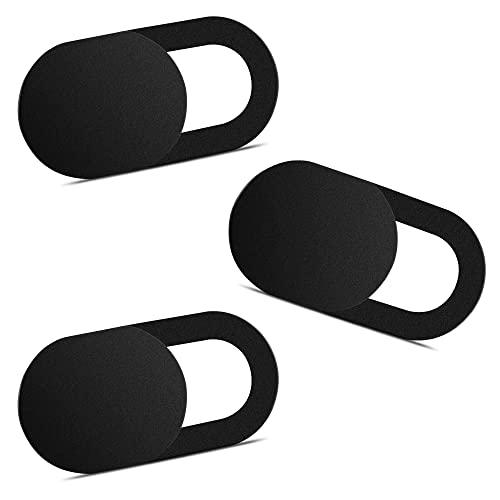
This one might seem like an odd inclusion in a power bank accessories roundup, but hear us out. When you’re working from public spaces — which is exactly when you’re most likely using a portable power bank — privacy matters. The Yilador Webcam Cover is an ultra-thin (0.03 inch) sliding cover that fits over your laptop’s built-in camera. It’s compatible with MacBooks, iPads, iMacs, and most Windows laptops.
Reviewers appreciate the slim profile, noting that it doesn’t interfere with closing most laptop lids (a common problem with thicker webcam covers). The sliding mechanism is smooth and satisfying, and the adhesive holds well without leaving residue when removed. At three per pack, you can cover your laptop, tablet, and a spare.
The main criticism is that on certain ultra-thin-bezel laptops, the cover can slightly interfere with the lid closure or trigger the screen’s pressure sensor. A small number of reviewers also report the adhesive weakening after several months, though this seems to be the minority experience. For the price, it’s a no-brainer addition to any mobile work kit.

Who should buy this: Anyone who works from public spaces and values visual privacy. It’s especially relevant for remote workers who use video conferencing — slide it open for calls, closed the rest of the time. The three-pack covers multiple devices.
Pros:
- Ultra-thin at 0.03 inches
- Smooth sliding mechanism
- Three-pack covers multiple devices
- Doesn’t leave adhesive residue
Cons:
- May interfere with ultra-thin-bezel laptop lids
- Adhesive can weaken over many months
- Won’t fit recessed webcam designs
Building Your Complete Mobile Workstation
The beauty of pairing these accessories with the Anker 165W power bank is that each one solves a distinct problem:
1. Power — The Anker power bank keeps your laptop and devices charged. 2. Ergonomics — The Gogoonike stand raises your screen to eye level. 3. Connectivity — The Anker USB-C hub expands your port options. 4. Comfort — The LapGear lap desk provides a stable surface anywhere. 5. Privacy — The Yilador webcam cover protects you in public spaces.
You don’t need all five to have a functional setup, but each addition removes a friction point from mobile work. If you’re budget-conscious, start with the power bank and the USB-C hub — those two solve the most critical problems (power and connectivity). Add the stand next for ergonomics, then the lap desk and webcam cover as your workflow demands. This incremental approach is similar to how we’ve covered budget alternatives in other product categories — start with what matters most and build from there.
Quick Comparison
Frequently Asked Questions
Can the Anker 165W power bank charge a MacBook Pro? Yes. With 100W per-port output, it can charge MacBook Pro models (including the 16″) at or near their maximum USB-C charging rate. Actual charge time depends on whether other ports are in use simultaneously.
Is the Anker 25000mAh power bank allowed on airplanes? According to Anker’s specifications, the battery capacity is approximately 92.5Wh, which falls under the 100Wh limit set by most airlines for carry-on lithium-ion batteries. Always check your specific airline’s policy before traveling.
Do I need a USB-C hub if my laptop has multiple ports? Not necessarily. The hub is most valuable for ultrabooks and MacBooks that have limited USB-C ports. If your laptop already has HDMI, USB-A, and multiple USB-C ports, you may not need one.
Will the laptop stand work with a 17-inch laptop? The Gogoonike stand is designed for various laptop sizes, but some verified reviewers report wobbling with heavier 17-inch models. It works best with laptops 15.6 inches and under.
How We Research
We have not personally tested, owned, or handled any of the products in this guide. Our reviews are based on a thorough synthesis of manufacturer specifications, official product documentation, and patterns found across verified customer and expert reviews. We cross-reference multiple sources to identify consistent praise and recurring complaints, and we’re transparent about trade-offs rather than presenting any product as perfect. This approach lets us provide honest, well-rounded assessments without fabricating hands-on experience.


Leave a Reply