
As an Amazon Associate I earn from qualifying purchases.
Portable power stations are investments — and like any investment, they reward owners who take care of them. The Anker SOLIX C1000 Gen 2 packs a 1,024 Wh LiFePO4 battery, 2,000 W continuous output (3,000 W surge), and an industry-leading 49-minute full charge time. Those are impressive numbers, but the real question is: how long will it keep delivering them? The answer depends almost entirely on how you maintain the unit between uses. This guide distills Anker’s own documentation, LiFePO4 battery science, and common owner feedback into a practical, step-by-step care plan you can follow starting today.
Best for: Campers, home-backup users, and remote workers who want a decade of reliable portable power
Why Maintenance Matters for Portable Power Stations
A portable power station isn’t a “set it and forget it” gadget. LiFePO4 (lithium iron phosphate) batteries are inherently more stable and longer-lived than standard lithium-ion cells, but they still degrade faster when exposed to temperature extremes, deep discharge cycles, or prolonged storage at full charge. Anker rates the C1000 Gen 2 for over 3,000 charge cycles to 80 % capacity — a figure that assumes you follow reasonable care practices. Neglect those practices and you could see noticeable capacity loss in a fraction of that time.
Think of maintenance as free insurance. A few minutes of attention every month can mean the difference between a unit that powers your campsite or home essentials for a decade and one that struggles after three years. If you’ve invested in other Anker power products, you already know the brand designs for longevity — but the hardware can only do its part if you do yours.
Meet the Anker SOLIX C1000 Gen 2
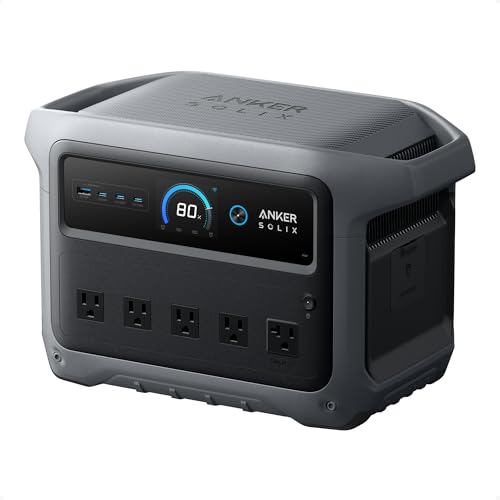
Before diving into care steps, let’s ground ourselves in what we’re maintaining. The Anker SOLIX C1000 Gen 2 is a second-generation portable power station built around a 1,024 Wh LiFePO4 battery pack. Key specs from Anker’s product documentation include:
- Continuous output: 2,000 W (surge to 3,000 W)
- Full recharge time: approximately 49 minutes via AC (with Anker’s proprietary fast-charge technology)
- Solar input: compatible with Anker solar panels for off-grid recharging
- Battery chemistry: LiFePO4 — rated for 3,000+ cycles to 80 % remaining capacity
- Output ports: multiple AC outlets, USB-A, USB-C, and a 12 V car port
- Weight and form factor: compact enough for car camping and tailgating, though not ultralight
The LiFePO4 chemistry is the headline here. Compared to NMC (nickel-manganese-cobalt) lithium-ion cells found in older or cheaper power stations, LiFePO4 offers superior thermal stability, a flatter discharge curve, and dramatically more charge cycles. But “more forgiving” doesn’t mean “maintenance-free.” The steps below are specifically tailored to this unit’s design and battery type.
What Verified Owners Commonly Report
Across verified customer reviews and community forums, the C1000 Gen 2 earns consistent praise for its blazing-fast recharge speed, solid build quality, and quiet operation under moderate loads. The most common complaints center on weight (it’s heavier than NMC alternatives of similar capacity), the premium price point, and the learning curve around the companion app’s settings. Several owners note that the unit runs warm during its rapid 49-minute charge — a point we’ll address in the temperature management section below.
Overall, the C1000 Gen 2 is widely regarded as one of the best-built LiFePO4 portable power stations available. It’s ideal for anyone who needs reliable backup power at home, dependable off-grid energy for camping or van life, or a robust station for powering tools and electronics on job sites.

Step 1: Charge It Right — Optimal Charging Habits
The single most impactful thing you can do for your C1000 Gen 2’s longevity is manage how and when you charge it.
Avoid Keeping It at 100 % Indefinitely
LiFePO4 cells handle high states of charge better than NMC cells, but storing the unit at 100 % for weeks or months still accelerates calendar aging. Anker’s documentation recommends storing the unit between 40 % and 80 % state of charge if you won’t be using it for an extended period. If you’ve just topped it off for an upcoming trip, that’s fine — just don’t leave it plugged in at full charge for months on end.
Use the Right Charger and Cable
Always use the AC adapter or solar panels specified by Anker. Third-party chargers with mismatched voltage or wattage can stress the battery management system (BMS). The C1000 Gen 2’s 49-minute fast charge is engineered around Anker’s own charging profile; a generic high-wattage charger won’t replicate it safely.
Don’t Routinely Deep-Discharge
Running the battery to 0 % occasionally won’t destroy it, but making it a habit will. LiFePO4 cycle-life ratings assume moderate depth of discharge. Try to recharge when the unit drops to around 20 % rather than waiting for a complete shutdown.
Solar Charging Best Practices
If you charge via solar panels, ensure the panels’ output stays within the C1000 Gen 2’s rated solar input range. Position panels to avoid partial shading, which can create hotspots and reduce efficiency. Solar charging is gentler on the battery than AC fast charging, so it’s a great option when time isn’t critical.
Step 2: Temperature Management — The Silent Battery Killer
Heat is the number-one enemy of any lithium battery. LiFePO4 is more heat-tolerant than NMC, but “more tolerant” still has limits.
Operating Temperature
Anker specifies an operating range (typically 0 °C to 45 °C / 32 °F to 113 °F for charging, and a slightly wider range for discharging). Operating outside these bounds — charging in a freezing garage or running the unit in direct desert sun — stresses the cells and can trigger the BMS to shut down the unit for protection.
Storage Temperature
For long-term storage, aim for a cool, dry environment between 10 °C and 30 °C (50 °F–86 °F). A climate-controlled closet or basement shelf is ideal. Avoid attics, uninsulated sheds, or car trunks in summer — temperatures in a parked car can exceed 60 °C (140 °F), which is well beyond safe limits.
Ventilation During Use
The C1000 Gen 2 has internal fans that activate under load. Don’t block the ventilation grilles by placing the unit against a wall, inside a tight cabinet, or on a soft surface like a bed or couch. Verified owners who report the unit running warm during fast charging typically resolve the issue by ensuring adequate airflow around all sides.
Step 3: Cleaning and Physical Care
A portable power station lives a rougher life than most electronics. Dust, moisture, and physical impacts are all realistic threats.
Exterior Cleaning
- Frequency: Wipe down the unit after every outdoor trip, or monthly during regular home use.
- Method: Use a dry or slightly damp microfiber cloth. Avoid spraying water or cleaning solutions directly onto the unit — liquid can seep into ports and ventilation openings.
- Ports: Use a can of compressed air to blow dust and debris out of AC outlets, USB ports, and the car-port socket. A wooden or plastic toothpick can dislodge stubborn lint from USB-C ports (never use metal tools).
Protecting the Screen and Controls
The C1000 Gen 2 features an LCD display panel. Avoid pressing it with sharp objects, and clean it with a soft cloth. If you transport the unit in a truck bed or gear pile, consider a padded carrying case or wrapping it in a moving blanket.
Moisture and Water Exposure
The C1000 Gen 2 is not waterproof or IP-rated for water resistance. Keep it under a tarp or canopy during rain. If it gets wet, power it off immediately, disconnect all cables, and let it dry thoroughly in a ventilated area before powering on again.
Step 4: Long-Term Storage Protocol
Many owners use their power station seasonally — heavy use during camping season or hurricane season, then months of downtime. Improper storage is where most avoidable damage happens.
Pre-Storage Checklist
1. Charge to 40–60 % — this is the sweet spot for LiFePO4 long-term storage. 2. Power off the unit completely — don’t leave it in standby mode, which slowly drains the battery. 3. Disconnect all accessories — unplug any cables, solar panel connectors, or USB devices. 4. Clean the unit — follow the cleaning steps above so you’re not storing it with corrosive dust or moisture. 5. Store in a cool, dry location — 10–30 °C, away from direct sunlight and heat sources.
Periodic Check-Ins
Even in storage, check the unit every 2–3 months. Power it on, verify the charge level, and top it up to 40–60 % if it has drifted below 30 %. LiFePO4 cells have very low self-discharge rates (typically 2–3 % per month), so you shouldn’t need to charge often — but checking prevents the rare scenario of a deep discharge during storage, which can be difficult to recover from.
This periodic-check habit is similar to maintaining any high-value vehicle or machine for long-term performance — a few minutes of attention prevents expensive problems.
Step 5: Firmware and App Updates
The Anker SOLIX C1000 Gen 2 connects to the Anker app via Bluetooth or Wi-Fi. Firmware updates can improve charging algorithms, fix bugs, and occasionally unlock new features.
- Check for updates every month or whenever Anker sends a notification through the app.
- Don’t interrupt a firmware update — keep the unit powered on and within Bluetooth/Wi-Fi range until the update completes.
- Update before long storage — running the latest firmware ensures the BMS is operating with the most current safety and efficiency parameters.
Step 6: Safe Usage Habits That Extend Lifespan
Beyond charging and storage, your day-to-day usage patterns matter.
Don’t Overload the Inverter
The C1000 Gen 2 handles 2,000 W continuous and surges to 3,000 W. Running it at or near maximum output for extended periods generates more heat and stresses the inverter. If you’re powering high-draw appliances, monitor the unit’s temperature and give it breaks when possible.
Use Pass-Through Charging Sparingly
Some owners charge the unit while simultaneously drawing power from it (pass-through). While the C1000 Gen 2’s BMS supports this, it increases thermal load on the battery. Use pass-through when necessary (e.g., during a power outage with solar panels connected), but don’t make it your default operating mode.
Transport Securely
During transport, secure the unit so it doesn’t slide or tip. A hard impact can damage internal connections or crack the housing. The retractable handle is for carrying, not for strapping — use the unit’s base and body as anchor points when securing it in a vehicle.
Step 7: Recognizing Warning Signs
Even with perfect maintenance, components can degrade. Watch for these red flags:
| Warning Sign | Possible Cause | Action |
|---|---|---|
| Noticeably reduced runtime | Battery capacity degradation | Check cycle count in app; contact Anker support if under warranty |
| Unit shuts off unexpectedly | BMS protection triggered (overtemp, overcurrent) | Let it cool; reduce load; check for blocked vents |
| Unusual smell or swelling | Internal cell failure (rare with LiFePO4) | Stop using immediately; contact Anker support |
| Charging takes much longer than 49 min | Charger issue or degraded cells | Try a different outlet; update firmware; contact support |
| Fan runs constantly at low loads | Thermal sensor issue or blocked airflow | Clean vents; ensure ambient temp is within range |
Common Maintenance Mistakes to Avoid
1. Storing at 100 % charge for months — accelerates calendar aging even in LiFePO4 cells. 2. Leaving it in a hot car — trunk temperatures can exceed safe limits within minutes on a summer day. 3. Using third-party chargers — mismatched voltage/wattage can bypass BMS protections. 4. Ignoring firmware updates — you miss safety patches and efficiency improvements. 5. Blocking ventilation — leads to thermal throttling and shortened component life. 6. Never cycling the battery — even in storage, occasional partial charge/discharge cycles keep the BMS calibrated.
Maintenance Schedule at a Glance
After every use:
- Wipe down exterior; blow out ports
- Charge to 40–80 % if not using again soon
Monthly:
- Check for firmware/app updates
- Inspect cables and connectors for wear
- Run a partial discharge/recharge cycle if the unit has been idle
Every 2–3 months (during storage):
- Power on and check charge level
- Top up to 40–60 % if needed
- Verify no physical damage, swelling, or unusual odors
Annually:
- Review cycle count in the Anker app
- Deep-clean all ports and ventilation grilles
- Test all output ports with a device to confirm functionality
- Check warranty status
Frequently Asked Questions
Can I leave the C1000 Gen 2 plugged in all the time as a UPS? Anker’s documentation indicates the unit supports UPS-style functionality for brief outages, but leaving it perpetually plugged in at 100 % is not recommended for long-term battery health. If you need always-on backup, consider using the app to set a charge limit if available, or unplug periodically to let the battery cycle.
How many years will the battery last? With 3,000+ rated cycles and moderate use (one cycle per day), the math suggests over eight years to 80 % capacity. Most home-backup and camping users cycle far less frequently, so a decade or more of useful life is realistic with proper care.
Is it safe to use in rain? No. The C1000 Gen 2 is not waterproof. Always keep it sheltered from rain, snow, and standing water.
Can I charge it with any solar panel? You can use compatible third-party solar panels, but you must ensure the voltage and wattage fall within the C1000 Gen 2’s rated solar input specifications. Anker’s own solar panels are optimized for the unit and are the safest choice.
If you’re also maintaining smaller Anker power products, our Anker MagGo Power Bank setup guide covers similar battery-care principles at a smaller scale, and our Anker 165W laptop power bank overview discusses how Anker’s charging technology works across its product line.
Product Comparison Card
How We Research
This guide was compiled by synthesizing Anker’s official product documentation, published specifications for the SOLIX C1000 Gen 2, general LiFePO4 battery science from peer-reviewed and manufacturer sources, and verified customer reviews from major retail platforms. We have not personally tested, owned, or handled the Anker SOLIX C1000 Gen 2. All claims about performance, cycle life, and charging times are sourced from Anker’s published materials and corroborated by independent reviewer consensus. Our goal is to give you an honest, well-sourced maintenance plan — not fabricated hands-on impressions.


Leave a Reply