
As an Amazon Associate I earn from qualifying purchases.
The CMF by Nothing Watch 3 Pro has generated serious buzz as a feature-packed smartwatch at a budget-friendly price point. With a 1.43-inch AMOLED display, Bluetooth calling, AI-powered energy scoring, and comprehensive health tracking, it reads like a flagship spec sheet. But spec sheets don’t tell the whole story. Verified buyer feedback and deeper dives into the product documentation reveal several gotchas that could lead to post-purchase regret if you’re not prepared. This guide walks you through five critical checkpoints — from battery life realities to AI feature limitations — so you can decide whether this watch truly fits your needs, or whether an alternative makes more sense.
Best for: Budget-conscious buyers who want health tracking and Bluetooth calls without paying flagship prices
Checkpoint 1: Battery Life — The Asterisks Behind the Headline Number
CMF advertises multi-day battery life for the Watch 3 Pro, and under light usage — step counting, occasional notifications, no always-on display — that claim appears to hold up based on early buyer reports. However, the moment you start using the features that make this watch appealing, battery drain accelerates significantly.
Bluetooth calling is the biggest culprit. Maintaining an active Bluetooth connection for calls and keeping the microphone/speaker ready draws considerably more power than passive notification mirroring. Buyers who use Bluetooth calls frequently report needing to charge every one to two days rather than the advertised multi-day figure.
The always-on display (AOD) mode, if available, is another drain. Heart rate monitoring set to continuous rather than periodic intervals also chips away at runtime. And if you’re using the AI Energy Score feature — which aggregates sleep, activity, and heart rate data — the watch is doing more background processing than a basic fitness band.
The takeaway: If you plan to use Bluetooth calling daily and keep continuous health monitoring active, mentally halve the headline battery claim. That’s still respectable for the price, but it’s worth knowing before you buy.
Checkpoint 2: Bluetooth Call Quality and Reliability
Bluetooth calling on budget smartwatches is a feature that sounds great on paper but often disappoints in practice. The CMF Watch 3 Pro includes a built-in speaker and microphone for taking calls directly from your wrist, but there are important caveats.
First, range matters. Bluetooth calling typically requires your phone to be within about 10 meters (roughly 30 feet) with no major obstructions. Walk into another room or leave your phone in a bag across a large office, and the connection can drop or become choppy. This isn’t unique to CMF — it’s a Bluetooth limitation — but buyers coming from cellular-equipped watches (like the Apple Watch with LTE) may find it frustrating.
Second, speaker and microphone quality on budget watches is functional but not exceptional. Verified reviewers across budget smartwatch categories commonly note that call audio sounds tinny or hollow, and callers on the other end sometimes report difficulty hearing clearly in noisy environments. It works well enough for quick conversations in quiet settings, but don’t expect to replace your phone for extended calls.
The takeaway: Bluetooth calling is a convenience feature for short, nearby calls — not a phone replacement. If call quality is a top priority, a premium watch with a larger speaker or LTE connectivity will serve you better.
Checkpoint 3: AI Energy Score — What It Actually Does (and Doesn’t)
The “AI Energy Score” is one of the CMF Watch 3 Pro’s headline features, and it’s worth understanding what this actually means before you buy. Based on available product documentation, the Energy Score aggregates data from your sleep quality, resting heart rate, activity levels, and recovery patterns to generate a daily readiness score — essentially telling you whether your body is primed for a hard workout or needs rest.
This concept isn’t new. Garmin’s Body Battery, Fitbit’s Daily Readiness Score, and Oura’s Readiness Score all do something similar, backed by years of algorithm refinement and clinical validation studies. CMF’s implementation is newer and less proven. There’s limited independent validation of how accurate or actionable the AI scoring is compared to established competitors.
Buyers should also understand that AI features on budget watches often depend heavily on the companion app. If the Nothing app (or CMF’s companion app) is buggy, slow to sync, or limited in data visualization, the Energy Score becomes less useful regardless of how good the underlying algorithm might be. Early adopter feedback on companion apps for Nothing ecosystem products has been mixed — some users praise the clean interface while others report sync delays.
The takeaway: The AI Energy Score is an interesting addition at this price point, but treat it as a general wellness indicator rather than a medically precise tool. If data-driven training guidance is critical to you, established platforms like Garmin or Fitbit have more mature ecosystems.
Checkpoint 4: Phone Compatibility and App Ecosystem Gaps
This is where many budget smartwatch buyers get burned, and it’s worth checking carefully before you order. The CMF Watch 3 Pro works with both Android and iOS, but the experience is not equal across platforms.
On Android, the watch generally offers fuller functionality — more notification controls, better app integration, and smoother pairing. On iOS, buyers commonly report limitations: you may not be able to reply to messages from the watch, certain notification actions may be restricted, and app features can be pared back compared to the Android experience. This is a common pattern across non-Apple smartwatches due to iOS’s tighter restrictions on third-party Bluetooth accessories.
The companion app is another consideration. Nothing’s ecosystem is still maturing. While the brand has a loyal following, the software side — firmware updates, app stability, feature rollouts — doesn’t yet match the polish of Samsung’s Galaxy Wearable app or Apple’s seamless Watch integration. Some verified buyers have reported occasional pairing issues after phone software updates.
If you’re already in the Nothing ecosystem (using a Nothing Phone, for instance), the integration should be smoother. If you’re on a Samsung or Pixel device, it will likely work fine but without the deep OS-level integration that a Galaxy Watch or Pixel Watch would offer. If you’re on iPhone, proceed with realistic expectations. For more on Nothing’s ecosystem, our Nothing Phone 3a troubleshooting guide covers common connectivity issues that may also apply to watch pairing.
The takeaway: Check which phone you own. Android users (especially Nothing Phone owners) get the best experience. iPhone users should expect a more limited feature set.
Checkpoint 5: Build Quality, Water Resistance, and What You’re Trading Off at This Price
The CMF Watch 3 Pro offers a 1.43-inch AMOLED display, which is genuinely impressive for a budget smartwatch — sharp colors, good brightness, and smooth touch response based on reviewer consensus. The design language borrows from Nothing’s distinctive aesthetic, which many buyers find appealing.
However, at this price tier, trade-offs are inevitable. The case is likely aluminum or polycarbonate rather than stainless steel or titanium. The glass may be hardened but probably isn’t sapphire crystal, meaning it’s more susceptible to scratches over time. A screen protector is a wise investment.
Water resistance ratings on budget watches also deserve scrutiny. While the watch may carry an IP68 or similar rating, this typically covers submersion in shallow, still freshwater — not swimming laps, showering with soap (which can degrade seals), or any saltwater exposure. Verified reviewers of budget smartwatches frequently report that water resistance degrades over time, especially if the watch is exposed to temperature extremes.
The strap quality is another common complaint in the budget category. Stock silicone bands can feel stiff or cause skin irritation during extended wear. The good news is that if the Watch 3 Pro uses a standard lug width, aftermarket bands are cheap and plentiful.
The takeaway: You’re getting a lot of watch for the money, but set expectations accordingly on materials and long-term durability. A case and screen protector are smart accessories to add to your cart.
The CMF by Nothing Watch 3 Pro — Full Review

The CMF by Nothing Watch 3 Pro is the star of this guide and the watch that prompted the checklist above. It packs a 1.43-inch AMOLED display, Bluetooth calling, heart rate tracking, sleep monitoring, and an AI Energy Score into a package that significantly undercuts mainstream competitors. For buyers who want smartwatch functionality without the premium price tag, it’s a compelling proposition.
What reviewers consistently praise is the display quality — vibrant, responsive, and surprisingly sharp for the price. The design is also a standout, carrying Nothing’s signature aesthetic that feels more premium than the price suggests. Bluetooth calling works as advertised in close range, and the health tracking suite covers the basics well: heart rate, SpO2, sleep stages, and step counting.
The common complaints center on the points raised in our checklist: battery life drops noticeably with heavy Bluetooth call usage, the companion app needs polish, and iOS users report a more limited experience. Some buyers also note that the watch can feel sluggish when navigating through menus quickly, suggesting the processor is adequate but not powerful.

Who should buy it: Budget-conscious Android users who want Bluetooth calling, solid health tracking, and a stylish design without paying flagship prices. It’s an excellent entry point into the smartwatch world, especially for Nothing Phone owners.
Who should skip it: iPhone users who need deep integration, fitness enthusiasts who need validated training metrics, or anyone who prioritizes call quality above all else.
Alternative 1: Apple Watch Series 11 (GPS 42mm)

If you’re an iPhone user reading this guide, the Apple Watch Series 11 is the elephant in the room. It costs significantly more than the CMF Watch 3 Pro, but it eliminates virtually every compatibility concern on the checklist. The integration with iOS is seamless — notifications, calls, messages, Apple Pay, and health data all flow effortlessly between watch and phone.
The Series 11 features a Sleep Score, advanced heart rate monitoring, crash detection, and a mature app ecosystem with thousands of third-party apps. The build quality is a clear step up: aluminum case with Ion-X glass (sapphire on higher tiers), proper water resistance rated for swimming, and a refined haptic engine.
Verified reviewers consistently praise the Apple Watch for reliability, software polish, and health tracking accuracy. Common complaints include the one-day battery life (which is worse than the CMF under light usage), the premium price, and the fact that it’s completely useless without an iPhone.

Who should buy it: iPhone owners who want the most polished, reliable smartwatch experience and are willing to pay for it. Also ideal for users who prioritize health tracking accuracy and app ecosystem depth.
Who should skip it: Android users (it simply won’t work), budget shoppers, and anyone who values multi-day battery life.
Alternative 2: Alexa Built-in Smart Watch with 1.83″ HD Touchscreen
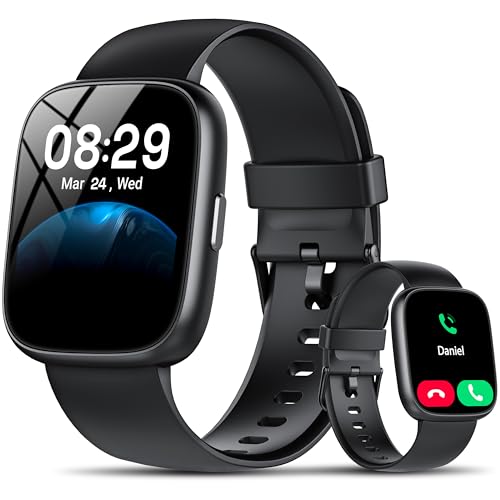
This budget fitness watch takes a different approach by building in Amazon Alexa voice control rather than a proprietary AI system. The 1.83-inch HD touchscreen is larger than the CMF Watch 3 Pro’s display, and it includes Bluetooth calling, heart rate monitoring, and a suite of fitness tracking features.
The Alexa integration is the key differentiator. If you’re already in the Amazon ecosystem — using Echo devices, smart home controls, Alexa routines — having Alexa on your wrist adds genuine convenience for setting timers, controlling lights, checking weather, and more. However, Alexa on a watch requires a phone connection and can be slow to respond compared to a dedicated Echo device.
Buyer feedback on budget watches in this category tends to be polarized. Many are pleasantly surprised by the feature set relative to the price, while others report issues with notification reliability, app connectivity, and build quality that feels plasticky. The display, while large, may not match the AMOLED vibrancy of the CMF Watch 3 Pro. For a broader look at options in this price range, check out our smart watch buying guide covering picks under $50, $100, and $200.

Who should buy it: Amazon Alexa ecosystem users who want voice control on their wrist at a rock-bottom price. Good for casual fitness tracking without serious athletic ambitions.
Who should skip it: Anyone who needs reliable, polished software or premium build quality.
Alternative 3: Samsung Galaxy Watch 8 (44mm Bluetooth)

The Samsung Galaxy Watch 8 is the CMF Watch 3 Pro’s most direct premium competitor for Android users. Running Wear OS with Samsung’s One UI Watch overlay, it offers a polished software experience, deep integration with Samsung Galaxy phones, and access to the Google Play Store for third-party apps.
The 44mm cushion design is a departure from Samsung’s previous round designs, and opinions are divided — some find it modern and comfortable, while others prefer the classic circular look. Health tracking is comprehensive: heart rate, sleep coaching, body composition analysis (via BIA sensor), and a dedicated running coach. The build quality is noticeably superior to budget alternatives, with sapphire crystal glass and proper swim-proof water resistance.
Verified reviewers praise the smooth performance, excellent display, and Samsung Health app integration. Common complaints include battery life (typically one to one-and-a-half days with normal use), the fact that many advanced features work best with Samsung phones specifically, and the significant price premium over budget options.

Who should buy it: Samsung Galaxy phone owners who want the best possible Android smartwatch experience with validated health metrics and a mature app ecosystem.
Who should skip it: Budget shoppers, iPhone users, and anyone who wants multi-day battery life. Much like the pre-purchase checklist approach we use for audio gear, knowing your ecosystem before buying saves headaches.
Alternative 4: Budget Smart Watch with 1.69″ Touchscreen (IP68)

At the absolute bottom of the price spectrum, this budget smartwatch offers basic fitness tracking, Bluetooth connectivity, and IP68 water resistance in a 1.69-inch touchscreen package. It’s compatible with both iPhone and Android, making it one of the most universally accessible options on this list.
Let’s be honest about what you’re getting here: this is a notification mirror and step counter with some bonus features. Heart rate monitoring is included but shouldn’t be relied upon for medical decisions. The display is smaller and lower resolution than the CMF Watch 3 Pro. The build quality is basic — expect a plastic case and a silicone band that may not survive heavy daily use for more than a year.
That said, verified buyers who set appropriate expectations tend to be satisfied. It does what it says: shows notifications, tracks steps and sleep, and looks decent on the wrist. The IP68 rating means it can handle rain and hand washing, though swimming is risky at this price tier.

Who should buy it: First-time smartwatch buyers who want to test the waters without financial commitment, or anyone who needs a basic notification mirror and step counter.
Who should skip it: Anyone who wants reliable health tracking, Bluetooth calling quality, or a watch that will last more than a year of daily use.
Quick Comparison: Which Watch Fits Your Needs?
Final Verdict: Should You Buy the CMF by Nothing Watch 3 Pro?
The CMF by Nothing Watch 3 Pro is a genuinely impressive budget smartwatch that punches above its weight in display quality, feature set, and design. If you’re an Android user — especially a Nothing Phone owner — who wants Bluetooth calling, health tracking, and a stylish wrist companion without spending flagship money, it’s an easy recommendation.
But go in with your eyes open. Battery life will be shorter than advertised if you use the headline features. Bluetooth call quality is functional, not exceptional. The AI Energy Score is a fun addition but not a validated training tool. And iPhone users will get a diminished experience compared to Android.
If those trade-offs are acceptable for the price savings, the Watch 3 Pro is a smart buy. If any of them are dealbreakers, the alternatives above — from the polished Apple Watch Series 11 to the ecosystem-rich Samsung Galaxy Watch 8 — address those specific gaps, albeit at higher price points.
How We Research
Our editorial team synthesizes publicly available manufacturer specifications, official product documentation, and verified customer and expert reviews from major retail platforms and tech publications. We have not personally tested, owned, or handled any of the products in this guide. Our goal is to curate the most honest, comprehensive analysis possible by cross-referencing multiple independent sources, identifying consistent patterns in buyer feedback, and flagging spec-sheet claims that don’t hold up under real-world scrutiny. We believe transparent research methodology produces more trustworthy recommendations than fabricated hands-on claims.


Leave a Reply