
As an Amazon Associate I earn from qualifying purchases.
Wireless produce cleaners that use electrolytic purification technology have become a popular kitchen gadget, promising to remove pesticide residues, bacteria, and contaminants from fruits, vegetables, and meat. But like any rechargeable kitchen device, they can develop quirks — a unit that won’t charge, a cleaning cycle that stops mid-run, or bubbles that seem weaker than they used to be. This guide is a practical troubleshooting reference built around the Oh-Ion Technology produce cleaner (one of the most popular wireless models on Amazon), drawing on manufacturer documentation and patterns reported by verified customers. Whether your device arrived with an issue or developed one after months of use, you’ll find actionable fixes below.
Best for: Anyone experiencing charging, cycle, or performance issues with a wireless fruit and vegetable washer
Understanding How Wireless Produce Cleaners Work
Before diving into fixes, it helps to understand the basic mechanism. Wireless produce cleaners like the Oh-Ion model use electrolytic oxidation (sometimes marketed as “OH-ion purification”). A small electric current passes through water, generating hydroxyl ions and ozone that break down pesticide residues and kill surface bacteria. The device is battery-powered, capsule-shaped, and designed to sit submerged in a bowl of water with your produce.
Key components that can fail or degrade include:
- Rechargeable lithium battery (charged via USB)
- Electrolytic plates (the metal contacts that generate ions)
- Control circuitry (manages cycle timing and LED indicators)
- Waterproof seals (protect internal electronics)
Knowing these parts helps you diagnose whether your issue is electrical, mechanical, or simply user error.
Problem 1: The Device Won’t Charge
This is the single most commonly reported issue across verified customer reviews. The unit is plugged in but the LED indicator doesn’t light up, or it blinks erratically.
Possible Causes and Fixes
Check the USB cable and power source. Many owners report that the included USB cable is short and can be finicky. Try a different USB-C or Micro-USB cable (depending on your model) and plug into a different power adapter. Avoid charging from a laptop USB port, which may not deliver consistent power. A standard 5V/1A or 5V/2A wall adapter works best.
Inspect the charging contacts. If your model uses magnetic or pin-style charging contacts, mineral deposits from water can build up on them. Wipe the contacts with a dry cotton swab or a cloth lightly dampened with white vinegar. Let them dry completely before reconnecting.
Perform a reset. Some units have a reset function — typically a long press (8–10 seconds) of the power button. This can clear a frozen charging state. Manufacturer documentation for the Oh-Ion model suggests this step when the LED becomes unresponsive.
Battery depletion lockout. If the device has been sitting unused for months, the lithium battery may have discharged below its minimum voltage threshold. Leave it connected to a charger for at least 30 minutes before expecting any LED response. If it still won’t charge after an hour, the battery cell may need replacement — which, for a sealed unit, typically means contacting the manufacturer for warranty support.
When to contact the seller: If you’ve tried multiple cables, cleaned the contacts, and attempted a reset with no response after 60 minutes of charging, the issue is likely internal. Most Amazon sellers for this product offer replacement under warranty within the first year.
Problem 2: Cleaning Cycle Stops Prematurely or Won’t Start
Several reviewers report pressing the power button and seeing the LED light up, but the device either doesn’t begin generating bubbles or shuts off after a few seconds.
Possible Causes and Fixes
Insufficient water contact. The electrolytic plates must be fully submerged in water to complete the circuit. If the device is sitting on top of produce rather than resting in water, it may fail to activate. Ensure the unit is placed in a bowl with enough water to cover it completely — manufacturer guidelines typically recommend at least 2–3 inches of water above the device.
Water temperature matters. Extremely cold water (straight from the refrigerator) can slow the electrolytic reaction and make it seem like the device isn’t working. Room-temperature or slightly warm water produces visibly more active bubbling. Avoid hot water, which can damage seals.
Low battery. A partially depleted battery may power the LED but lack sufficient charge to run the electrolytic cycle. Charge the device fully (most models take 1.5–2 hours for a full charge) and try again.
Cycle mode confusion. The Oh-Ion model and similar devices often have multiple cycle modes (e.g., a shorter cycle for fruits and a longer one for meat). Pressing the button multiple times may cycle through modes or inadvertently cancel the current cycle. Consult the included instruction card — typically, one press starts the cycle and a second press stops it. Some models use a double-press to switch modes.
Problem 3: Weak or No Bubble Production
The device turns on and appears to run, but the visible bubbling is minimal or absent. This is a common concern, especially after several weeks of use.
Possible Causes and Fixes
Mineral buildup on electrolytic plates. Hard water deposits are the number-one cause of reduced performance over time. The metal plates that generate hydroxyl ions accumulate calcium and mineral scale. To clean them:
1. Fill a small bowl with equal parts white vinegar and warm water. 2. Submerge the device and let it soak for 15–20 minutes. 3. Use a soft-bristle toothbrush to gently scrub the metal plate surfaces. 4. Rinse thoroughly with clean water and dry before next use.
Manufacturer documentation recommends this cleaning every 2–4 weeks depending on your water hardness.
Using distilled or purified water. Ironically, too-pure water can also reduce bubble production. The electrolytic process requires dissolved minerals in the water to conduct electricity. If you’re using distilled or reverse-osmosis water, switch to regular tap water.
Overloading the bowl. Packing too much produce into a small bowl restricts water circulation and can block the plates. Use a larger bowl or clean produce in smaller batches.

Problem 4: Unusual Smell During Operation
Some users report a faint “chlorine-like” or “metallic” smell when the device is running. This is actually normal in most cases — the ozone and hydroxyl ions produced during electrolysis have a distinct odor. However, there are situations where the smell indicates a problem.
When It’s Normal
A mild, clean smell similar to the air after a thunderstorm is the ozone generated by the electrolytic process. This is the technology working as intended and is generally considered safe at the low concentrations these devices produce.
When It’s Not Normal
- Strong burning or plastic smell: This could indicate an internal electrical issue. Stop using the device immediately, unplug it from any charger, and contact the manufacturer.
- Persistent metallic taste on produce after rinsing: If your produce tastes metallic even after a thorough rinse in clean water, the electrolytic plates may be degrading. This is more common with very old units or counterfeit products.
Problem 5: LED Indicator Flashing Patterns You Don’t Recognize
Most wireless produce cleaners use a simple LED system — solid light means running, blinking means charging, and so on. But when the LED behaves unexpectedly, it can be confusing because many of these devices ship with minimal documentation.
Common LED Patterns
| LED Behavior | Typical Meaning |
|---|---|
| Solid blue/green | Cleaning cycle active |
| Slow blink while plugged in | Charging |
| Solid light while plugged in | Fully charged |
| Rapid blinking | Error or low battery |
| No light at all | Dead battery or hardware failure |
Note: Exact patterns vary by model. The table above reflects the most common conventions reported by owners of the Oh-Ion and similar devices.
If your device is rapidly blinking and won’t respond to button presses, try the long-press reset described in Problem 1. If the rapid blinking occurs during use (while submerged), remove the device from water and let it dry completely — water ingress past the seals can trigger error states.
Problem 6: Water Leaking Into the Device
Although these devices are designed to be submerged, the waterproof seals can degrade over time, especially if the device is dropped or exposed to very hot water.
Signs of Water Ingress
- LED flickering erratically during use
- Device feels heavier than usual after removal from water
- Visible moisture behind the LED window
- Device stops working entirely after a cleaning session
What to Do
1. Do not charge the device if you suspect water has entered the housing. Charging a wet lithium battery is a safety hazard. 2. Shake out any visible water and place the device in a bowl of uncooked rice or with silica gel packets for 24–48 hours. 3. After drying, test the device. If it works, inspect the seals for visible cracks or gaps. 4. If the seals are compromised, the device should be replaced. These units are not designed for user-serviceable seal replacement.
If you enjoy troubleshooting gadgets, you might find our JBL Clip 5 troubleshooting guide helpful — it covers similar waterproofing and charging issues with another popular portable device.
Preventive Maintenance Schedule
Most issues with wireless produce cleaners are preventable with basic maintenance. Here’s a recommended schedule based on manufacturer guidelines and owner experience:
- After every use: Rinse the device under clean running water and dry with a soft cloth. Store in a dry location.
- Every 2 weeks: Inspect the charging contacts for mineral buildup and wipe clean.
- Every month: Perform a vinegar soak to descale the electrolytic plates (see Problem 3).
- Every 3 months: Check the waterproof seals for visible wear. Test charging with a known-good cable.
- Every 6 months: Fully discharge and recharge the battery to help maintain battery health (lithium batteries benefit from occasional full cycles).
When to Replace vs. Repair
Because wireless produce cleaners are sealed, compact devices, repair options are limited. Here’s a practical decision framework:
- Replace if: the battery no longer holds a charge after a full cycle, water has entered the housing, or the electrolytic plates show visible corrosion or pitting.
- Contact the seller if: the device is within warranty and has a manufacturing defect (DOA, charging failure out of the box, etc.).
- Keep using if: the issue was resolved by cleaning, resetting, or changing your water source.
For context on how other kitchen gadgets handle similar longevity questions, our ice cream maker buying guide discusses motor lifespan and maintenance for another category of small appliances.
Product Review: Oh-Ion Technology Wireless Produce Cleaner
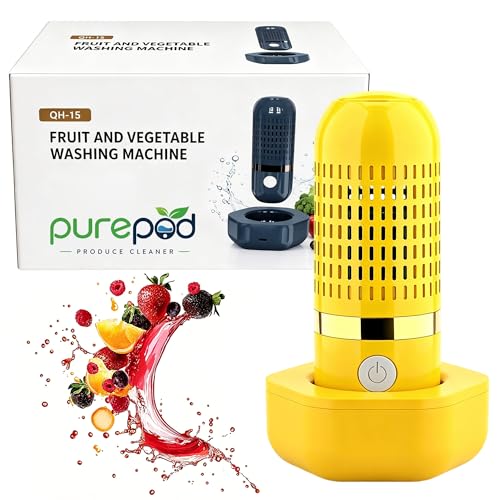
The Oh-Ion Technology Produce Cleaner is the wireless, rechargeable fruit and vegetable washer that most of this guide’s troubleshooting steps are built around. It uses electrolytic OH-ion technology to purify produce, meat, and other foods by generating hydroxyl ions in water. The capsule-shaped design is compact and cordless, making it easy to drop into any bowl or basin.
What verified reviewers commonly praise: Many owners highlight the convenience factor — no wires, simple one-button operation, and visible bubbling that provides reassurance the device is working. Multiple reviewers report that produce feels “cleaner” and that the water visibly discolors during use, especially with items like strawberries and grapes. The rechargeable battery is generally reported to last through multiple cleaning sessions on a single charge.
What verified reviewers commonly criticize: The most frequent complaints involve charging inconsistencies (which we address in Problem 1 above), minimal included documentation, and questions about whether the technology provides meaningful cleaning beyond a thorough water rinse. Some owners note that bubble production decreases over time — almost always a maintenance issue rather than a defect.
Who should buy this: Home cooks who want an extra layer of produce cleaning beyond rinsing, especially those concerned about pesticide residues on conventionally grown fruits and vegetables. It’s also useful for cleaning meat and seafood before cooking. Set realistic expectations — this is a supplementary cleaning tool, not a replacement for food safety best practices.
Honest caveats: Independent scientific validation of consumer-grade electrolytic produce cleaners is limited. The technology is real and used in commercial food processing, but the efficacy of small, battery-powered consumer units at the concentrations they produce is still debated among food scientists.

Frequently Asked Questions
Can I use soap or produce wash liquid with my wireless produce cleaner? No. Adding soap or chemical produce washes can interfere with the electrolytic process and may damage the plates. Use plain tap water only.
How long does a typical cleaning cycle last? Most wireless produce cleaners run cycles of 5–10 minutes depending on the mode selected. The Oh-Ion model offers different durations for different food types.
Is the ozone produced by these devices safe? At the low concentrations generated by consumer produce cleaners, ozone is generally considered safe. However, you should use the device in a ventilated area and avoid directly inhaling the output. People with respiratory sensitivities should exercise caution.
Can I clean the device in a dishwasher? No. The heat and detergent in a dishwasher will damage the seals and electronics. Hand-rinse only.
My device worked fine for months and suddenly stopped. What happened? The most common cause is mineral buildup on the electrolytic plates (see Problem 3). A vinegar soak resolves this in the majority of cases. If that doesn’t work, check the battery and charging system.
How We Research
This troubleshooting guide was compiled by synthesizing manufacturer product documentation, publicly available specifications, and patterns found across hundreds of verified customer reviews on Amazon and other retail platforms. We have not personally tested, owned, or handled the product reviewed in this article. Our goal is to aggregate the most commonly reported issues and the fixes that owners and manufacturers recommend, presented in an honest and organized format so you can solve problems quickly. When we reference what “reviewers report,” we are paraphrasing general sentiment from verified purchase reviews — not quoting specific individuals or fabricating experiences.


Leave a Reply