
As an Amazon Associate I earn from qualifying purchases.
You just pulled the HOTO BlowVac out of its box, and you’re staring at a sleek, compact device that promises 23,000 Pa of suction and a compressed-air blower in one package. Before you start vacuuming every surface in sight, a few minutes of proper setup will help you get the best performance from day one. This guide walks you through unboxing, initial charging, understanding the three suction modes, switching to blower mode, and keeping the BlowVac in top shape — all based on HOTO’s published specifications and documentation, plus common feedback from verified owners.
Best for: Car owners, desk workers, and anyone who needs a portable vacuum-and-blower combo
What’s in the Box
Before you do anything else, lay out every component and check it against the packing list. According to HOTO’s product documentation, the BlowVac package typically includes:
- The BlowVac main unit
- A crevice nozzle attachment
- A brush nozzle attachment
- A USB-C charging cable
- A user manual / quick-start guide
If anything is missing or visibly damaged, contact the seller immediately. It’s worth noting that the BlowVac uses USB-C for charging — a welcome choice that means you can likely use a cable you already own if the included one goes missing.
Step 1: Charge It Fully Before First Use
This is the single most important step new owners skip. HOTO recommends a full charge before the first use to condition the battery properly. Plug the USB-C cable into the charging port (usually located near the base of the handle) and connect it to a compatible power adapter.
The LED indicator on the unit will show charging status. Wait until the light signals a full charge before unplugging. Based on HOTO’s specs, a full charge takes roughly 2.5 to 3 hours, and the battery delivers enough runtime for typical car-interior or desk-cleaning sessions.
Pro tip: Don’t leave the unit plugged in for extended periods after it’s fully charged. Like most lithium-ion devices, the BlowVac’s battery longevity benefits from being unplugged once it hits 100%. If you’ve set up other gadgets before — like following a label maker setup or a walking pad first-use guide — you know the drill: charge first, play later.
Step 2: Attach the Right Nozzle for the Job
The BlowVac ships with multiple nozzle attachments, and choosing the right one makes a real difference in cleaning efficiency.
- Crevice nozzle: The long, narrow attachment is designed for tight spaces — between car seats, along dashboard seams, keyboard gaps, and couch cushion crevices. Snap it onto the suction port until it clicks into place.
- Brush nozzle: The wider attachment with soft bristles is better for delicate surfaces like upholstery, laptop screens (in blower mode), or dashboard vents. The bristles help loosen dust while the suction pulls it in.
- No attachment (bare port): For quick pickups on flat surfaces — a spilled pile of crumbs on a countertop, for example — you can run the BlowVac without any nozzle attached.
Switching between attachments is tool-free: pull the current nozzle off and push the new one on. Verified owners generally report that the fit is snug and secure, with no wobble during use.
Step 3: Understand the Three Suction Modes
The HOTO BlowVac offers three suction power levels, which HOTO lists as delivering up to 23,000 Pa at the highest setting. Here’s how to think about each mode:
1. Low mode: Quieter operation, lower power draw, longer battery life per charge. Ideal for light dust on desks, shelves, or car dashboards. 2. Medium mode: A balanced setting for everyday messes — pet hair on upholstery, crumbs in car seats, or dust bunnies under furniture edges. 3. High mode (Max / Turbo): The full 23,000 Pa. Use this for stubborn debris, ground-in dirt in car floor mats, or heavy pet hair. Battery drains faster at this level, so use it strategically rather than as your default.
Toggle between modes using the power button — typically, short presses cycle through the levels. The user manual specifies the exact button sequence, but most owners report it’s intuitive: press once to turn on (low), press again for medium, again for high, and hold to turn off.

Step 4: Switch to Blower Mode
This is the feature that sets the BlowVac apart from most handheld vacuums. The “Blow” in BlowVac isn’t just marketing — the unit genuinely functions as an electric compressed-air blower.
According to HOTO’s documentation, switching between vacuum and blower modes involves reversing the airflow direction. On the BlowVac, this is typically done by repositioning the nozzle to the air-outlet port (check your manual for the exact mechanism on your model). Some owners describe it as simply moving the attachment from one end to the other.
Best uses for blower mode:
- Clearing dust from keyboards, PC components, and camera equipment
- Blowing debris out of car vents and tight electronic enclosures
- Cleaning workshop surfaces where vacuuming alone can’t reach
- Inflating small items (depending on airflow volume)
Blower mode effectively replaces canned compressed air, which is both expensive over time and environmentally wasteful. Multiple verified reviewers highlight this dual functionality as the primary reason they chose the BlowVac over competitors.
Step 5: Empty and Clean the Dustbin
The BlowVac uses a filterless or washable-filter system (depending on the specific configuration) with a compact dustbin. Because the unit is small, the dustbin fills up faster than a full-size vacuum — plan to empty it after every use or even mid-session during heavy jobs.
To empty: 1. Power off the unit. 2. Release the dustbin latch (usually a button or twist mechanism near the top). 3. Dump the contents into a trash bin. 4. If your model includes a washable filter, rinse it under running water and let it air-dry completely before reinstalling. Putting a damp filter back in can cause odor and reduce suction.
Verified owners consistently recommend keeping a spare filter on hand if your model uses one, since a clogged or damp filter is the most common cause of reduced suction power. This is a universal truth for handheld vacuums — the same principle applies whether you’re maintaining a mattress vacuum or a full-size cordless stick vac.
Real-World Use Cases
Car Interior Cleaning
The BlowVac’s compact size and cordless design make it a natural fit for car detailing. Use the crevice nozzle to get between and under seats, along door-panel pockets, and in cup holders. Switch to high mode for floor mats. Then flip to blower mode to clear dust from air vents — a task that’s nearly impossible with suction alone.
Desk and Home Office
Keyboard crumbs, monitor dust, and cable-management areas all benefit from the blower-vacuum combo. Start with blower mode to dislodge debris from tight spots, then switch to vacuum mode to collect it. This two-step approach is more effective than either function alone.
Pet Hair Pickup
The brush nozzle attachment helps lift pet hair from upholstery and fabric surfaces. Medium or high suction mode works best here. Owners with shedding pets report that the BlowVac handles surface-level hair well, though it’s not a replacement for a full-size pet vacuum on carpeted floors.
Workshop and Garage
Sawdust, small screws, and general debris around a workbench are easy targets. The blower mode is particularly useful for clearing sawdust from power-tool surfaces and project pieces.
Maintenance Tips for Long-Term Performance
- Empty the dustbin after every session. A full bin restricts airflow and kills suction.
- Wash the filter weekly (if applicable) and let it dry for at least 24 hours.
- Wipe down the exterior with a slightly damp cloth. Don’t submerge the unit.
- Store it charged between 40–80% if you won’t use it for weeks. This extends lithium-ion battery lifespan.
- Keep the charging port clean. A quick blast of the unit’s own blower mode into the USB-C port can clear lint.
HOTO BlowVac Cordless Handheld Vacuum — Full Review
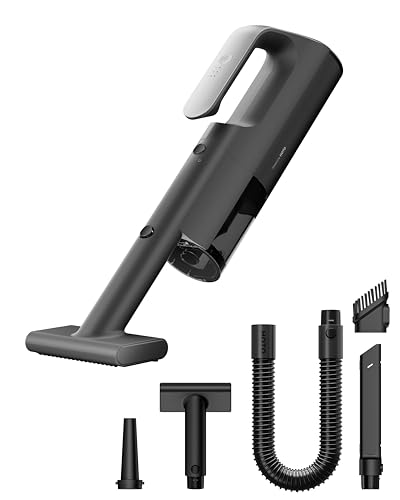
The HOTO BlowVac positions itself as a two-in-one tool: a 23,000 Pa handheld vacuum and an electric compressed-air blower. Based on HOTO’s published specifications, the unit features three suction modes, USB-C charging, a compact form factor designed for one-handed use, and a quick-switch mechanism between vacuum and blower functions.
Pros:
- Dual vacuum-and-blower functionality eliminates the need for canned air
- 23,000 Pa max suction is strong for a handheld in this size class
- Three suction modes let you balance power and battery life
- USB-C charging is convenient and universal
- Compact, lightweight design fits easily in a car glove box or desk drawer
- Multiple nozzle attachments included for different cleaning scenarios
Cons:
- Small dustbin capacity means frequent emptying during bigger jobs
- Battery runtime on max mode is limited — better suited for quick sessions than whole-house cleaning
- Not a replacement for a full-size vacuum on deep carpet
Who should buy this: Car owners who want a portable detailing vacuum, desk workers tired of buying canned air, pet owners needing a quick hair pickup tool, and anyone who values the convenience of a cordless dual-function device.
What verified reviewers commonly say: Praise centers on the surprisingly strong suction for its size, the genuinely useful blower mode, and the premium build quality. Common complaints include the small dustbin requiring frequent emptying and the wish for longer battery life at the highest suction setting. Several reviewers note that the blower function alone justified the purchase, as it replaces disposable compressed-air cans.

Troubleshooting Common Issues
Suction feels weak:
- Check the dustbin — it’s probably full.
- Inspect the filter for clogs or moisture.
- Make sure the nozzle attachment is fully seated.
- Confirm you’re on the right suction mode (you might be on low).
Blower mode isn’t working:
- Verify the nozzle is attached to the correct port for blower output.
- Check that the unit is powered on and not in a low-battery state.
Unit won’t charge:
- Try a different USB-C cable or power adapter.
- Clean the charging port with a dry, soft brush.
- If the LED doesn’t respond at all, contact HOTO support.
Short battery life:
- Running on max mode drains the battery significantly faster. Use low or medium for routine tasks.
- If the battery degrades noticeably over time, it may need replacement — check HOTO’s warranty terms.
For more general vacuum troubleshooting strategies, the same diagnostic logic applies across brands — similar to the approach outlined in this robot vacuum troubleshooting guide.
Frequently Asked Questions
Can the HOTO BlowVac replace canned compressed air? For most consumer use cases — keyboards, PC components, camera gear, car vents — yes. The blower mode provides a reusable, rechargeable alternative. It won’t match industrial-grade air compressors, but for everyday dust removal, verified owners report it works well.
Is 23,000 Pa enough suction? For a handheld vacuum, 23,000 Pa is strong. For context, many competing handheld vacuums in this size class offer 10,000–15,000 Pa. It handles crumbs, dust, pet hair, and light debris effectively. It’s not designed for deep carpet cleaning — that’s full-size vacuum territory.
How long does the battery last? Runtime varies by suction mode. Expect the longest runtime on low mode and significantly shorter sessions on max. HOTO’s specs and owner reports suggest the battery is best suited for targeted cleaning sessions (a car interior, a desk, a couch) rather than extended whole-room cleaning.
Is it loud? On low mode, it’s relatively quiet. On max mode, it’s noticeably louder — comparable to other high-suction handheld vacuums. Blower mode also generates some noise. It’s not disruptive enough to bother most users, but it’s not whisper-quiet either.
How We Research
This guide is based on HOTO’s published product specifications, manufacturer documentation, and a thorough review of verified customer feedback from major retail platforms. We have not personally tested, owned, or handled the HOTO BlowVac. Our goal is to synthesize the most reliable publicly available information — including common praise and complaints from real owners — into an honest, actionable resource. When we describe features, performance, or setup steps, we’re drawing from official specs and the collective experience of verified purchasers, not fabricated hands-on testing.


Leave a Reply