
As an Amazon Associate I earn from qualifying purchases.
If you’ve ever been locked out of your own home or fumbled for keys with grocery bags in both hands, you already understand the appeal of a keyless entry deadbolt. But the market spans a wide price range — from budget keypad deadbolts that simply replace your key with a code, all the way up to Wi-Fi-connected smart locks with app control, voice assistants, and activity logs. The real question isn’t which lock is best — it’s how much smart-lock technology is actually worth paying for. In this guide, we compare two popular keypad deadbolts at very different price points: the budget-friendly TEEHO TE001 and the premium Schlage Encode Smart Wi-Fi Deadbolt. We break down what you gain (and what you give up) at each tier so you can make a confident decision.
Best for: Budget-conscious homeowners and renters who want reliable keypad entry without paying for Wi-Fi or app features
Why Keyless Entry Deadbolts Are Worth Considering
Traditional keyed deadbolts have been the standard for decades, and they still work. But keyless entry solves several everyday pain points:
- No more lockouts. A memorized code means you never need to hide a spare key under the mat.
- Easy guest access. Give temporary codes to dog walkers, house cleaners, or visiting family — then delete them when the job is done.
- Auto-lock features. Many keypad deadbolts can lock themselves after a set time, eliminating the “did I lock the door?” anxiety.
- Activity tracking. Higher-end models log who unlocked the door and when, which is valuable for families and rental property owners.
The trade-off is always price versus features. A basic keypad deadbolt gives you code-based entry and physical key backup. A Wi-Fi-enabled smart lock adds remote access, voice assistant integration, and smartphone notifications — but at two to four times the cost. Below, we examine one lock from each tier to help you decide where your money is best spent.
If you’re building out a broader smart-home security setup, you might also want to pair your new lock with a video doorbell for package security — the two work together to cover your front door from every angle.
What to Look for in a Keypad Deadbolt
Before diving into specific products, here are the key factors that separate a good keyless deadbolt from a frustrating one:
1. Entry Methods
Most keypad deadbolts offer at least two ways in: a numeric code and a physical key backup. Premium models add Bluetooth, Wi-Fi app control, fingerprint readers, or voice assistant integration. Think about which methods you’ll actually use daily — paying for Wi-Fi connectivity you never configure is wasted money.
2. Installation Difficulty
Nearly all residential keypad deadbolts are designed to replace a standard single-cylinder deadbolt using the same door prep (a single borehole). The real variable is how clear the instructions are and whether the lock fits doors of varying thicknesses. Look for models that support door thicknesses from 1⅜” to 1¾” — that covers the vast majority of exterior doors.
3. Power Source
Battery-powered locks dominate this category. Most use four AA batteries and last six to twelve months depending on usage. Some premium models use lithium batteries or proprietary packs. Always check how the lock alerts you to low battery — a warning beep or app notification can save you from a dead-lock scenario.
4. Build Quality and Grade
The ANSI/BHMA grading system rates locks from Grade 1 (commercial) to Grade 3 (residential). Grade 2 is the sweet spot for most homeowners — it’s tested to withstand 400,000 cycles and offers solid forced-entry resistance. Budget locks sometimes skip ANSI certification entirely, which doesn’t necessarily mean they’re flimsy, but it does mean they haven’t been independently tested to a recognized standard.
5. Smart Features (and Their Real Cost)
Wi-Fi, Bluetooth, Alexa, Google Home, Apple HomeKit — these integrations sound impressive, but each one adds cost and complexity. Ask yourself: Do I need to unlock my door remotely, or is a keypad on the door sufficient? Do I want activity logs on my phone, or is a simple code system enough? Your honest answers will point you to the right price tier.
TEEHO TE001 Keyless Entry Door Lock — Best Value Pick

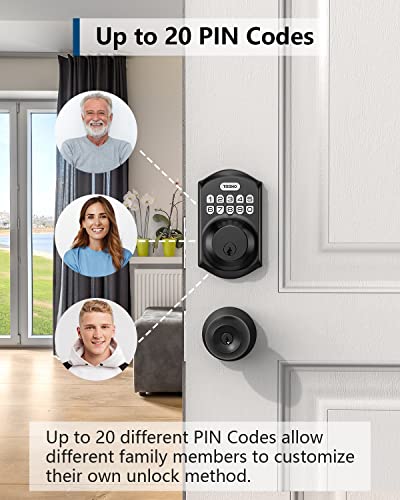
The TEEHO TE001 is a straightforward keypad deadbolt that focuses on doing the basics well at a budget-friendly price point. It offers two entry methods — a backlit numeric keypad and two included physical keys — and supports up to 20 unique user codes. There’s no Wi-Fi, no app, and no voice assistant integration. For many buyers, that’s not a limitation; it’s the entire point.
According to manufacturer specifications, the TE001 fits standard door preparations and supports door thicknesses from 1⅜” to 1¾”. It runs on four AA batteries (not included) and features a low-battery warning indicator. The auto-lock function can be set to engage after a configurable period, which is a genuinely useful feature that you’d normally associate with pricier smart locks.
Verified customer reviews consistently praise the TE001 for its easy installation — many report completing the swap in under 30 minutes with just a screwdriver. The backlit keypad gets positive marks for nighttime visibility. Reviewers also appreciate the solid, metallic feel of the lock body, noting it doesn’t feel cheap despite its budget positioning.
On the downside, some reviewers note that the keypad buttons can feel slightly stiff when new, though this reportedly loosens with use. The lack of any connectivity means you can’t check lock status remotely or receive notifications — if someone enters while you’re away, you won’t know unless you’re physically present. A few users have also mentioned that the instruction manual could be clearer, particularly around programming multiple user codes.
Pros:
- Very affordable entry into keyless convenience
- Simple installation with standard door prep
- Auto-lock feature included
- Backlit keypad for nighttime use
- Two physical backup keys included
- Supports up to 20 user codes
Cons:
- No Wi-Fi, Bluetooth, or app control
- No activity logging
- No ANSI/BHMA grade certification listed
- Instruction manual could be more detailed
Who should buy this: The TEEHO TE001 is ideal for renters, budget-conscious homeowners, or anyone who simply wants to ditch their keys without paying for smart-home features they won’t use. It’s also a solid choice for side doors, garage entries, or rental properties where you need easy code management without the complexity of an app-based system.
Schlage Encode Smart Wi-Fi Deadbolt — Premium Pick
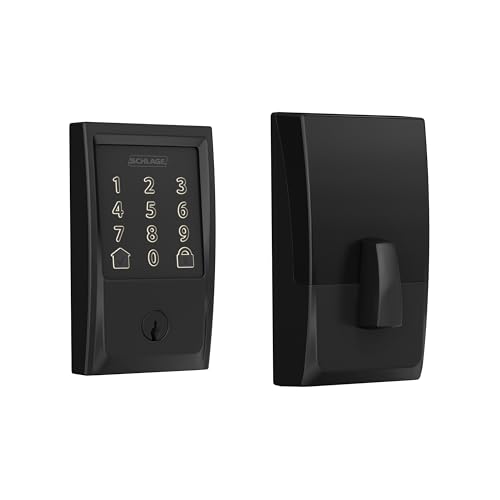
The Schlage Encode represents the other end of the keypad deadbolt spectrum. It’s a full-featured smart lock from one of the most recognized names in residential security, and it comes with built-in Wi-Fi — no additional hub or bridge required. That’s a meaningful distinction in the smart-lock world, where many competitors require a separate Bluetooth-to-Wi-Fi bridge to enable remote access.
The Encode connects directly to your home Wi-Fi network and integrates with the Schlage Home app (iOS and Android), Amazon Alexa, and Google Home. Through the app, you can lock and unlock remotely, create and manage up to 100 access codes, view a detailed activity log, and receive real-time notifications when someone enters. The touchscreen keypad features Schlage’s fingerprint-resistant coating, and the lock carries an ANSI/BHMA Grade 1 certification — the highest residential security rating available, tested to 800,000 cycles.
Verified reviewers frequently highlight the Encode’s build quality and the reassuring weight of the lock body. The touchscreen keypad is widely praised for its responsiveness and the anti-fingerprint coating that prevents code-guessing from smudge patterns. Integration with Alexa and Google Home works reliably according to most reports, allowing voice commands like “Alexa, lock the front door.”

The most common complaints center on Wi-Fi connectivity. Some reviewers report that the lock occasionally drops its Wi-Fi connection, requiring a reconnection through the app. This doesn’t affect the keypad or physical key entry — only remote features. Battery life is another consideration; the built-in Wi-Fi radio draws more power than a simple keypad lock, and some users report needing to replace the four AA batteries every four to six months with heavy use, compared to the eight to twelve months typical of non-connected locks.
Installation is straightforward for anyone comfortable with a standard deadbolt swap, though the Wi-Fi setup process adds an extra 10-15 minutes according to reviewer reports. The lock is also noticeably larger than a traditional deadbolt, which some reviewers mention as an aesthetic consideration.
Pros:
- ANSI/BHMA Grade 1 — highest security certification
- Built-in Wi-Fi (no hub required)
- Remote lock/unlock via smartphone app
- Up to 100 user codes with scheduling options
- Activity log with real-time notifications
- Alexa and Google Home integration
- Fingerprint-resistant touchscreen
- Trusted brand with strong warranty support
Cons:
- Significantly more expensive than basic keypad locks
- Wi-Fi connectivity can occasionally drop
- Shorter battery life due to Wi-Fi radio
- Larger physical footprint than traditional deadbolts
- No Apple HomeKit support (Schlage offers a separate model for that)
Who should buy this: The Schlage Encode is best for homeowners who want full smart-home integration and are willing to pay for it. It’s particularly valuable for families who need to manage multiple access codes (kids, housekeepers, dog walkers), Airbnb hosts who want remote code management, and anyone who values the peace of mind that comes with real-time entry notifications and a Grade 1 security rating. If you’re already invested in an Alexa or Google Home ecosystem, the Encode slots in seamlessly.
For a broader look at smart devices that complement a connected lock, check out our guide to building a smart bedroom setup — many of the same platforms (Alexa, Google Home) tie everything together.
Budget vs. Premium: What Are You Actually Paying For?
Let’s be direct about what separates these two price tiers:
| Feature | TEEHO TE001 | Schlage Encode |
|---|---|---|
| Keypad entry | ✅ | ✅ |
| Physical key backup | ✅ (2 keys) | ✅ |
| Auto-lock | ✅ | ✅ |
| User codes | Up to 20 | Up to 100 |
| Wi-Fi connectivity | ❌ | ✅ (built-in) |
| App control | ❌ | ✅ |
| Voice assistant support | ❌ | Alexa, Google Home |
| Activity log | ❌ | ✅ |
| Remote lock/unlock | ❌ | ✅ |
| ANSI/BHMA Grade | Not listed | Grade 1 |
| Typical battery life | 6-12 months | 4-6 months |
The core function — walking up to your door and punching in a code — works identically on both locks. The premium you pay for the Schlage Encode buys you three things: remote access, activity visibility, and certified security. Whether those are worth the price difference depends entirely on your situation.
When the Budget Lock Makes More Sense
- You just want to stop carrying keys
- You’re a renter who may move soon
- The lock is for a secondary door (side entry, garage)
- You don’t use Alexa or Google Home
- You want the longest possible battery life
When the Premium Lock Justifies Its Price
- You manage an Airbnb or rental property remotely
- You have kids, housekeepers, or frequent guests who need unique codes
- You want to know who unlocked the door and when
- You’re building a connected smart-home ecosystem
- Maximum security certification matters to you
- You want to lock/unlock from anywhere via your phone
If you’re also thinking about securing valuables inside the home, a fireproof safe can complement your upgraded door security nicely.
Installation Tips for Any Keypad Deadbolt
Regardless of which lock you choose, these tips (drawn from common reviewer feedback) can save you headaches:
1. Measure your door thickness first. Most keypad deadbolts fit 1⅜” to 1¾” doors, but some older or custom doors fall outside this range. 2. Check your existing borehole. Standard deadbolt prep uses a 2⅛” diameter face bore and a 1″ edge bore. If your door already has a deadbolt, the new lock should drop right in. 3. Have fresh batteries ready. Don’t use the batteries that have been sitting in your junk drawer — start with a fresh set for reliable performance. 4. Test before closing the door. Program your codes and test both locking and unlocking with the door open. This prevents a lockout if something isn’t configured correctly. 5. Keep the physical keys somewhere accessible but secure. Even the most reliable keypad lock can have a dead battery. A backup key with a trusted neighbor is cheap insurance.
Final Verdict: How Much Should You Spend?
The honest answer is that a budget keypad deadbolt like the TEEHO TE001 delivers the single most valuable feature — keyless entry — at a fraction of what premium smart locks cost. For many people, that’s genuinely all they need. The Schlage Encode is a superior product by almost every measurable standard, but the features that justify its higher price (remote access, activity logs, voice control) are only valuable if you’ll actually use them.
Our recommendation: if you’re new to keyless entry and aren’t sure how much you’ll use smart features, start with a budget keypad lock. You’ll solve the key-fumbling problem immediately, and if you find yourself wishing for app control or remote access down the road, you can upgrade later with confidence that the premium tier delivers on those promises.
How We Research
We have not personally tested, owned, or handled either of these locks. Our analysis is based on a thorough synthesis of manufacturer specifications, official product documentation, and patterns found across hundreds of verified customer and expert reviews from public sources. We cross-reference claims from multiple review platforms to identify consistent praise and recurring complaints. This approach lets us provide honest, well-sourced recommendations without fabricating hands-on experience. When we say reviewers report something, we mean it — we’re summarizing real feedback, not inventing scenarios.


Leave a Reply