
As an Amazon Associate I earn from qualifying purchases.
The LabCharge Small Ionic Air Purifier is a compact, silent-operation unit designed for bedrooms and small living spaces up to 250 square feet. It combines HEPA filtration with ionic technology to tackle pet hair, smoke, dust, and other airborne particles. While verified buyers generally praise its quiet performance and small footprint, no appliance is problem-free. Below, we walk through the most frequently reported issues with the LabCharge Small Ionic Air Purifier and provide practical, step-by-step fixes drawn from manufacturer documentation and real customer feedback.
Best for: Bedroom and small-room use, pet owners, allergy sufferers
Why Troubleshoot Before Returning?
Many of the issues customers report with compact air purifiers — including the LabCharge — stem from simple setup oversights, filter packaging left in place, or environmental factors rather than genuine defects. Before initiating a return, it’s worth spending five minutes running through the fixes below. You may also find our guides on troubleshooting other home devices helpful; for instance, our eufy C28 Robot Vacuum troubleshooting guide follows a similar diagnostic approach, and the BougeRV PC35 PRO Portable AC troubleshooting guide covers airflow and filter issues that overlap with air purifier problems.
Problem 1: Unit Won’t Power On
What customers report: The purifier does nothing when the power button is pressed — no lights, no fan, no response.
Possible Causes & Fixes
1. Loose or disconnected power cable. Confirm the USB-C or DC adapter (depending on your model variant) is fully seated at both the wall outlet and the unit. Try a different outlet to rule out a dead socket. 2. Surge protector or power strip issue. If the purifier is plugged into a power strip, plug it directly into a wall outlet instead. Some low-wattage devices don’t trigger smart power strips. 3. Button hold requirement. Several verified reviewers note that the power button requires a firm press-and-hold of 2–3 seconds rather than a quick tap. This is a common design choice on compact purifiers to prevent accidental activation. 4. Adapter wattage mismatch. If you’re using a third-party USB-C cable or adapter, make sure it meets the wattage requirements listed in the LabCharge manual. Under-powered adapters may fail to start the unit. 5. Internal safety lockout. If the filter compartment cover isn’t properly closed, many purifiers disable power as a safety measure. Remove and reseat the cover until it clicks.
If none of these steps work, the unit may have a defective power board — contact LabCharge support or initiate a warranty claim through Amazon.
Problem 2: Filter Replacement Indicator Won’t Reset
What customers report: After installing a new HEPA filter, the filter-change light stays on.
Possible Causes & Fixes
1. Reset procedure not performed. Simply swapping the filter doesn’t automatically reset the indicator on most purifiers. With the unit powered on, press and hold the filter-reset button (often the same as the speed or mode button) for 3–5 seconds until the indicator light blinks and turns off. 2. Filter not seated correctly. Remove the new filter, check for any remaining plastic wrapping or cardboard inserts, and reinstall it firmly. A misaligned filter can prevent the sensor from registering the swap. 3. Power cycle after reset. Some users report that turning the unit off and back on after the reset procedure clears a stubborn indicator.
Problem 3: Weak or No Airflow
What customers report: The purifier runs but barely moves air, or airflow has noticeably decreased over time.
Possible Causes & Fixes
1. Plastic wrap still on the filter. This is the single most common complaint across nearly all compact air purifiers. New HEPA filters ship sealed in plastic to preserve their media. If you don’t remove this wrapping before first use, airflow will be almost nonexistent. 2. Clogged pre-filter or HEPA filter. In dusty environments or homes with shedding pets, the filter can load up faster than the recommended replacement interval. Remove the filter and inspect it. If it’s visibly gray or matted, replace it. 3. Blocked intake or exhaust vents. The LabCharge is small enough to sit on a nightstand, but placing it flush against a wall or curtain can block its intake grilles. Maintain at least 6–8 inches of clearance on all sides. 4. Fan speed set to lowest setting. The unit’s “silent” mode runs the fan at minimal RPM. If you need more airflow, cycle to a higher speed setting. 5. Ambient temperature. Extremely cold rooms can make airflow feel weaker than it actually is. This isn’t a malfunction — the air simply feels less noticeable against cool skin.
Problem 4: Unusual or Unpleasant Odor
What customers report: A chemical, plastic, or “ozone-like” smell when the purifier is running.
Possible Causes & Fixes
1. New-unit off-gassing. Brand-new purifiers often emit a mild plastic or chemical smell for the first 24–48 hours of operation. Run the unit on its highest setting in a well-ventilated room for a day to accelerate off-gassing. 2. Ionic function producing trace ozone. Ionizers generate negatively charged ions, and a small amount of ozone can be a byproduct. The LabCharge is marketed as producing ozone levels well below FDA limits, but sensitive individuals may still notice a faint metallic smell. If the odor is bothersome, check whether the unit has an option to disable the ionizer function while keeping the HEPA fan running. 3. Saturated activated-carbon layer. If your HEPA filter includes an activated-carbon pre-filter layer (common in combo filters), it can become saturated with VOCs and start releasing odors back into the room. Replace the filter. 4. External contaminant. If the purifier is placed near cooking areas, scented candles, or cleaning-product storage, it may recirculate those odors. Relocate the unit.

Problem 5: Excessive Noise or Rattling
What customers report: Buzzing, rattling, or vibrating sounds that seem louder than expected for a “silent” purifier.
Possible Causes & Fixes
1. Uneven surface. Place the purifier on a flat, stable surface. A slightly uneven nightstand or shelf can cause the unit to vibrate against the surface. A thin rubber mat or mouse pad underneath can dampen vibrations. 2. Loose filter or cover. Open the filter compartment, remove the filter, and reseat both the filter and the cover. A filter that’s slightly askew can rattle against the housing. 3. Foreign object inside. Small debris — a pet-hair clump, a piece of paper — can get pulled into the intake and contact the fan blade. Power off the unit, unplug it, and carefully inspect the intake grille and fan area. 4. Fan bearing wear. If the unit has been running continuously for many months, fan bearings can develop a whine. This is a hardware issue that typically requires replacement.
Problem 6: Indicator Lights Too Bright at Night
What customers report: LED indicator lights are distractingly bright in a dark bedroom.
Possible Causes & Fixes
1. Dim or sleep mode. Check the manual for a display-off or dim mode. Many compact purifiers allow you to hold a button combination to turn off all LEDs while the unit continues running. 2. Physical cover. If no software dimming option exists, a small piece of electrical tape or a purpose-made LED dimming sticker over the indicator can reduce brightness without affecting operation. 3. Orientation. Rotating the unit so the LED panel faces away from your bed is a simple but effective workaround.
Problem 7: Unit Turns Off by Itself
What customers report: The purifier shuts down unexpectedly after running for a period of time.
Possible Causes & Fixes
1. Auto-off timer engaged. The LabCharge may include a built-in timer (common intervals are 2, 4, or 8 hours). If the timer was accidentally set, the unit will power down after the interval. Cycle through the timer settings to disable it. 2. Overheating protection. If the intake or exhaust is blocked, the internal temperature can rise and trigger a thermal shutoff. Clear obstructions and allow the unit to cool for 15–20 minutes before restarting. 3. Power supply interruption. Loose cables, intermittent outlet connections, or a failing adapter can cause random shutoffs. Test with a known-good cable and outlet.
Problem 8: Ionizer Not Working (No Ion Output)
What customers report: The air doesn’t feel “fresher” or the ion indicator isn’t lit.
Possible Causes & Fixes
1. Ionizer toggled off. On many hybrid purifiers, the ionizer is a separate toggle from the fan. Press the ion button to ensure it’s activated — an indicator light should confirm. 2. Dirty ion emitter needle. Over time, dust can accumulate on the ionizer’s emitter pin. Power off and unplug the unit, then gently clean the needle with a dry cotton swab. Do not use water or cleaning solutions. 3. Perception vs. reality. Ionizers don’t produce a tangible breeze or obvious sensation. The “fresh” feeling is subtle. Unless the indicator light is off, the ionizer is likely functioning normally.
Maintenance Tips to Prevent Problems
- Replace the HEPA filter on schedule. Most manufacturers recommend every 6–8 months, but homes with pets or smokers may need replacements every 3–4 months.
- Wipe down the exterior and intake grilles weekly with a dry or slightly damp microfiber cloth.
- Clean the ionizer needle monthly with a dry cotton swab.
- Don’t run the unit 24/7 on the highest setting unless necessary — this accelerates filter saturation and fan wear.
- Store the unit upright if you move it between rooms to avoid jostling internal components.
If you enjoy troubleshooting your home gadgets, you might also find our Portable Monitor Troubleshooting Guide useful for diagnosing display and connectivity issues.
Full Product Review: LabCharge Small Ionic Air Purifier
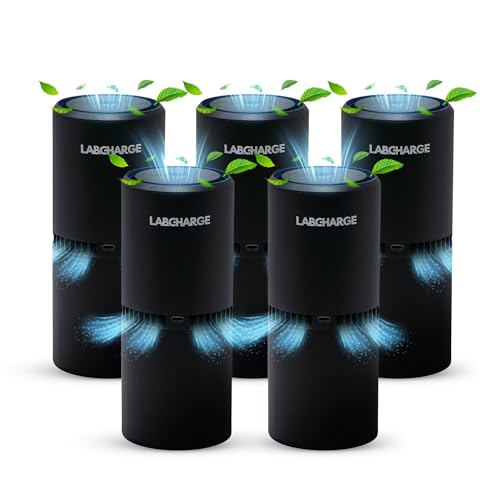
The LabCharge Small Ionic Air Purifier targets a specific niche: people who need quiet, compact air purification for a single room up to 250 square feet. It pairs a true HEPA filter with an ionic generator, aiming to capture particles as small as 0.3 microns while also releasing negative ions to help settle airborne contaminants.
Pros based on verified customer feedback:
- Extremely quiet on its lowest setting — multiple reviewers confirm it’s nearly inaudible, making it well-suited for bedrooms and nurseries.
- Compact footprint that fits easily on a nightstand, desk, or shelf without dominating the space.
- Noticeable improvement in air quality for allergy sufferers and pet owners, according to many verified buyers.
- Simple, intuitive controls with minimal buttons.
Cons based on verified customer feedback:
- Coverage area of 250 sq ft means it’s not suitable for large open-plan living spaces.
- Some users report a faint ozone-like smell from the ionizer function, particularly in smaller, poorly ventilated rooms.
- Replacement filters can be an ongoing cost, and availability of OEM filters through third-party sellers varies.
- The indicator LEDs can be bright in a dark room if the unit lacks a dedicated dim mode.
Who should buy this: Anyone looking for a quiet, small-footprint air purifier for a bedroom, home office, or nursery — especially pet owners and allergy sufferers. It’s not the right choice for whole-home purification or large rooms.

Quick-Reference Comparison
When to Contact LabCharge Support
If you’ve worked through every fix above and the problem persists, it’s time to reach out to the manufacturer or initiate a return through Amazon. Common warranty-eligible issues include:
- Complete power failure after verifying the adapter and outlet.
- Persistent burning or electrical smell (power off and unplug immediately).
- Fan motor failure or grinding noise that doesn’t resolve after cleaning.
- Defective control panel (buttons unresponsive after power cycling).
Always have your order number and purchase date ready when contacting support.
How We Research
This guide was compiled by synthesizing the LabCharge product listing, manufacturer-provided specifications and documentation, and verified customer reviews on Amazon. We did not personally test, own, or handle this product. Our goal is to aggregate the most commonly reported issues and the fixes that real owners and manufacturer guidance suggest, so you get honest, actionable advice without fabricated hands-on claims.


Leave a Reply