
As an Amazon Associate I earn from qualifying purchases.
Choosing a portable printer for travel, remote work, or on-the-go document needs can be surprisingly tricky. Two very different approaches compete for your bag space: the NDYIN N80, a compact Bluetooth thermal printer that uses no ink at all, and the Canon PIXMA TR160, a full-featured wireless inkjet that prints in color. One promises zero consumable costs and ultra-light portability; the other delivers traditional print quality with a wider feature set. In this comparison we break down the specs, real-world reviewer feedback, and ideal use cases so you can decide which portable printer earns a spot in your travel kit.
Best for: Budget-conscious travelers and mobile professionals who primarily need black-and-white document output
How These Two Printers Differ Fundamentally
Before diving into specs, it’s worth understanding that these printers represent two entirely different printing philosophies. The NDYIN N80 is a thermal printer — it uses heat to activate special thermal paper, producing text and images without any ink, toner, or cartridges. The Canon PIXMA TR160 is a traditional inkjet printer that uses replaceable ink cartridges to print on standard paper in full color.
This fundamental difference shapes everything: ongoing costs, print quality, paper flexibility, weight, and who each printer is best suited for. If you’ve ever compared portable gadgets that take radically different approaches to the same problem, you know the “winner” almost always depends on your specific priorities.
Key Specs at a Glance
Here’s a quick side-by-side of the most important specifications based on manufacturer listings:
| Feature | NDYIN N80 | Canon PIXMA TR160 |
|---|---|---|
| Print Technology | Direct thermal (inkless) | Inkjet (color) |
| Connectivity | Bluetooth, USB | Wi-Fi, USB, Wi-Fi Direct |
| Paper Size | Up to 8.5″ × 11″ (US Letter) | Up to 8.5″ × 11″ (US Letter) |
| Color Printing | No (monochrome only) | Yes (full color) |
| Ink/Toner Required | None | Yes (Canon ink cartridges) |
| Paper Tray | Manual feed | 50-sheet tray |
| Display | None listed | 1.44″ LCD |
| Power | Built-in rechargeable battery | Rechargeable battery |
| Ideal For | Quick B&W documents, receipts, labels | Full documents, color prints, professional output |
NDYIN N80 Portable Thermal Printer — Detailed Review

The NDYIN N80 positions itself as the ultimate no-fuss travel printer. Its headline feature is inkless thermal printing — you never buy cartridges, toner, or ribbons. The printer uses direct thermal technology to produce text and graphics on thermal paper, which means your only ongoing cost is the paper itself. For travelers tired of hunting for replacement ink in unfamiliar cities, this is a genuine advantage.
According to the manufacturer, the N80 supports US Letter-sized paper (8.5″ × 11″), which is a notable step up from many thermal printers that are limited to narrow receipt-width rolls. Bluetooth connectivity lets you print directly from a smartphone or tablet, and USB provides a wired backup option. The unit is compact and lightweight enough to slip into a laptop bag or backpack without adding significant bulk.
What reviewers commonly praise: Verified buyers frequently highlight the N80’s simplicity and the freedom from ink costs. Setup via Bluetooth is generally described as straightforward, and the print speed for basic documents is reported as adequate for on-the-go needs. Many users appreciate how light and portable the unit is compared to traditional portable printers.

What reviewers commonly note as drawbacks: The most consistent criticism centers on print quality limitations inherent to thermal technology. Output is monochrome only, and fine details or images can appear grainy compared to inkjet output. Thermal paper can also be sensitive to heat and light over time — prints may fade if stored improperly. Some users note that the thermal paper itself, while cheaper than ink cartridges, isn’t as universally available as standard copy paper. The lack of Wi-Fi (Bluetooth only for wireless) may also be a limitation for some workflows.
Who should buy this: The NDYIN N80 is best suited for travelers, field workers, and mobile professionals who need to print basic black-and-white documents — contracts, invoices, shipping labels, itineraries, or notes — without worrying about ink supplies. If you don’t need color and prioritize low ongoing costs and maximum portability, this is a compelling option.
Canon PIXMA TR160 Wireless Portable Printer — Detailed Review

The Canon PIXMA TR160 takes a more traditional approach to portable printing. This is a full-color inkjet printer shrunk down to a travel-friendly form factor. It features Wi-Fi and Wi-Fi Direct connectivity, a 50-sheet paper tray (a significant convenience upgrade over manual-feed designs), and a 1.44-inch LCD display for on-device navigation and status monitoring.
Canon’s PIXMA line has a long reputation in the consumer printing space, and the TR160 carries that pedigree into the portable segment. It prints on standard paper — plain, photo, or specialty — giving you far more flexibility in paper choice than any thermal printer. The built-in rechargeable battery means you can print without being tethered to an outlet, though battery life will vary depending on print volume and whether you’re printing in color or black-and-white.
The 50-sheet paper tray is a standout feature for a portable printer. Many competing models require you to feed sheets one at a time, which becomes tedious if you’re printing multi-page documents. The TR160 lets you load paper and walk away, which is a meaningful workflow improvement for anyone printing more than a page or two at a time.
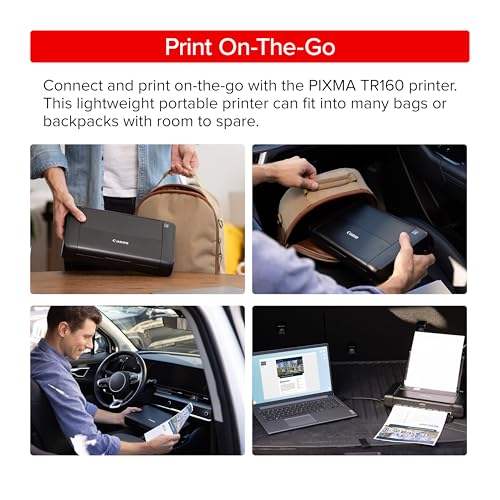
What reviewers commonly praise: Users frequently highlight the print quality, noting that color output is sharp and suitable for professional documents, presentations, and even casual photo prints. The 50-sheet tray and LCD display are often cited as features that make the TR160 feel like a “real” printer rather than a compromise. Wi-Fi Direct connectivity is appreciated for its flexibility across devices.
What reviewers commonly note as drawbacks: The most frequent complaints involve ongoing ink costs — replacement Canon cartridges add up, especially for color printing. The TR160 is also heavier and bulkier than ultra-compact thermal printers like the N80, which matters when every ounce counts in a travel bag. Some users report that the battery doesn’t last as long as they’d like for extended printing sessions away from power. And as with any inkjet, if you don’t print regularly, there’s a risk of printhead clogging from dried ink.
Who should buy this: The Canon PIXMA TR160 is the right choice for travelers and remote workers who need color printing capability, professional-quality output, or the ability to print on standard paper. If you’re printing client-facing documents, color charts, or photos on the road, the TR160 delivers in ways a thermal printer simply cannot. Just be prepared for the ongoing cost of ink cartridges.
If you’re already thinking about keeping your portable tech powered up on the road, a reliable power bank is essential — here’s a useful guide on maintaining portable power stations for longevity.
Head-to-Head: Five Key Decision Factors
1. Print Quality
The Canon PIXMA TR160 wins this category decisively. Inkjet technology produces sharper text, smoother gradients, and full-color output that thermal printing simply can’t match. The NDYIN N80’s thermal output is perfectly legible for documents and labels, but it lacks the crispness and color capability of the Canon. If print quality is your top priority, the TR160 is the clear choice.
2. Ongoing Costs
The NDYIN N80 has a massive advantage here. With no ink, toner, or cartridges to replace, your only recurring expense is thermal paper. The Canon TR160 requires Canon ink cartridges, which — like most inkjet consumables — can add up quickly, especially with color printing. Over months of regular use, the cost difference can be substantial.
3. Portability and Weight
The NDYIN N80 is the more portable option. Thermal printers are inherently simpler mechanisms (no printhead carriage, no ink system), which translates to a lighter, more compact package. The Canon TR160, while impressively small for a full inkjet, is heavier and bulkier due to its paper tray, ink system, and LCD display. For ultralight travelers, the N80 has the edge.
4. Paper Flexibility
The Canon TR160 wins here. It prints on standard copy paper, photo paper, envelopes, and various specialty media. The NDYIN N80 requires thermal paper, which is a specific consumable you’ll need to source and carry. If you want to grab a ream of paper from any office supply store and start printing, the Canon is more versatile.
5. Connectivity
The Canon TR160 offers Wi-Fi, Wi-Fi Direct, and USB — a broader range of wireless options. The NDYIN N80 provides Bluetooth and USB. For most smartphone and tablet users, both will connect easily, but the Canon’s Wi-Fi support makes it more compatible with laptops and networked workflows. If you primarily print from a phone, Bluetooth (N80) is arguably simpler; for mixed-device environments, Wi-Fi (TR160) is more flexible.
Which Printer Should You Choose?
The decision ultimately comes down to what you’re printing and how much you value simplicity versus capability.
Choose the NDYIN N80 if:
- You only need black-and-white document printing
- You want zero ongoing ink costs
- Maximum portability and minimum weight are priorities
- You print documents like contracts, labels, itineraries, or receipts
- You prefer Bluetooth simplicity for phone-based printing
Choose the Canon PIXMA TR160 if:
- You need color printing capability
- Professional print quality matters for your work
- You want to use standard paper (no special thermal paper)
- You print multi-page documents regularly (50-sheet tray)
- You need Wi-Fi connectivity for laptop or network printing
For many travelers, the NDYIN N80 represents the better value proposition — it’s simpler, lighter, and eliminates the recurring cost of ink. But if your work demands color output or you need prints that look polished enough for client presentations, the Canon PIXMA TR160 justifies its higher total cost of ownership with genuinely superior output quality.
Much like choosing between premium and budget options in other product categories, the “best” portable printer is the one that matches your actual use case — not the one with the longest spec sheet.
Product Comparison Cards
Frequently Asked Questions
Can the NDYIN N80 print on regular paper?
No. The N80 is a thermal printer and requires thermal paper to produce output. It cannot print on standard copy paper, photo paper, or other non-thermal media.
Does the Canon PIXMA TR160 work without being plugged in?
Yes. The TR160 has a built-in rechargeable battery that allows wireless, untethered printing. However, battery life is limited, so extended print sessions may require access to a power source.
Will thermal prints from the NDYIN N80 fade over time?
Thermal prints can fade when exposed to heat, direct sunlight, or humidity over extended periods. For archival documents, thermal printing is generally not recommended. For temporary documents like itineraries, receipts, or shipping labels, fading is typically not an issue within normal use timeframes.
Can I print from my iPhone or Android with both printers?
Both printers support mobile printing. The NDYIN N80 connects via Bluetooth, while the Canon PIXMA TR160 uses Wi-Fi and Wi-Fi Direct. Both approaches work with modern smartphones, though the specific app experience may vary.
Which printer is better for printing photos?
The Canon PIXMA TR160 is the only option here — it prints in full color on photo paper. The NDYIN N80 is monochrome only and not designed for photo output.
How We Research
This comparison was produced by synthesizing publicly available manufacturer specifications, product documentation, and patterns from verified customer and expert reviews across major retail platforms. We did not personally test, handle, or own either of these printers. Our goal is to honestly aggregate and contextualize the best available information so you can make an informed decision. When we describe reviewer sentiment, we are paraphrasing commonly reported themes — not quoting specific individuals or fabricating experiences.


Leave a Reply