
As an Amazon Associate I earn from qualifying purchases.
The OLight O’Pen 3 occupies a unique niche in the everyday-carry world: it’s a bolt-action pen, an LED flashlight, a green-beam pointer, and a clip light rolled into a single pocket-friendly body. But no single tool — no matter how cleverly designed — covers every situation. The accessories and EDC companions you pair with it determine whether your pocket kit is merely adequate or genuinely ready for anything. This guide covers the O’Pen 3 itself (because many readers are still deciding on a variant) and then walks through the best compact multitools and pocket knives that complement it without adding bulk. Every pick was chosen for size compatibility, pocket-clip friendliness, and the kind of real-world utility that verified buyers consistently praise.
Best for: EDC enthusiasts who want a compact, versatile pocket kit anchored by a quality pen light
Why the O’Pen 3 Needs the Right Companions
The O’Pen 3 handles writing, illumination, and signaling beautifully, but it can’t cut, pry, or turn a screw. That’s where a thoughtfully chosen EDC companion comes in. The ideal pairing adds capability without duplicating what the pen already does — and without turning your pocket into a hardware store. Below, we review five products that fill those gaps, starting with the O’Pen 3 itself.
If you’re building out a broader OLight ecosystem, you might also want to read our review of the OLight Oclip Pro, another compact light that clips to hats and bags for hands-free illumination — a natural partner for the O’Pen 3 when you need more lumens or a different mounting option.
OLIGHT O’Pen 3 EDC Pen Light — The Foundation of Your Kit
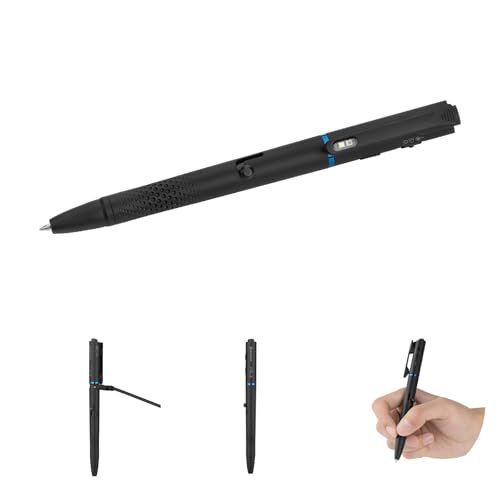
Before accessorizing, it’s worth understanding exactly what the O’Pen 3 brings to the table. This latest iteration from OLight packs a 120-lumen LED flashlight, a green beam, a bolt-action ballpoint pen mechanism, and a detachable clip light into a body that weighs just a few ounces. The bolt-action fidget factor is a genuine draw — many verified buyers mention it as a stress-relief tool during long meetings or commutes.
The 120-lumen output is modest by dedicated-flashlight standards, but it’s more than enough for close-range tasks like reading a map, inspecting a fuse box, or finding a keyhole. The green beam adds a presentation-pointer function that office workers and educators appreciate. OLight’s magnetic charging system means you never fumble with micro-USB cables, though you do need to keep track of the proprietary charger.

Pros: Genuinely pocketable 4-in-1 design; satisfying bolt-action mechanism; magnetic charging; removable clip light doubles as a hands-free lamp. Cons: Proprietary charging cable (lose it and you’re stuck); 120 lumens won’t replace a dedicated flashlight for outdoor use; replacement nibs can be hard to source outside OLight’s own store. Who should buy it: Anyone who wants to consolidate pen, flashlight, and pointer into one slim carry item. Verified reviewers consistently praise the build quality and fidget-friendly action, though some note the pen refill could write smoother and the clip can feel stiff at first.
EDC Pry Bar Multitool with Ratchet Screwdriver & Everlasting Pen

If the O’Pen 3 covers writing and light, this pry-bar multitool fills nearly every remaining gap. It combines a bi-directional ratchet screwdriver, wrenches, a crowbar/pry bar, a bottle opener, a box opener, and even an “everlasting pen” (a metal-tip stylus that writes without ink) into a flat, pocket-friendly form factor. The ratchet screwdriver is the standout feature — verified buyers frequently highlight how useful it is for tightening eyeglass screws, adjusting electronics, or handling quick repairs that would otherwise require a trip to the toolbox.
The flat profile means it stacks neatly alongside the O’Pen 3 in a pocket organizer or slip pouch without creating an uncomfortable bulge. The pry-bar function is handy for opening paint cans, popping staples, or separating snap-fit plastic housings.

Pros: Impressive number of functions in a flat package; ratchet screwdriver is genuinely useful; pairs well with the O’Pen 3 since it adds capabilities the pen lacks. Cons: The “everlasting pen” is redundant when you already carry the O’Pen 3; some reviewers note the wrench sizes are limited; pry bar is small and not suited for heavy-duty leverage. Who should buy it: The tinkerer or repair-minded EDC enthusiast who wants screwdriver and pry capability without carrying a full multitool. Reviewers generally praise the build quality for the price but caution that it’s a light-duty tool, not a construction-site substitute.
Gerber Gear Paraframe Mini Pocket Knife
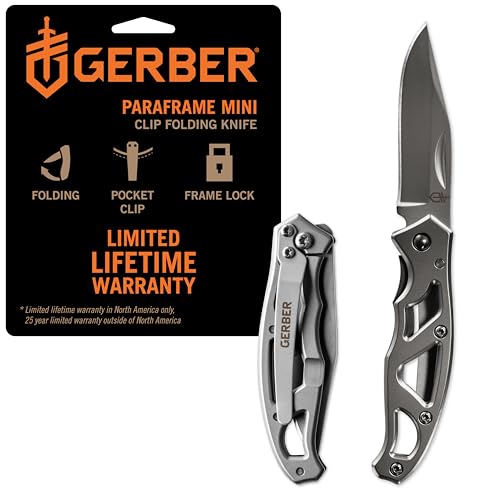
A pen light handles illumination; a knife handles cutting. The Gerber Paraframe Mini is one of the most popular ultra-compact EDC knives on the market, and for good reason. Its 2.2-inch fine-edge blade is just long enough to handle everyday cutting tasks — opening packages, slicing cord, trimming loose threads — without crossing into “intimidating” territory. The open-frame design keeps weight to a minimum and makes cleaning effortless.
The liner lock provides a reassuring click when the blade is deployed, and the frame’s skeletonized stainless-steel construction means there’s almost nothing to break. Gerber backs it with a limited lifetime warranty, which adds peace of mind for a knife in this price range.

Pros: Extremely lightweight and slim; fine-edge blade handles most daily cutting; Gerber’s reputation and warranty; pocket clip keeps it accessible. Cons: The open frame can collect lint in a pocket; blade steel is basic (won’t hold an edge as long as premium steels); some reviewers report the clip loosens over time. Who should buy it: Minimalist EDC carriers who want a reliable, no-nonsense blade that pairs with the O’Pen 3 without adding noticeable weight. Verified buyers overwhelmingly praise the value proposition, though knife enthusiasts note you’ll need to sharpen it more often than a premium blade. This is a great companion if you follow the accessories-pairing philosophy of choosing tools that complement rather than duplicate each other.
Gerber Gear EAB Utility Knife

The EAB (Exchange-A-Blade) takes a different approach to EDC cutting: instead of sharpening a fixed blade, you simply swap in a fresh standard utility razor blade when the edge dulls. This makes it arguably the sharpest knife in any EDC rotation at all times, and replacement blades are available at every hardware store on the planet.
The EAB clips to a pocket or keychain and folds flat enough to disappear alongside the O’Pen 3. Its stainless-steel frame is robust for its size, and the liner lock holds the blade securely during use. Gerber’s design is deliberately spartan — no frills, no wasted material.

Pros: Always razor-sharp with cheap, universally available replacement blades; incredibly compact; clips to keychain or pocket; Gerber build quality. Cons: Exposed blade corners can poke fingers when fishing it out of a pocket; no finger guard means careful handling is essential; the frame can feel slippery with wet hands. Who should buy it: Warehouse workers, hobbyists, and anyone who opens a lot of boxes or packaging daily. Verified reviewers love the “always sharp” convenience and the tiny footprint, but consistently warn that the blade change mechanism requires a bit of practice to master safely. Paired with the O’Pen 3, you get light, writing, and cutting in two slim pocket items.
FUNBRO Small Pocket Knife — Keychain Box Cutter

For those who want cutting capability but prefer something even smaller and less knife-like than the Gerber options, the FUNBRO keychain box cutter is worth a look. With a 1.34-inch blade, it’s firmly in the “utility cutter” category rather than the “knife” category — which can matter in workplaces or jurisdictions with blade-length restrictions.
The folding mechanism is simple and the overall footprint is small enough to live permanently on a keychain without adding annoying jingle or bulk. The blade is adequate for breaking down cardboard, opening clamshell packaging, and cutting zip ties — the kinds of micro-tasks that come up constantly in daily life.

Pros: Tiny and lightweight; keychain-friendly; blade length stays under most workplace and legal limits; affordable enough to gift or keep multiples. Cons: The 1.34-inch blade limits what you can cut; build quality is a step below Gerber; some reviewers note the lock mechanism feels less secure than pricier knives. Who should buy it: Gift-givers, office workers, and anyone who needs a discreet cutting tool that won’t raise eyebrows. Verified buyers frequently mention it as a stocking stuffer or gift item, and most are pleasantly surprised by the quality for the price. As an O’Pen 3 companion, it adds just enough cutting utility to round out a truly minimal carry without any pocket bulk.
How to Build Your O’Pen 3 EDC Kit
The beauty of the O’Pen 3 is that it already consolidates several tools. Your job is to fill the gaps without over-packing. Here’s a framework:
1. Light + Writing + Signaling → O’Pen 3 (covered) 2. Cutting → Choose ONE knife: the Paraframe Mini for a traditional blade, the EAB for always-sharp utility cutting, or the FUNBRO for ultra-compact keychain carry. 3. Prying + Screwdriving → The EDC Pry Bar Multitool adds these functions in a flat profile. 4. Hands-free light → Consider adding an OLight Oclip Pro for hat-clip or bag-clip illumination when you need both hands free.
This three-item carry (O’Pen 3 + one knife + pry bar multitool) covers writing, illumination, signaling, cutting, prying, and basic repairs — all in a pocket-friendly package.
Tips for Maintaining Your O’Pen 3
- Charging: Keep a spare OLight magnetic charger at your desk and one in your travel bag. The proprietary connector means a dead charger equals a dead light.
- Pen refills: OLight sells replacement ballpoint refills directly. Some users report that standard Parker-style refills can be adapted, but compatibility isn’t guaranteed — check OLight’s documentation before experimenting.
- Clip care: The removable clip light can accumulate pocket lint around the magnetic connection point. A quick wipe with a dry cloth every week keeps the connection reliable.
- Bolt-action mechanism: A tiny drop of light machine oil on the bolt mechanism every few months keeps the action smooth, according to community forums.
Frequently Asked Questions
Can I use standard pen refills in the O’Pen 3? OLight designs the O’Pen 3 around its own proprietary refills. Some EDC community members have reported success fitting certain Parker-style refills with minor modifications, but OLight’s official documentation recommends using their branded replacements to ensure proper fit and ink flow.
Does the O’Pen 3 charge with a standard USB-C cable? No. The O’Pen 3 uses OLight’s proprietary magnetic charging system. While this makes charging effortless (just snap the cable on), it means you need to carry or store the OLight-specific cable. Buying a spare charger is strongly recommended.
Which knife pairs best with the O’Pen 3 for minimal carry? If you want the absolute smallest addition, the FUNBRO keychain knife adds cutting capability with almost zero extra bulk. For more serious cutting, the Gerber Paraframe Mini offers a better blade in a still-compact package.
Is the O’Pen 3’s green beam a laser? OLight markets it as a green beam rather than a laser pointer, and it’s designed for presentation pointing and signaling. Always check local regulations regarding beam devices before use in public settings.
How We Research
Our editorial process is built on honest curation, not fabricated testing. We synthesize publicly available manufacturer specifications, official product documentation, and patterns from verified customer and expert reviews across major retail platforms. We have not personally tested, owned, or handled the products in this guide. When we describe a product’s strengths or weaknesses, we’re reporting what real buyers and credible reviewers consistently say — not inventing first-hand experience. Our goal is to save you time by distilling the most reliable information into a single, comprehensive resource.


Leave a Reply