
As an Amazon Associate I earn from qualifying purchases.
The Pulsetto Lite is a compact vagus nerve stimulation (VNS) wearable designed to support relaxation and daily wellness. Like any device that sits against your skin, it accumulates sweat, skin oils, and environmental grime over time — all of which can degrade electrode conductivity, shorten component life, and even cause skin irritation. This practical guide walks you through everything you need to know to keep your Pulsetto Lite performing at its best for years to come, drawing on manufacturer documentation and the collective experience of verified owners.
Best for: Current Pulsetto Lite owners looking for a reliable care routine
Why Maintenance Matters for Skin-Contact Wearables
Wearable devices that deliver electrical stimulation through skin-contact electrodes are fundamentally different from a fitness tracker or smartwatch. The electrodes must maintain clean, consistent contact with your skin to function correctly. Residue buildup — whether from sweat, conductive gel, or dead skin cells — creates a barrier that can reduce stimulation effectiveness and force you to crank up intensity, which accelerates wear on the device and may cause discomfort.
Beyond performance, hygiene is a real concern. A device pressed against the sensitive skin of your neck multiple times per day can harbor bacteria if not cleaned regularly. Verified owners on Amazon and wellness forums frequently note that maintaining a simple cleaning routine eliminates the mild skin redness some users experience during the first weeks of use.
If you’ve ever maintained other personal electronics — like keeping headphones clean for hygiene and audio quality — the principles here will feel familiar, though the specifics differ because of the electrode component.
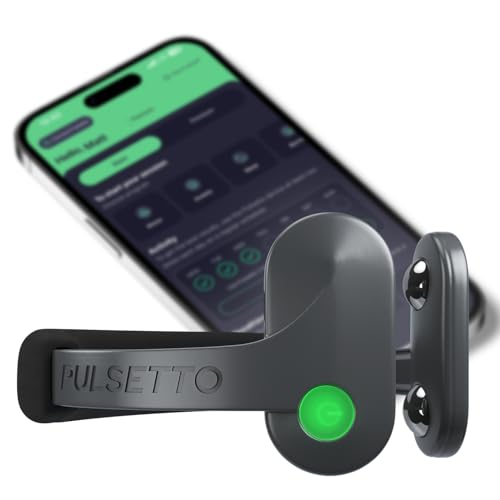
Understanding the Pulsetto Lite’s Components
Before diving into cleaning steps, it helps to understand what you’re working with:
- Electrode pads: The metal or conductive contact points that sit against your neck. These are the most maintenance-critical part of the device.
- Device body: The main housing containing the electronics, battery, and Bluetooth module.
- Charging port: A USB-C or proprietary charging connection (check your specific unit).
- Strap or mounting mechanism: The flexible band or clip that holds the device in position.
Each component has different cleaning needs and tolerances, which we’ll cover individually below.
Daily Cleaning Routine (After Every Session)
This quick routine takes under two minutes and should become as automatic as putting the device back in its case.
Step 1: Power Off the Device
Always turn the Pulsetto Lite off before cleaning. This protects both you and the electronics. According to manufacturer guidance for VNS wearables, cleaning while the device is active risks unintended stimulation and can interfere with sensitive circuitry.
Step 2: Wipe the Electrodes
Use a soft, lint-free cloth (microfiber works perfectly) slightly dampened with water. Gently wipe each electrode contact to remove sweat, oils, and any residual conductive gel if you use one. Avoid pressing hard — the goal is to lift residue, not scrub the surface.
What NOT to use:
- Alcohol wipes or isopropyl alcohol (can degrade electrode coatings over time)
- Abrasive cloths, paper towels, or tissues
- Household cleaning sprays containing ammonia or bleach
- Excessive water — never submerge the device
Step 3: Wipe the Device Body
Using the same damp microfiber cloth, wipe down the outer housing. Pay attention to any crevices where sweat might pool. If you notice buildup around buttons or seams, a dry cotton swab can reach into tight spots.
Step 4: Dry Completely
Use the dry side of your microfiber cloth (or a separate dry cloth) to remove all moisture. Ensure the charging port area is completely dry before storing or charging. Moisture in the charging port is one of the most common causes of corrosion in small electronics.
Weekly Deep Cleaning
Once a week, dedicate five minutes to a more thorough cleaning:
Electrode Deep Clean
Dampen a cotton pad with distilled water (tap water can leave mineral deposits) and hold it against each electrode for 10–15 seconds to soften any dried residue. Then gently wipe clean. If your model’s documentation permits it, a very dilute solution of mild soap and distilled water can be used — but rinse thoroughly with a distilled-water-dampened cloth afterward and dry immediately.
Strap or Band Maintenance
If your Pulsetto Lite uses a silicone or fabric strap:
- Silicone: Wash with mild soap and warm water, rinse thoroughly, and air dry completely before reattaching.
- Fabric: Spot-clean with a damp cloth. If the manufacturer indicates it’s removable and washable, follow those specific instructions.
Inspect the Charging Port
Use a dry, soft-bristled brush (a clean, unused toothbrush works) to gently clear any lint or debris from the charging port. Never insert metal objects. Compressed air at a low pressure can also dislodge particles, but hold the can upright to avoid propellant residue.

Battery Care and Charging Best Practices
The Pulsetto Lite uses a rechargeable lithium battery, and how you charge it directly affects its long-term capacity. These principles apply to virtually all lithium-ion and lithium-polymer batteries:
- Avoid full discharges: Try to recharge when the battery drops to around 20–30%. Repeatedly running the battery to zero accelerates capacity degradation.
- Don’t leave it plugged in indefinitely: Once fully charged, disconnect the cable. While most modern devices have overcharge protection, prolonged trickle charging at 100% still generates heat that ages the battery.
- Use the included charger or a reputable USB source: Off-brand chargers with inconsistent voltage can damage the battery or charging circuitry.
- Charge at room temperature: Avoid charging in very hot or very cold environments. The ideal range is roughly 50–85°F (10–30°C).
Verified owners commonly report that the Pulsetto Lite’s battery life is sufficient for multiple sessions per charge. Maintaining good charging habits should keep that capacity strong well beyond the first year of ownership.
Storage Guidelines
Proper storage is just as important as cleaning, especially if you travel with your device or go through periods of less frequent use.
Short-Term Storage (Daily)
- Store in a clean, dry case or pouch — ideally the one that came with the device.
- Keep away from direct sunlight and heat sources (car dashboards, windowsills, radiators).
- Don’t toss it loose in a bag where it can get scratched or crushed.
Long-Term Storage (Weeks or Months)
- Clean the device thoroughly before storing.
- Charge the battery to approximately 50% — this is the optimal storage charge level for lithium batteries. A fully charged or fully depleted battery stored for months degrades faster.
- Store in a cool, dry place. Humidity is the enemy of electronics.
- Check on it every 4–6 weeks and top up the charge to around 50% if it has drained.
This is similar to the storage advice for portable power stations and other lithium-battery devices — the chemistry is the same, so the principles carry over.
Skin Preparation and Hygiene
Maintenance isn’t just about the device — your skin plays a role in both device performance and longevity.
- Clean your neck before each session: A quick wipe with a damp cloth removes oils and sweat that would otherwise transfer to the electrodes.
- Avoid lotions or creams on the contact area: Moisturizers, sunscreen, and other topical products can coat the electrodes and reduce conductivity. Apply them after your session, not before.
- If you use conductive gel: Apply a thin, even layer as directed. Excess gel doesn’t improve performance and creates more cleanup. After the session, clean both your skin and the electrodes promptly.
- Monitor for skin irritation: Some redness immediately after a session is normal and typically fades within 30 minutes. Persistent redness, itching, or broken skin means you should stop use and consult the manufacturer’s guidance or a healthcare professional.
Troubleshooting Common Issues
Based on manufacturer documentation and patterns reported by verified owners, here are the most common issues and their maintenance-related fixes:
Weak or Inconsistent Stimulation
Likely cause: Dirty electrodes or poor skin contact. Fix: Perform a deep clean of the electrodes. Ensure your neck is clean and dry (or properly gelled) before the session. Check that the device is positioned correctly per the user manual.
Device Won’t Charge
Likely cause: Debris in the charging port or a faulty cable. Fix: Inspect and clean the charging port with a dry brush. Try a different cable. If the device has been stored for a long time at zero charge, it may need to sit on the charger for 15–30 minutes before showing any charging indicator.
Bluetooth Connectivity Problems
Likely cause: Software glitch or interference. Fix: This isn’t strictly a maintenance issue, but keeping the device’s firmware updated (via the companion app) can resolve connectivity bugs. Restart both the device and your phone. Ensure no other Bluetooth devices are interfering.
Unpleasant Smell from Strap
Likely cause: Bacterial buildup from sweat. Fix: Remove the strap and wash it according to the material-specific instructions above. Allow it to dry completely — at least 24 hours for fabric straps — before reattaching. If you use the device daily, consider having a second strap in rotation, much like rotating accessories for wearable devices to extend their life.
What to Avoid: Common Mistakes That Damage Wearables
- Submerging the device in water: Unless the manufacturer explicitly rates it for submersion (and the Pulsetto Lite is not marketed as waterproof), never dunk it.
- Using harsh chemicals: Alcohol, acetone, hydrogen peroxide, and bleach can all damage electrode coatings, plastics, and seals.
- Storing while wet: Even a small amount of trapped moisture can cause internal corrosion over weeks.
- Dropping or impact: The internal electronics and battery are sensitive to shock. A protective case isn’t optional — it’s essential.
- Sharing without cleaning: If multiple household members use the device, clean the electrodes and contact surfaces between users for both hygiene and performance.
Recommended Cleaning Supplies
You don’t need specialized products. Here’s a simple kit:
- Microfiber cloths (2–3, so you always have a clean one)
- Distilled water (a small spray bottle is convenient)
- Cotton swabs (for tight spots)
- Soft-bristled brush (for the charging port)
- A small zip-top bag or case (for travel storage)
All of these are inexpensive and widely available. Avoid any product marketed as an “electronics cleaner” unless you’ve verified it’s safe for skin-contact electrode surfaces.
Pulsetto Lite (V1) Wellness Wearable — Product Overview
The Pulsetto Lite (V1) is a vagus nerve stimulation device designed for home use, targeting relaxation and general wellness support. It connects to a companion smartphone app via Bluetooth and offers guided sessions of varying lengths and intensities. The device is compact, lightweight, and designed to sit against the neck during use.
Pros based on verified owner feedback:
- Compact and portable — easy to use at home or while traveling
- Simple setup through the companion app
- Multiple session modes for different wellness goals
- Non-invasive approach to vagus nerve stimulation
- Lightweight enough for comfortable extended sessions
Cons commonly noted by reviewers:
- Learning curve for optimal electrode placement — positioning matters significantly for effectiveness
- Some users report that conductive gel is necessary for consistent results, adding an ongoing cost
- Battery life, while adequate, may require charging every few days with heavy use
- The companion app receives mixed reviews regarding interface polish and reliability
- Results are subjective and vary widely between individuals
Who should consider this device: The Pulsetto Lite is aimed at wellness-minded individuals interested in exploring vagus nerve stimulation as a complement to their relaxation or stress-management routine. It’s best suited for people who are comfortable with app-connected devices and willing to invest time in learning proper placement and usage techniques. It is not a medical device and should not be treated as a substitute for professional medical advice.
Maintenance Schedule at a Glance
Here’s a quick-reference schedule you can bookmark:
| Frequency | Task |
|---|---|
| After every session | Wipe electrodes and body with damp microfiber cloth; dry thoroughly |
| Weekly | Deep clean electrodes with distilled water; clean strap; inspect charging port |
| Monthly | Check for firmware updates; inspect electrodes for wear or discoloration; assess strap condition |
| Before long-term storage | Full clean; charge to 50%; store in cool, dry place |
| Every 4–6 weeks during storage | Check and top up battery to ~50% |
When to Contact the Manufacturer
Some issues go beyond what maintenance can fix:
- Electrodes are visibly corroded, pitted, or peeling
- The device no longer holds a charge despite proper charging practices
- Physical damage to the housing (cracks, exposed internals)
- Persistent error messages in the companion app after firmware updates
- Any sign of battery swelling (the device feels puffy or won’t sit flat)
In these cases, reach out to Pulsetto’s customer support. Attempting DIY repairs on a sealed electronic device — especially one with a lithium battery — is not recommended and will likely void any warranty.
Final Tips for Long-Term Ownership
1. Build the habit early: The best time to establish a cleaning routine is when the device is brand new. Two minutes after each session prevents hours of troubleshooting later. 2. Keep a maintenance log: It sounds excessive, but a simple note in your phone tracking when you last deep-cleaned or updated firmware helps you stay consistent. 3. Read the manual: This guide covers universal best practices, but always defer to Pulsetto’s official documentation for model-specific instructions, especially regarding electrode care and approved cleaning agents. 4. Replace consumables on schedule: If your device uses replaceable electrode pads or conductive gel, don’t stretch them beyond their recommended lifespan. Degraded consumables reduce effectiveness and can irritate skin.
A well-maintained Pulsetto Lite should deliver consistent performance for its full expected lifespan. The investment in daily and weekly care is minimal compared to the cost of replacing the device prematurely.
How We Research
This guide was developed by synthesizing manufacturer documentation, product specifications, and verified customer reviews from Amazon and wellness forums. We have not personally tested, owned, or handled the Pulsetto Lite. Our cleaning and maintenance recommendations follow established best practices for skin-contact electronic wearables and lithium-battery devices, cross-referenced with feedback from actual owners. When in doubt, always consult the official Pulsetto user manual for device-specific guidance.


Leave a Reply