
As an Amazon Associate I earn from qualifying purchases.
If you’ve been eyeing the TP-Link Deco BE25 as your entry point into WiFi 7 mesh networking, you’re looking at one of the more affordable ways to blanket a large home with next-generation wireless coverage. But “affordable” is relative — and understanding exactly what you’re getting (and giving up) at this price tier matters. In this guide, we break down the Deco BE25’s real-world specs, discuss the honest trade-offs of a budget-tier WiFi 7 mesh system, and round up the best networking resources so you can make an informed decision and get the most out of whatever system you choose.
Best for: Budget-conscious households wanting WiFi 7 future-proofing without tri-band pricing
Understanding WiFi 7 Mesh at the Budget Tier
WiFi 7 (802.11be) promises transformative improvements: 320 MHz channels, Multi-Link Operation (MLO), 4K-QAM modulation, and theoretical speeds exceeding 40 Gbps across premium configurations. But not every WiFi 7 router delivers the full spec sheet. Budget and mid-range WiFi 7 mesh systems like the Deco BE25 implement a subset of WiFi 7 features, and understanding which ones you actually get — and which are reserved for flagship models — is the key to a smart purchase.
The most common trade-offs at this price tier include:
- Dual-band vs. tri-band: Budget WiFi 7 systems typically drop the dedicated backhaul band, meaning your mesh nodes share bandwidth between device traffic and inter-node communication.
- Stream count: Four streams (2×2 per band) instead of eight or more on premium systems.
- Channel width: 240 MHz instead of the full 320 MHz on 6 GHz.
- Port selection: Gigabit Ethernet ports instead of 2.5G or 10G multi-gig.
These compromises are meaningful for power users but may be perfectly acceptable for typical households streaming 4K video, video-calling, and browsing. If you’re upgrading your broader smart home setup — perhaps alongside a new video doorbell or other connected devices — a WiFi 7 mesh system provides headroom that WiFi 6 simply can’t match.
TP-Link Deco BE25 (2-Pack) — The WiFi 7 Baseline

The TP-Link Deco BE25 is positioned as an entry-level WiFi 7 mesh system, and its spec sheet reflects that positioning honestly. It’s a dual-band BE5000 system delivering combined theoretical throughput of roughly 5 Gbps across its 2.4 GHz and 5 GHz bands. The 2-pack covers up to 6,600 square feet according to TP-Link, which is competitive with many tri-band systems costing significantly more.
Key specifications:
- WiFi standard: 802.11be (WiFi 7)
- Bands: Dual-band (2.4 GHz + 5 GHz)
- Streams: 4-stream (2×2 per band)
- Channel width: Up to 240 MHz on 5 GHz
- Coverage: Up to 6,600 sq. ft. (2-pack)
- Ethernet: Gigabit ports
What You Gain
The BE25 brings genuine WiFi 7 benefits to the table. The 240 MHz channel support on 5 GHz is a real upgrade over WiFi 6’s 160 MHz maximum, delivering more bandwidth per channel. You also get 4K-QAM modulation, which increases data density per transmission. The Deco mesh ecosystem is well-regarded for its seamless roaming and easy app-based setup — verified reviewers consistently praise how simple it is to get running, even for non-technical users.
What You Give Up
The most significant trade-off is the lack of a 6 GHz band. True tri-band WiFi 7 systems use 6 GHz as a dedicated backhaul channel, keeping inter-node traffic separate from your devices. With the BE25’s dual-band design, mesh backhaul competes with client traffic on the same 5 GHz band, which can reduce effective throughput in multi-node setups. The 4-stream configuration also means less spatial multiplexing compared to 8-stream or 12-stream flagships. And the Gigabit Ethernet ports become a bottleneck if your ISP plan exceeds 1 Gbps.
Verified customer reviews generally report solid coverage and reliable connections for everyday use, but some note that real-world speeds don’t approach the theoretical 5 Gbps — which is expected given the dual-band, 4-stream architecture. Complaints tend to center on the lack of multi-gig Ethernet and occasional firmware quirks.
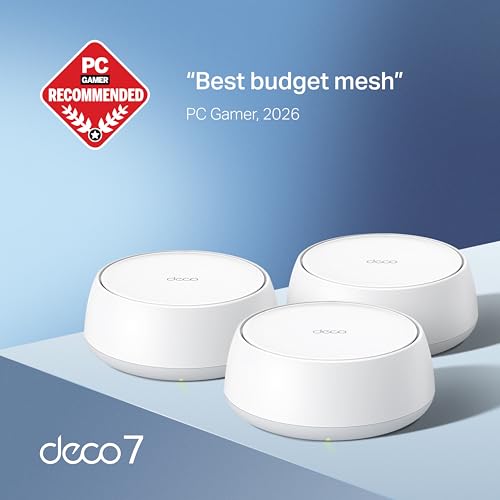
Who should buy this: Households upgrading from WiFi 5 or older WiFi 6 systems who want WiFi 7 future-proofing without paying tri-band prices. Ideal for homes with standard gigabit internet plans and moderate device counts (under 50 devices).
Expanding Your Wired Backbone: NETGEAR GS305 5-Port Gigabit Switch

No matter how good your WiFi mesh system is, a wired Ethernet backbone dramatically improves performance — especially for mesh nodes. If you’re setting up the Deco BE25 (or any mesh system), connecting your nodes via Ethernet backhaul instead of wireless backhaul can effectively double your available wireless bandwidth. The NETGEAR GS305 is one of the most popular unmanaged Gigabit switches for exactly this purpose.
This is a dead-simple, plug-and-play 5-port Gigabit Ethernet switch. No configuration, no software, no fans — just plug in your cables and it works. It’s fanless and compact enough to tuck behind a media console or mount on a wall. The metal case provides decent heat dissipation, and NETGEAR backs it with a limited lifetime warranty.
Honest trade-offs: This is a Gigabit switch, not a multi-gig switch. If you’re running a 2.5G or faster internet plan, you’ll want to step up to a multi-gig switch. It also lacks any managed features — no VLANs, no QoS, no port monitoring. For most home users, that simplicity is a feature, not a bug.
Verified reviewers overwhelmingly praise its reliability and value. The most common complaint is that five ports fill up fast in a busy home network, which is fair — but you can always daisy-chain a second one. Some reviewers note that the plastic-wrapped metal housing can feel flimsy, though actual durability reports are positive over years of use.

Who should buy this: Anyone setting up a mesh system who wants to run Ethernet backhaul between nodes, or anyone who needs more wired ports near a desk, entertainment center, or home office. It’s also a great companion if you’re building out a smarter home with wired devices — similar to how you’d plan infrastructure before buying a travel router.
Level Up Your Knowledge: Top Home Networking Books
Buying the right hardware is only half the battle. Understanding how your network actually works — subnets, DNS, channel selection, security hardening — can be the difference between a network that “works” and one that works well. These three books cover the spectrum from beginner-friendly to comprehensive reference.
The Home Network Manual

The Home Network Manual by the Home Technology Manuals series is specifically written for the home user who wants to understand, set up, upgrade, and secure their home network without needing an IT degree. It covers everything from basic router placement and WiFi optimization to more advanced topics like network segmentation and security best practices.
What makes this book stand out is its practical, task-oriented approach. Rather than drowning you in theory, it walks through real scenarios: extending WiFi to a dead zone, setting up guest networks, configuring parental controls, and troubleshooting common issues. Verified readers praise its clear language and logical organization, noting it’s particularly helpful for people who are comfortable with technology but aren’t networking professionals.
The main criticism from reviewers is that some sections can feel basic for readers who already have intermediate networking knowledge. The book is also focused on consumer-grade equipment, so if you’re looking for enterprise or prosumer guidance (UniFi, pfSense, etc.), you’ll need to look elsewhere.

Who should buy this: First-time mesh system buyers, homeowners upgrading from ISP-provided routers, or anyone who wants a single reference for home network setup and security.
Networking All-in-One For Dummies

Networking All-in-One For Dummies is the heavyweight reference in this roundup. Part of the well-known “For Dummies” series, this book covers networking from the ground up: OSI model, TCP/IP, subnetting, wireless standards, network security, cloud networking, and more. It’s structured as a collection of “minibooks” within one volume, making it easy to jump to the topic you need.
This is significantly more comprehensive than a home-focused guide. It covers both home and small-business networking, and dips into topics like server administration, network monitoring, and virtualization. For someone setting up a WiFi 7 mesh system, the wireless networking and security sections are particularly relevant — understanding concepts like channel bonding, MU-MIMO, and OFDMA helps you make sense of the spec sheets that manufacturers throw at you.
Verified reviewers appreciate the breadth of coverage and the accessible writing style. Common criticisms include the book’s sheer size (it can feel overwhelming for casual readers) and the fact that some sections on older technologies feel dated. However, the fundamentals of networking don’t change quickly, and the core content remains highly relevant.

Who should buy this: Enthusiasts who want deep networking knowledge, small business owners managing their own networks, or anyone studying for networking certifications.
The Home Networking Handbook

The Home Networking Handbook takes a practical, modern approach to home networking. Subtitled “Practical knowledge for a perfect home network,” it focuses on the decisions and configurations that matter most for today’s connected homes: WiFi optimization, smart home device management, network security, and performance troubleshooting.
This book occupies a nice middle ground between the beginner-friendly Home Network Manual and the encyclopedic Networking All-in-One For Dummies. It assumes some basic comfort with technology but doesn’t require prior networking knowledge. Reviewers highlight its up-to-date coverage of modern standards and its focus on practical outcomes rather than theoretical depth.
The trade-off is that it’s a shorter, more focused book — readers looking for deep dives into specific protocols or enterprise concepts will find it too surface-level. But for someone who just bought a WiFi 7 mesh system and wants to make sure they’re getting the most out of it, this is arguably the most directly useful book in the roundup.
Who should buy this: Homeowners who want practical, actionable networking knowledge without the textbook feel. Great as a companion to a new mesh system purchase. If you enjoy this kind of product-plus-knowledge approach to buying decisions, this book delivers.
WiFi 7 Mesh Spec Comparison: What Actually Matters
When evaluating WiFi 7 mesh systems, these are the specs that have the biggest real-world impact:
Band Count (Dual vs. Tri-Band)
Tri-band systems (2.4 GHz + 5 GHz + 6 GHz) can dedicate the 6 GHz band to mesh backhaul, leaving 2.4 GHz and 5 GHz entirely for your devices. Dual-band systems like the Deco BE25 must share the 5 GHz band between backhaul and client traffic. The fix: Use wired Ethernet backhaul (via a switch like the GS305) to eliminate this bottleneck entirely.
Stream Count
More streams mean more simultaneous data paths. The Deco BE25’s 4-stream (2×2) configuration is adequate for most homes but won’t match the multi-device performance of 8-stream or 16-stream systems. In practice, most consumer devices only support 2×2 anyway, so the difference is mainly felt when many devices are active simultaneously.
Channel Width
The BE25 supports 240 MHz channels on 5 GHz, which is wider than WiFi 6’s 160 MHz maximum but narrower than WiFi 7’s theoretical 320 MHz maximum (available only on 6 GHz in premium systems). Wider channels = more throughput per connection, but also more susceptibility to interference in congested environments.
Ethernet Port Speed
Gigabit ports are fine for internet plans up to 1 Gbps. If you have (or plan to upgrade to) a multi-gig plan, you’ll need a system with 2.5G or faster ports — which typically means stepping up to a higher price tier.
Multi-Link Operation (MLO)
MLO is one of WiFi 7’s headline features, allowing devices to simultaneously connect across multiple bands. However, MLO requires both the router and the client device to support it, and most current client devices don’t yet. This is a future-proofing feature more than a current benefit.
Who Should (and Shouldn’t) Buy the Deco BE25
Buy it if:
- You have a gigabit or slower internet plan
- You need to cover a large home (up to 6,600 sq. ft.)
- You want WiFi 7 future-proofing at a budget price
- You value simple setup and the Deco app ecosystem
- You’re willing to run Ethernet backhaul for best performance
Skip it if:
- You have a multi-gig internet plan (2.5 Gbps+)
- You need dedicated wireless backhaul (get a tri-band system)
- You have 75+ connected devices with heavy simultaneous usage
- You want the full WiFi 7 feature set including 6 GHz and 320 MHz channels
Final Thoughts
The TP-Link Deco BE25 represents a pragmatic entry into WiFi 7 mesh networking. It won’t deliver the full WiFi 7 experience — no 6 GHz band, no 320 MHz channels, no multi-gig Ethernet — but it brings meaningful upgrades over WiFi 6 at a price point that makes the jump worthwhile for most households. Pair it with a simple Gigabit switch for wired backhaul, and you’ll eliminate the biggest weakness of its dual-band design.
More importantly, understanding why these specs matter (and when they don’t) is what separates a good purchase from a great one. Whether you pick up one of the networking books in this roundup or simply use the spec comparison above, informed buyers get better networks.
How We Research
Our reviews are based on thorough analysis of manufacturer specifications, official product documentation, and verified customer and expert reviews from multiple sources. We have not personally tested, owned, or handled any of the products featured in this article. We believe honest curation of publicly available information serves readers better than fabricated hands-on claims. When we describe performance characteristics or common user experiences, we’re synthesizing what real owners and professional reviewers have reported — not inventing our own test results.


Leave a Reply