
As an Amazon Associate I earn from qualifying purchases.
You just pulled a fresh pair of Beats Powerbeats Fit out of the shipping box — congratulations. These wireless noise-cancelling workout earbuds promise secure-fit wingtips, up to 30 hours of combined battery life, and active noise cancellation that can keep the gym soundtrack out of your ears. But before you hit the treadmill, there are a handful of setup steps that will make the difference between a frustrating first run and a seamless one. This guide walks you through every stage — unboxing, pairing, physical fit, sound customization, and first-workout best practices — drawing on Beats’ own documentation and verified owner feedback so you can start training with confidence.
Best for: Gym-goers, runners, and active users who want earbuds that stay put during intense exercise
What’s in the Box
Before you do anything else, lay out the contents on a clean surface and make sure nothing is missing. According to Beats’ packaging documentation, you should find:
- Beats Powerbeats Fit earbuds (left and right, pre-installed with medium wingtips and ear tips)
- Charging case with built-in battery
- USB-C charging cable
- Additional wingtip and ear-tip sizes (small and large, giving you three sizes total)
- Quick-start guide and warranty card
If any component is missing, contact the retailer or Beats support before proceeding. It’s also worth inspecting the charging case for any shipping damage — the hinge area is the most common spot to check.
Step 1: Charge Before You Pair
Resist the urge to pair immediately. Beats recommends giving the case and earbuds an initial charge so the firmware update process (which often triggers on first connection) doesn’t stall mid-way. Plug the USB-C cable into the bottom of the charging case and connect it to any USB-C power source — a laptop port, wall adapter, or portable charger will all work.
The LED indicator on the front of the case shows charging status. According to Beats’ specs, a full charge takes roughly 90 minutes for the case and earbuds together. A quick 5-minute charge can reportedly deliver about an hour of playback if you’re truly impatient, but for the smoothest first-time experience, let everything top off completely.
Step 2: Pairing with Your Device
Pairing with an iPhone or iPad
Beats earbuds that use the Apple W1 or H-series chips benefit from one-touch pairing on iOS devices. Based on Beats’ documentation for the Powerbeats Fit:
1. Make sure Bluetooth is enabled on your iPhone or iPad. 2. Open the charging case lid near your device with the earbuds inside. 3. A pairing animation should appear on your screen within a few seconds. 4. Tap Connect, then follow any on-screen prompts (you may be asked to agree to terms or sign in with your Apple ID). 5. Once paired, the earbuds are automatically linked to every Apple device signed into the same iCloud account — your Mac, Apple Watch, and other iPads.
If the animation doesn’t appear, press and hold the system button on the case for a few seconds until the LED flashes, then try again.
Pairing with an Android Phone
Beats has expanded Android support significantly. If your Android phone supports Google Fast Pair:
1. Enable Bluetooth and open the case lid near your phone. 2. A Fast Pair notification should pop up. 3. Tap to connect.
If Fast Pair isn’t available, you can pair manually: open the case, press and hold the system button until the LED flashes in pairing mode, then select “Beats Powerbeats Fit” from your phone’s Bluetooth settings. For the best experience on Android, Beats recommends installing the Beats app from the Google Play Store, which unlocks firmware updates, EQ controls, and fit-test features.
If you’ve previously set up other wireless earbuds, the process is very similar to what’s described in our Samsung Galaxy Buds 4 Pro setup guide or our Amazon Basics True Wireless Earbuds walkthrough.
Step 3: Getting the Right Physical Fit
This is arguably the most important step for workout earbuds — and the one most people rush through. A poor fit leads to earbuds that fall out mid-burpee, weak bass response, and ineffective noise cancellation.
Choosing Your Ear-Tip Size
The Powerbeats Fit ship with three sizes of silicone ear tips (small, medium, large). The medium tips come pre-installed. To test the seal:
1. Insert the earbud and gently twist it forward until the ear tip feels snug in your ear canal. 2. Play music at a moderate volume. 3. Cup your hand over the earbud and release. If the bass noticeably drops when you release, the seal isn’t tight enough — try the next size up.
Beats’ documentation also references an in-app Ear Tip Fit Test (available through the Beats app on both iOS and Android) that uses the earbuds’ microphones to evaluate the acoustic seal and recommend a size. This is worth running — verified reviewers frequently mention that switching from the default medium tips to small or large made a dramatic difference in both comfort and sound quality.
Adjusting the Wingtips
The secure-fit wingtips are the signature feature that keeps these earbuds locked in during high-intensity movement. They tuck into the curved ridge of your outer ear (the antihelix). To adjust:
1. With the earbud inserted, rotate the wingtip so it nestles into the natural fold of your ear. 2. Give your head a few vigorous shakes. If the earbud shifts, try a different wingtip size. 3. The wingtip should feel secure but not painful — you shouldn’t feel pressure points after 10 minutes of wear.
Owner feedback consistently highlights that the wingtip system is one of the Powerbeats Fit’s strongest selling points. Runners and CrossFit enthusiasts commonly report that the earbuds stay put through box jumps, sprints, and overhead movements where other earbuds would fall out.
Step 4: Configuring Sound and ANC Settings
Active Noise Cancellation vs. Transparency Mode
The Powerbeats Fit offer two listening modes:
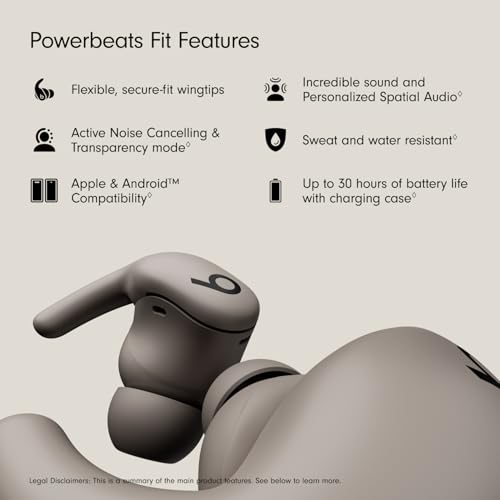
- Active Noise Cancellation (ANC): Reduces ambient noise — great for blocking out clanking weights and gym music.
- Transparency Mode: Lets outside sound in so you can hear traffic, conversation, or gym announcements.
You can toggle between modes by pressing and holding the physical button on either earbud (the default mapping), or through the Beats app / your phone’s Bluetooth settings. For outdoor running, most safety-conscious users prefer Transparency Mode so they can hear approaching vehicles and cyclists. For indoor gym sessions, ANC is generally the preferred choice.
Equalizer and Sound Profiles
The Beats app provides EQ presets and, depending on firmware version, may offer a custom EQ. Beats’ house sound signature has historically leaned bass-forward, which suits workout playlists heavy on hip-hop, EDM, and pop. If you find the bass overwhelming for podcasts or acoustic music, dialing back the low end in the EQ can help.
Customizing Button Controls
Through the Beats app, you can remap what the physical buttons do — for example, assigning one earbud’s long-press to skip tracks and the other to toggle ANC. Spend a minute configuring this before your first workout so you’re not fumbling with controls while sweating.
Step 5: Firmware Update
After pairing, check for a firmware update immediately. On iOS, this happens automatically when the earbuds are connected and charging. On Android, open the Beats app and look for an update prompt. Firmware updates often improve ANC performance, Bluetooth stability, and battery-life management. The update process typically takes 5–10 minutes — don’t remove the earbuds from the case or close the app during this time.
Step 6: Your First Workout
With everything configured, here are some tips for a smooth maiden voyage:
- Start with a shorter session (20–30 minutes) to evaluate comfort. Even with the right tip and wingtip size, your ears may need a few sessions to adapt.
- Test sweat resistance. The Powerbeats Fit carry an IPX4 rating, meaning they’re rated to handle splashing water and sweat from any direction. They are not rated for submersion, so keep them out of the pool.
- Monitor battery. Your phone’s Bluetooth menu (iOS) or the Beats app (Android) will show the battery level of each earbud and the case individually. With ANC on, expect battery life closer to the lower end of Beats’ stated range; with ANC off, you’ll get closer to the maximum.
- Wipe down after every session. Sweat contains salt and oils that degrade silicone ear tips over time. A quick wipe with a dry or slightly damp lint-free cloth extends the life of the tips and keeps the charging contacts clean. For more detailed care advice, check out our Beats Studio Pro maintenance guide — many of the same cleaning principles apply.
Detailed Product Review: Beats Powerbeats Fit

The Beats Powerbeats Fit are positioned squarely at fitness-focused listeners who need earbuds that won’t budge during intense activity. The headline specs are compelling: active noise cancellation, up to 30 hours of total battery life (earbuds plus case), secure-fit wingtips, and cross-platform compatibility with both Apple and Android devices via the Beats app.
Verified purchasers consistently praise the secure fit — the wingtip design receives near-universal approval from runners, lifters, and HIIT enthusiasts who have struggled with earbuds falling out during workouts. Sound quality is described as punchy and bass-forward, which suits workout playlists but can feel heavy-handed for spoken-word content unless you adjust the EQ. ANC performance is generally rated as good but not class-leading; reviewers note it handles steady gym noise well but doesn’t match over-ear headphones for airplane-level isolation (which is expected for an in-ear workout bud).
On the downside, some owners report that the ear tips can feel fatiguing during very long sessions (90+ minutes), and a few Android users have noted occasional Bluetooth hiccups that were resolved by firmware updates. The charging case is compact but lacks wireless charging, which some competitors in this price range now offer.
Pros:
- Exceptional workout stability thanks to wingtip design
- Strong battery life (up to 30 hours combined)
- ANC and Transparency modes
- Seamless pairing on both iOS and Android
- IPX4 sweat and water resistance
Cons:
- No wireless charging on the case
- Bass-heavy default tuning may not suit all genres
- Extended wear comfort could be better for very long sessions
- ANC is good but not best-in-class
Who should buy these: Anyone who prioritizes a secure, shake-proof fit for running, gym training, or outdoor sports and wants the convenience of ANC without sacrificing battery life. They’re an especially strong pick for Apple ecosystem users thanks to one-touch pairing, but Android users get a solid experience too via the Beats app.

Troubleshooting Common First-Use Issues
Earbuds Won’t Pair
- Make sure the earbuds are in the case and the case lid is open.
- Press and hold the system button for 10–15 seconds to force pairing mode (LED will flash).
- Restart Bluetooth on your phone and try again.
- If you previously paired with a different device, the earbuds may be trying to reconnect to it. “Forget” the earbuds on the old device first.
One Earbud Sounds Quieter Than the Other
- Check that both ear tips are creating a proper seal.
- Clean the speaker mesh with a dry, soft-bristled brush — even new earbuds can have minor debris from packaging.
- Run the Ear Tip Fit Test in the Beats app.
ANC Sounds “Off” or Creates Pressure
- Re-seat the ear tips for a better seal. ANC relies on a good acoustic seal to work properly.
- Try Transparency Mode to see if the sensation goes away — some users are sensitive to the slight pressure feeling ANC creates.
Battery Drains Faster Than Expected
- Disable ANC when you don’t need it; it’s the single biggest battery drain.
- Make sure the earbuds are fully seated in the case when not in use — if the charging pins don’t make contact, they won’t charge.
- Check for a firmware update, as battery optimization is a common fix in updates.
Quick-Reference Setup Checklist
1. ✅ Unbox and verify all components 2. ✅ Fully charge case and earbuds (~90 minutes) 3. ✅ Pair via one-touch (iOS) or Fast Pair / manual (Android) 4. ✅ Install the Beats app 5. ✅ Run firmware update 6. ✅ Test ear-tip seal (use in-app Fit Test) 7. ✅ Adjust wingtip size and position 8. ✅ Configure ANC/Transparency toggle and button mapping 9. ✅ Adjust EQ to taste 10. ✅ Do a short test workout and fine-tune
Final Thoughts
The Beats Powerbeats Fit are designed to be grabbed, charged, and taken straight to the gym — and the setup process reflects that simplicity. The most time you’ll spend is dialing in the right ear-tip and wingtip combination, and that investment pays off every single workout. Take the 15 minutes to run through this guide properly, and you’ll have earbuds that sound great, stay put, and last through even your longest training sessions.
If you’re also setting up other new gear, you might find our AirPods Pro first-day setup guide helpful for comparison — especially if you’re deciding which pair to use for workouts versus daily commuting.
How We Research
This guide was compiled by synthesizing Beats’ official product documentation, published specifications, and verified customer reviews from major retail platforms. We did not personally test, own, or handle the Beats Powerbeats Fit. All claims about features, battery life, and performance are attributed to manufacturer specs or the general consensus of verified purchaser feedback. Our goal is to provide the most thorough, honest setup resource available — curated from real sources, not fabricated experience.


Leave a Reply