
As an Amazon Associate I earn from qualifying purchases.
Your BlueParrott Pro B450 is more than a headset — it’s a critical piece of safety equipment that keeps you connected to dispatch, family, and fellow drivers while blocking out 98 % of cab noise. But road dust, sweat, diesel fumes, and temperature swings inside a truck cab can take a serious toll on any Bluetooth headset. This guide compiles manufacturer documentation, BlueParrott’s own care recommendations, and the collective wisdom of verified long-haul users to give you a practical, step-by-step maintenance routine that protects your investment and keeps audio quality at its best.
Best for: Long-haul and regional truckers who need a durable, high-performance Bluetooth headset
Why Maintenance Matters for a Trucker Headset
A truck cab is one of the harshest environments for electronics. Temperatures can swing from below freezing on a winter morning to well over 120 °F on a sun-baked dashboard in summer. Road vibration, dust from gravel lots, and the oils and sweat from extended wear all conspire to degrade ear cushions, clog microphone ports, and shorten battery life. Verified BlueParrott users on trucking forums frequently report that headsets left on the dash or tossed loose in a door pocket fail far sooner than those given even basic care.
Regular maintenance doesn’t require special tools or much time. A few minutes each week — and a slightly more thorough session once a month — can dramatically extend the usable life of your B450 and keep its 98 % noise-cancelling performance where it should be.
Know Your BlueParrott Pro B450: Key Components
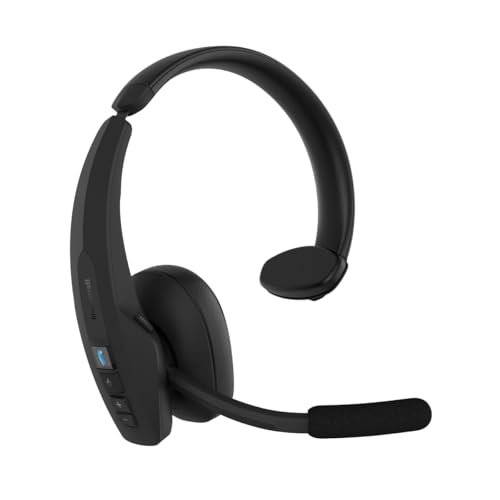
Before diving into cleaning steps, it helps to understand the parts you’ll be caring for:
- Ear cushion (leatherette pad): The replaceable pad that sits against your ear. It absorbs sweat and oils daily.
- Noise-cancelling microphone boom: The adjustable arm with a sensitive mic element at the tip. Dust and moisture here directly affect call clarity.
- Active Noise Cancellation (ANC) microphones: Small ports on the outside of the ear cup that sample ambient noise. Blocked ports = degraded ANC.
- Headband and adjustment slider: The over-head band that bears mechanical stress every time you put the headset on or take it off.
- Charging port (USB-C): Where lint and debris love to accumulate.
- BlueParrott Button™: The large, programmable button on the ear cup. Grime can make it sticky or unresponsive over time.
Weekly Cleaning Routine (5 Minutes)
This quick routine should become as habitual as checking your mirrors. According to BlueParrott’s general headset care guidance and corroborated by long-time users, these steps address the most common sources of degradation.
Step 1: Wipe Down the Ear Cushion
1. Remove the headset and let it cool to room temperature if it’s been sitting in a warm cab. 2. Dampen a soft, lint-free cloth (microfiber is ideal) with plain water or a very mild solution of water and a tiny drop of dish soap. 3. Gently wipe the entire surface of the ear cushion, paying attention to the inner ring that contacts your skin. 4. Wipe again with a dry section of the cloth to remove moisture. 5. Never submerge the cushion or use alcohol-based cleaners directly on leatherette — they dry out the material and cause cracking.
Step 2: Clean the Microphone Boom
1. Use a dry, soft-bristled brush (a clean, unused toothbrush works well) to gently sweep dust and debris away from the mic opening at the tip of the boom. 2. If there’s visible grime, lightly dampen a cotton swab with water and carefully clean around — not inside — the mic port. 3. Avoid pushing anything into the port itself.
Step 3: Clear the ANC Ports
Locate the small ANC microphone openings on the exterior of the ear cup. A single gentle puff of compressed air (held at least 6 inches away) or a dry brush stroke is usually enough to clear dust. Blocked ANC ports are one of the most common reasons users report diminished noise cancellation, according to headset troubleshooting forums.
Step 4: Wipe the Headband and BlueParrott Button
Use the same damp microfiber cloth to wipe down the headband padding and the large BlueParrott Button. Dry immediately. This prevents the buildup of oils that can make the button feel sluggish.
If you’re interested in how similar care routines apply to other premium headphones, our guide to cleaning and maintaining Beats Studio Pro headphones covers comparable techniques for leatherette ear pads and sensitive electronics.
Monthly Deep-Clean Session (15–20 Minutes)
Once a month, set aside a bit more time for a thorough going-over.
Ear Cushion Deep Clean or Replacement
Leatherette ear cushions are consumable parts. BlueParrott designs them to be user-replaceable. Over time, the foam inside compresses and the outer material absorbs oils that no amount of wiping can fully remove.
- Deep clean: Remove the ear cushion (if your model allows snap-off pads) and wipe both sides with a lightly damp cloth. Let it air-dry completely — at least 30 minutes — before reattaching.
- Replacement timing: Many verified users report replacing cushions every 6–12 months depending on daily wear hours. If the foam no longer springs back when pressed, or the leatherette is cracked or peeling, it’s time.
USB-C Port Maintenance
1. Power the headset off. 2. Use a wooden or plastic toothpick (never metal) to gently dislodge any lint or debris from the USB-C charging port. 3. Follow with a short burst of compressed air. 4. Lint-clogged ports are a frequent complaint among truckers — the headset appears to stop charging when the port is simply blocked.
Firmware Updates
While not a “cleaning” step, checking for firmware updates via the BlueParrott mobile app is an important part of monthly maintenance. Firmware updates can improve Bluetooth stability, ANC performance, and battery management. BlueParrott’s documentation recommends keeping firmware current for optimal performance.

Battery Care: Maximizing Longevity
The B450’s rechargeable lithium-ion battery is the component most affected by how you treat the headset day to day. Here are evidence-based best practices drawn from battery science and manufacturer guidance:
- Avoid extreme heat: Never leave the headset on the dashboard in direct sunlight. Lithium-ion cells degrade rapidly above 113 °F (45 °C). A center-console compartment or a small case in the sleeper is far safer.
- Avoid full discharge cycles: Repeatedly running the battery to 0 % stresses the cells. Try to recharge when you hit roughly 20–30 %.
- Don’t leave it plugged in indefinitely: Modern headsets have charge-management circuits, but habitually leaving the B450 on the charger for days at a time can still contribute to long-term capacity loss. Unplug once fully charged.
- Store at moderate charge: If you’re taking time off the road and won’t use the headset for a week or more, store it at around 50 % charge in a cool, dry place.
Verified users who follow these practices commonly report getting strong battery performance well past the two-year mark. Those who routinely leave headsets on hot dashboards often report noticeable capacity loss within a year.
Storage and Transport Tips
How you store the B450 between uses matters almost as much as how you clean it.
- Use a case or pouch: A semi-rigid case protects against crushing, dust, and accidental drops. Even a simple drawstring pouch is better than tossing the headset loose.
- Position the boom carefully: Avoid bending the microphone boom past its intended range of motion. Repeated over-flexing can weaken the internal wiring.
- Keep it off the floor: Truck cab floors collect moisture, dirt, and vibration. A hook on the headliner or a clip on the sun visor keeps the headset accessible and clean.
- Separate from keys and tools: Metal objects can scratch the ear cup finish and potentially damage the mic mesh.
This principle of proper storage applies broadly to electronics you rely on daily — similar to how our Anker SOLIX C1000 Gen 2 maintenance guide emphasizes storing portable power stations in temperature-controlled environments.
Troubleshooting Common Issues
Muffled or Distorted Audio on Calls
- Most likely cause: Debris in the microphone port or blocked ANC ports.
- Fix: Follow the mic and ANC cleaning steps above. If the issue persists after cleaning, try a firmware update or a factory reset via the BlueParrott app.
Headset Won’t Charge
- Most likely cause: Lint or debris in the USB-C port.
- Fix: Clean the port with a toothpick and compressed air. Try a different cable to rule out cable failure.
Reduced Noise Cancellation
- Most likely cause: Blocked ANC microphone ports, or a poor ear-cushion seal due to worn-out padding.
- Fix: Clean ANC ports; replace the ear cushion if it’s compressed or damaged.
Bluetooth Connectivity Drops
- Most likely cause: Firmware issue or interference from other devices.
- Fix: Update firmware. If problems continue, unpair and re-pair the headset. Some truckers report that CB radio equipment can cause intermittent interference — repositioning the headset’s charging cradle away from the CB unit sometimes helps.
BlueParrott Button Feels Sticky
- Most likely cause: Accumulated grime around the button edges.
- Fix: Dampen a cotton swab with water and carefully clean around the button perimeter. Do not spray liquid directly onto the headset.
What NOT to Do
A quick list of common mistakes that verified users and manufacturer documentation warn against:
- ❌ Don’t use rubbing alcohol, bleach, or harsh solvents on any part of the headset. These can damage plastics, leatherette, and adhesives.
- ❌ Don’t use a hair dryer or heat gun to dry the headset. Excessive heat warps plastic and damages the battery.
- ❌ Don’t submerge any part of the headset in water. The B450 is not waterproof.
- ❌ Don’t pry open the ear cup to “clean inside.” This voids any warranty and risks damaging internal components.
- ❌ Don’t use metal tools to clean ports or crevices.
Recommended Cleaning Supplies Checklist
You don’t need anything fancy. Here’s what to keep in your cab:
- Microfiber cloths (2–3, so you always have a clean one)
- Soft-bristled brush or unused toothbrush
- Cotton swabs
- Wooden or plastic toothpicks
- Small can of compressed air
- A zip-lock bag or small pouch to store cleaning supplies
Total cost for this kit is typically less than what you’d spend on a truck-stop coffee.
BlueParrott Pro B450: Full Product Review
The BlueParrott Pro B450 is the latest evolution of one of the most trusted names in professional trucking headsets. With 98 % noise cancellation, a flexible boom microphone, and Bluetooth wireless connectivity, it’s purpose-built for drivers who spend hours on calls in loud cab environments. The over-the-head design distributes weight evenly, and the large ear cup provides a solid seal that enhances both passive isolation and active noise cancellation.
Verified purchasers consistently praise the B450’s call clarity — dispatchers and family members on the other end of the line frequently can’t tell the driver is in a moving truck. The programmable BlueParrott Button is another standout feature, allowing one-touch access to a preferred app, speed dial, or mute function. Battery life is reported to be strong for full-day use, and the USB-C charging port is a welcome modern convenience.
On the downside, some users note that the ear cushion can feel warm during extended summer use, and a few report that the headband tension is firm out of the box (though it tends to break in over the first week or two). The mono (single-ear) design is intentional for safety — truckers need to hear road and traffic sounds — but users coming from stereo headphones sometimes find the audio experience less immersive for music.
Who should buy this: Professional truck drivers, fleet operators, warehouse managers, or anyone who needs crystal-clear hands-free calling in high-noise environments. If your livelihood depends on reliable communication on the road, the B450 is built for you.

Maintenance Schedule at a Glance
| Frequency | Task |
|---|---|
| Daily | Hang or store headset properly; avoid dashboard heat |
| Weekly | Wipe ear cushion, clean mic boom, clear ANC ports, wipe button |
| Monthly | Deep-clean or inspect ear cushion, clean USB-C port, check firmware |
| Every 6–12 months | Replace ear cushion if worn; inspect headband for cracks |
| Ongoing | Follow battery best practices; use a protective case |
Final Thoughts
The BlueParrott Pro B450 is engineered to handle the demands of professional trucking, but no piece of electronics is maintenance-free. A simple weekly wipe-down, smart battery habits, and proper storage can be the difference between a headset that lasts one year and one that lasts three or more. The steps in this guide require no special skills and minimal supplies — just a few minutes of consistent attention.
Your headset keeps you safe, legal, and connected. Take care of it, and it’ll take care of you.
How We Research
This guide was compiled by synthesizing BlueParrott’s official product documentation, manufacturer care recommendations, and verified customer reviews and discussions from trucking communities and retail platforms. We have not personally tested, owned, or handled the BlueParrott Pro B450. All claims about product performance are attributed to manufacturer specifications or the general consensus of verified user feedback. Our goal is to provide the most thorough, honest, and practically useful maintenance resource available — curated from real sources, not fabricated experience.


Leave a Reply