
As an Amazon Associate I earn from qualifying purchases.
The Herman Miller Aeron is one of the most iconic office chairs ever made — and one of the most expensive. With prices routinely north of $700 for a new unit, it’s the kind of purchase that stings if you get it wrong. And plenty of buyers do get it wrong. They order the wrong size, misunderstand the difference between PostureFit and PostureFit SL, or discover too late that the tilt limiter doesn’t work the way they assumed. This guide walks you through six critical checks — drawn from manufacturer specs, Herman Miller’s own documentation, and patterns in verified customer reviews — so you can buy with confidence. We’ve also rounded up a few desk accessories that pair well with a premium ergonomic setup.
Best for: Home-office workers who sit 6+ hours daily and want a chair that lasts 12+ years
Check #1: Size — A, B, or C (This Is Where Most Regrets Start)
The Aeron comes in three sizes — A (small), B (medium), and C (large) — and Herman Miller publishes a sizing chart based on height and weight. Size B fits roughly 5′2″ to 6′0″ and 130–230 lbs, which is why it’s the most commonly sold. But “most common” doesn’t mean “right for you.”
Verified reviewers who ordered the wrong size consistently report the same complaints: the seat pan is either too deep (causing pressure behind the knees) or too shallow (leaving the thighs unsupported). Herman Miller’s own sizing guide recommends measuring your torso and leg length, not just your overall height. A 5′10″ person with a long torso and short legs may actually need a Size A seat with a Size B back — which isn’t an option in the standard configuration.
The takeaway: Don’t guess. Use Herman Miller’s official sizing tool on their website, and if you’re on the border between two sizes, many ergonomics experts suggest sizing down rather than up. A seat pan that’s slightly too short is generally more comfortable than one that digs into the backs of your knees.
Check #2: PostureFit vs. PostureFit SL — They’re Not the Same
This is one of the most misunderstood spec differences on the Aeron. The “Classic” Aeron (the model still widely available through third-party sellers on Amazon) uses the original PostureFit lumbar support — a single adjustable pad that presses against the sacral region of your lower back.
The newer “Remastered” Aeron (launched in 2016) uses PostureFit SL, which adds a second pad targeting the lumbar region above the sacrum. The SL version provides two independent adjustment points, giving you more granular control over lower-back support.
Why does this matter? Because many listings — including the one we’re reviewing below — are for the Classic model with original PostureFit. Verified buyers sometimes report disappointment when they realize they didn’t get the dual-pad SL system they saw in YouTube reviews of the Remastered version. If lumbar support is your primary reason for buying an Aeron, make sure you know which generation you’re ordering.
Check #3: The Tilt Limiter Isn’t a Recline Lock
New Aeron owners frequently confuse the tilt limiter with a recline-lock feature. The tilt limiter lets you restrict the range of recline to one of several positions — but it doesn’t lock the chair at a fixed recline angle the way some competitors do. When engaged, the chair still tilts freely within the allowed range.
If you want to lean back and stay at, say, a 15-degree recline while reading, the tilt limiter alone won’t do that. You’d need to also increase the tilt tension (the knob under the seat) to make the chair resist your body weight at that angle. Many verified reviewers note that it takes a few days of experimentation to find the right combination of tilt-limiter setting and tension.
If you’re coming from a chair with a simple recline-lock lever — like the Steelcase Series 1 — this is a meaningful behavioral difference worth understanding before you buy.
Check #4: The Mesh Seat Isn’t for Everyone
The Aeron’s Pellicle mesh is legendary for breathability. If you run hot, it’s a genuine advantage over foam-padded chairs. But mesh has trade-offs that rarely get mentioned in marketing:
- Pressure distribution: Some users — particularly those under 130 lbs — report that the mesh doesn’t flex enough under lighter body weight, creating pressure points on the sit bones. Heavier users sometimes report the opposite: the mesh stretches over time and loses support.
- Comfort on bare skin: If you work from home in shorts, the mesh texture can leave imprints on the backs of your thighs. It’s a minor cosmetic annoyance, but verified reviewers mention it surprisingly often.
- No cushion feel: If you’re accustomed to a plush, padded seat, the Aeron will feel firm — even hard — for the first week or two. Most long-term owners say they adjusted, but the break-in period is real.
Check #5: Arm Adjustability Varies by Model
The “Highly Adjustable” designation in the listing title means the chair includes fully adjustable arms — height, angle, depth, and width. But not every Aeron listing is “Highly Adjustable.” Some are sold with fixed arms or no arms at all, and the price difference can be significant.
For a home-office setup where you’re typing for hours, fully adjustable arms are essentially non-negotiable according to most ergonomics guidance. Make sure the listing explicitly states “Highly Adjustable” or “Fully Adjustable” arms before you commit.
Check #6: Warranty Coverage Through Third-Party Sellers
Herman Miller offers a 12-year warranty on the Aeron — one of the best in the industry. However, that warranty applies to chairs purchased through authorized dealers. If you buy through a third-party Amazon seller, you may not be covered by Herman Miller’s warranty at all. Some sellers offer their own warranty, but the terms are typically far less generous.
This is a critical consideration. A 12-year warranty on a $700+ chair is a major part of the value proposition. Without it, you’re essentially betting that nothing will go wrong — no cracked tilt mechanism, no sagging mesh, no broken arm pads — for the life of the chair. Check the seller’s authorization status and warranty terms before ordering.
The Aeron Chair: Detailed Review

The Herman Miller Aeron in Size B (Medium) with Graphite frame and PostureFit remains one of the most respected ergonomic chairs on the market. Its Pellicle mesh seat and back provide excellent ventilation, and the synchronized tilt mechanism encourages natural movement throughout the workday. The “Highly Adjustable” configuration includes adjustable arms (height, width, depth, and pivot), a tilt limiter with multiple range settings, adjustable tilt tension, and seat-height adjustment via pneumatic cylinder.
According to manufacturer specifications, the chair supports users from approximately 5′2″ to 6′0″ and 130–230 lbs in Size B. The PostureFit pad on this Classic model provides sacral support via a single adjustable mechanism — effective, but less versatile than the dual-pad PostureFit SL on the Remastered version.

Verified reviewers consistently praise the Aeron’s durability and long-term comfort, with many reporting 8–15 years of daily use. Common complaints center on the high price, the firm mesh feel during the break-in period, and confusion about the tilt-limiter behavior. Some buyers also express frustration about warranty coverage when purchasing through unauthorized sellers.
Who should buy this: Anyone who sits 6+ hours daily, values breathability, and is willing to invest in a chair that should last a decade or more. It’s not ideal for people who prefer a plush, cushioned feel or who need a simple recline-lock mechanism.
Desk Accessories That Complement a Premium Chair Setup
Once you’ve invested in a high-end chair, the rest of your desk setup matters too. Tangled cables, a poorly positioned monitor, and a laptop that forces you to hunch forward can undo the ergonomic benefits of even the best chair. Here are four accessories worth considering.
INCHOR Cord Organizer Cable Clips (2-Pack)

If you’ve just spent serious money on an Aeron, the last thing you want is a rat’s nest of cables detracting from your setup. The INCHOR cord organizer clips are a simple, adhesive-backed solution for routing USB cables, charging cords, and headphone wires along the edge of your desk. Each clip holds multiple cables and uses 3M adhesive to attach without drilling.
Verified reviewers generally praise the strong adhesive and the flexible silicone material that accommodates different cable thicknesses. The most common complaint is that the adhesive can leave residue on certain desk finishes if removed, and some users report that heavier cables (like thick USB-C charging cables) can pull the clips loose over time.

Who should buy this: Anyone with 3–5 cables running across their desk who wants a quick, no-drill organization fix. Not ideal for very heavy or stiff cables.
Under Desk Cable Management Tray (No-Drill, Clamp Mount)

For a more comprehensive cable-management solution, this metal mesh tray clamps under your desk without any drilling. It’s designed to hold power strips, adapters, and excess cable length out of sight. The clamp mount accommodates desk thicknesses up to approximately 1.6 inches, according to the product listing.
Verified reviewers appreciate the sturdy metal construction and the fact that it doesn’t require permanent modifications to the desk — a real plus for renters or anyone with a standing desk they might reconfigure. Common complaints include the clamp being slightly too small for thicker desks and the tray sagging under the weight of a heavy power strip plus multiple adapters.

Who should buy this: Home-office workers who want to hide a power strip and cable clutter under their desk without drilling holes. Measure your desk thickness first — if it’s over 1.5 inches, check compatibility carefully.
Gogoonike Adjustable Laptop Stand

If you’re using a laptop at your desk — even with an external monitor — raising the screen to eye level is one of the simplest ergonomic improvements you can make. The Gogoonike adjustable laptop stand is a foldable, metal riser that elevates your laptop and provides ventilation underneath. It adjusts to multiple angles and folds flat for portability.
Verified reviewers highlight the solid metal construction (it doesn’t wobble like some plastic alternatives) and the compact folded size for travel. The most frequent criticism is that the rubber grips on the support arms can wear down over time, and some users find the adjustment mechanism slightly stiff at first. A few reviewers also note that very large laptops (17-inch screens) can feel less stable at steeper angles.

Who should buy this: Laptop users who want to raise their screen to a more ergonomic height without committing to a bulky, permanent stand. Pairs well with an external keyboard and mouse. If you’re building out a full home-office setup, this is a low-cost ergonomic win.
Gianotter Dual Monitor Stand Riser with Drawer
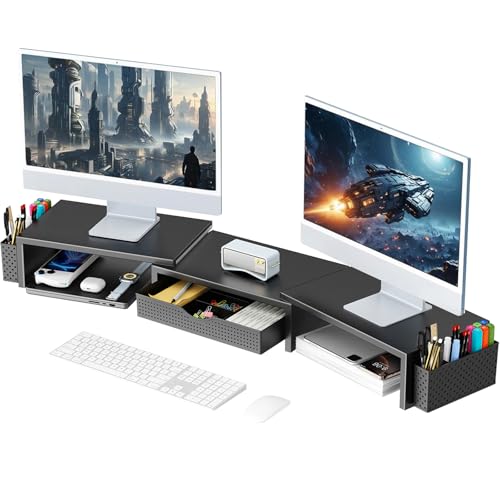
For dual-monitor setups, the Gianotter stand riser elevates both screens to a more comfortable viewing height while adding a storage drawer and pen holders underneath. It’s a simple bamboo-and-wood shelf design — no assembly tools required beyond sliding the pieces together.
Verified reviewers appreciate the added desk organization (the drawer is handy for sticky notes, cables, and small accessories) and the clean aesthetic. Common complaints include the drawer being shallower than expected and the stand flexing slightly under the weight of two heavy monitors. Some reviewers recommend placing it on a non-slip mat to prevent sliding.
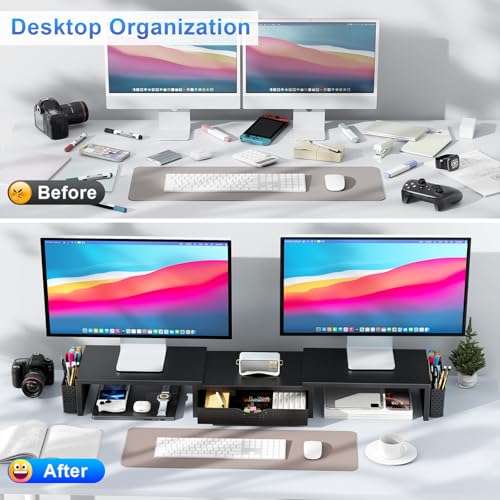
Who should buy this: Dual-monitor users who want a simple, affordable way to raise their screens and reclaim some desk storage. If your monitors are over 27 inches each, verify the stand’s width against your setup. For a cleaner desk overall, pairing this with a smart approach to cable management makes a noticeable difference.
Quick-Reference Product Cards
Frequently Asked Questions
Is the Aeron worth it for someone who only sits 3–4 hours a day? It depends on your budget and priorities. The Aeron’s ergonomic benefits are most noticeable during extended sitting sessions. For shorter stints, a well-reviewed mid-range chair may deliver 80% of the comfort at a fraction of the cost.
Can I try the Aeron before buying? Herman Miller has showrooms in major cities, and many authorized dealers have floor models. This is strongly recommended, especially if you’re between sizes.
Classic vs. Remastered — which should I buy? The Remastered Aeron (2016+) offers PostureFit SL, updated Pellicle mesh with more zones, and a smoother tilt mechanism. If you can find it within budget, the Remastered is the better chair. The Classic remains excellent but is an older design.
What’s the weight limit? Herman Miller rates the Size C at up to 350 lbs. Size B is rated for approximately 230 lbs, and Size A for approximately 150 lbs.
How We Research
We have not personally tested, owned, or sat in the products reviewed in this article. Our analysis is based on manufacturer specifications, Herman Miller’s published documentation (including their sizing guide and product spec sheets), and a thorough review of verified customer feedback across multiple retail platforms. We cross-reference expert ergonomics resources and long-form reviews from established publications. Our goal is to synthesize this publicly available information into an honest, comprehensive guide — not to fabricate first-hand experience we don’t have.


Leave a Reply