
As an Amazon Associate I earn from qualifying purchases.
The Steelcase Series 1 sits in a fascinating middle ground: it carries the Steelcase name — synonymous with commercial-grade office furniture — but at a price point that undercuts the brand’s flagship Leap and Gesture by hundreds of dollars. That accessibility is exactly what makes it so popular among home-office workers upgrading from a cheap task chair. But popularity doesn’t mean it’s the right fit for everyone. After synthesizing manufacturer specifications, verified customer reviews, and expert assessments from ergonomics-focused publications, we’ve identified four specific areas where buyers commonly experience regret. This guide walks you through each one so you can make a confident, informed decision — and we’ve also rounded up a few desk-organization accessories that pair well with any serious home-office upgrade.
Best for: Average-height home-office workers on carpet who want Steelcase quality without flagship pricing
Why a Pre-Purchase Checklist Matters for a Chair Like This
A desk chair isn’t a gadget you can toss in a return box and ship back easily. It’s heavy, it’s bulky, and depending on where you buy it, the return window and restocking fees can sting. The Steelcase Series 1 is generally well-reviewed — most verified buyers praise its build quality, breathable mesh back, and weight-activated mechanism. But the complaints that do surface tend to cluster around the same four issues. If you’ve already read our pre-purchase checklist for smart tower fans, you know we’re fans of this format: surface the gotchas before you click “Buy Now.”
Checklist Item #1: Seat Depth and Your Body Proportions
This is the single most common complaint in verified reviews of the Steelcase Series 1. The standard model does not include an adjustable seat depth. According to Steelcase’s own spec sheet, the seat depth is fixed at approximately 17.75 inches. For users between roughly 5’4″ and 5’11”, this tends to work fine. But taller users — particularly those with longer femurs — frequently report that the seat pan feels too short, leaving insufficient thigh support and creating pressure behind the knees.
Steelcase does offer an optional seat-depth adjustment upgrade, but it’s typically only available when ordering directly through Steelcase or authorized dealers, and it adds to the cost. If you’re buying through Amazon, confirm which configuration you’re getting. Many verified reviewers who are 6’0″ or taller specifically call out this limitation as a dealbreaker they wish they’d known about beforehand.
The takeaway: Measure your current chair’s seat depth and compare. If you need 18.5 inches or more of seat pan, the standard Series 1 may leave you wanting.
Checklist Item #2: Armrest Adjustability (or Lack Thereof)
The base-model Series 1 comes with fixed-height armrests. They adjust in width (you can pivot them in and out), but they do not go up and down unless you specifically order the height-adjustable arm upgrade. This catches a surprising number of buyers off guard because most competing chairs in this price range — including options from HON, Autonomous, and even some budget brands — include 3D or 4D adjustable arms as standard.
Why does this matter? If your desk height doesn’t perfectly align with the fixed arm position, you’ll either have arms that bump the desk edge (preventing you from pulling in close) or arms that sit too low to provide meaningful forearm support. Ergonomics experts consistently emphasize that armrest height should allow your elbows to rest at roughly 90 degrees with your shoulders relaxed.
Verified reviewers who work at standing-desk setups (where desk height changes throughout the day) are especially vocal about this limitation. A chair with fixed arms paired with a sit-stand desk is a recipe for frustration.
The takeaway: Check the product listing carefully for “adjustable arms” or “4D arms.” If the listing doesn’t explicitly mention height-adjustable armrests, assume they’re fixed.
Checklist Item #3: Carpet Casters vs. Hard-Floor Casters
The standard Steelcase Series 1 ships with hard casters designed for carpet. This is clearly stated in the product title on most listings — “Wheels for Carpet” — but it’s easy to gloss over. If you’re rolling on hardwood, laminate, tile, or luxury vinyl plank, these casters will scratch your floor and roll too freely, making the chair feel unstable.
Steelcase sells soft casters (also called hard-floor casters) separately, but they’re not cheap, and third-party replacements vary in quality and stem-size compatibility. Some verified buyers report that aftermarket rollerblade-style casters work well, but others note that the stem diameter on the Series 1 is slightly different from generic office chairs, requiring careful measurement.
The takeaway: Know your floor type before ordering. If you’re on hard floors, budget for a caster swap or a quality chair mat — and verify the caster stem size (the Series 1 uses a standard 11mm stem, but always double-check).
Checklist Item #4: Return Policy Fine Print
Steelcase chairs purchased through Amazon are typically sold by third-party sellers or by Steelcase’s own Amazon storefront. The return experience varies dramatically depending on the seller. Steelcase’s direct 30-day return policy (when buying from steelcase.com) is straightforward, but Amazon marketplace sellers may charge restocking fees of 15–20% on opened furniture, and some listings are marked “non-returnable” once assembled.
Verified reviewers who needed to return the chair frequently mention the hassle of repackaging a partially assembled office chair into its original box — which is often damaged during unboxing. A few report being denied returns entirely because the chair was assembled.
If you’re buying through Steelcase directly, the brand offers a 12-year warranty on the Series 1, which is genuinely impressive. But warranty coverage (for defects) and return policies (for preference) are two different things. Make sure you understand both before committing.
The takeaway: Screenshot the return policy before purchasing. If you’re unsure about fit, buying directly from Steelcase.com may offer a smoother return experience, even if the price is similar.
The Chair Itself: Steelcase Series 1 Office Chair

With the caveats above fully disclosed, the Steelcase Series 1 remains a genuinely solid ergonomic chair for the right buyer. The weight-activated mechanism is one of its standout features — it automatically adjusts recline tension based on your body weight, eliminating the need to fumble with a tension knob. The 3D LiveBack technology flexes with your spine as you shift positions, and the air-mesh back provides excellent breathability during long work sessions.
Build quality is unmistakably Steelcase. The frame feels sturdy without being excessively heavy, and the overall fit-and-finish is a clear step above budget ergonomic chairs. The pneumatic height adjustment has a generous range (roughly 16″ to 21″ seat height), accommodating a wide variety of desk setups.
Verified reviewers consistently praise the chair’s comfort during 6–8 hour workdays, particularly for users in the 5’4″ to 5’10” range. The seat cushion is firm but supportive — not plush — which some buyers love and others find too hard initially. Multiple reviewers note that the cushion breaks in after 2–3 weeks.

On the downside, the lumbar support on the base model is basic — a flexible zone in the mesh rather than a dedicated adjustable lumbar pad. Taller and heavier users (above 250 lbs) report that the chair feels undersized. And as discussed above, the fixed seat depth and fixed armrests on the base configuration are legitimate limitations.
Best for: Average-height home-office workers who want commercial-grade build quality and a breathable mesh back, and who are willing to verify their configuration before ordering.
Pair Your Chair Upgrade with a Cleaner Desk Setup
If you’re investing in a proper ergonomic chair, it’s worth tidying up the rest of your workspace too. A clean desk isn’t just aesthetic — it reduces visual clutter that can sap focus. Here are four affordable accessories that verified buyers frequently pair with home-office chair upgrades. If you’ve been thinking about upgrading your overall home-office setup, these small additions make a noticeable difference.
Hook and Loop Cable Straps (80-Piece Pack)

These reusable hook-and-loop cable straps are the simplest, cheapest way to wrangle the tangle of monitor cables, chargers, and USB hubs that accumulate behind a desk. The 80-piece pack gives you more than enough for an entire home office — and extras for your entertainment center or nightstand.
Each strap features an adhesive-backed mounting point, so you can stick them to the underside of a desk or along a wall. The hook-and-loop closure means you can open, reroute, and re-close without cutting or replacing anything. Verified reviewers praise the simplicity and value, noting that the adhesive holds well on smooth surfaces but can struggle on textured or painted wood.

The main complaint? The adhesive isn’t repositionable — once you stick it, pulling it off may leave residue or damage paint. A few reviewers recommend using command strips instead of the included adhesive for rental-friendly installation.
Best for: Anyone who wants a quick, no-tools cable cleanup without committing to a permanent mounting solution.
Under-Desk Cable Management Tray (No-Drill Clamp Mount)

For a more structured approach to cable management, this metal mesh tray clamps to the underside of your desk without drilling. The clamp mount accommodates desk thicknesses up to roughly 1.6 inches, and the tray itself is wide enough to hold a power strip, excess cable length, and adapters.
The metal mesh construction is a notable upgrade over plastic trays — it’s sturdier, allows better airflow around power bricks that generate heat, and looks more professional if visible. Two pass-through holes let you route cables in and out cleanly.

Verified reviewers appreciate the no-drill installation, especially renters and standing-desk users who don’t want to void their desk warranty. Common complaints include the clamp being slightly too tight for thicker desks and the tray sagging slightly under heavy loads (multiple power bricks plus a surge protector). A few users recommend adding a second clamp for longer trays.
Best for: Renters and standing-desk owners who need a clean, reversible cable-management solution with no permanent modifications.
INCHOR Cord Organizer Cable Clips (2-Pack)

These silicone cable clips mount to the edge of your desk and hold individual cables in place — think charging cables, headphone cords, or a mouse cable. The 2-pack provides enough slots for the most common desk cables, and the weighted silicone base keeps them from sliding around.
The design is minimalist and unobtrusive. Each clip has multiple grooves sized for different cable diameters, from thin Lightning/USB-C cables up to thicker power cords. The adhesive backing is 3M-based, which verified reviewers report holds well on smooth desk surfaces.

The downside: these clips work best on flat, smooth desk edges. If your desk has a beveled or rounded edge, the adhesive may not make full contact. Some reviewers also note that very thin cables (like Apple Watch chargers) can slip out of the grooves. Overall, though, the consensus is overwhelmingly positive for the price.
Best for: Minimalists who want individual cables neatly docked at the desk edge, ready to grab when needed.
MDOZQ Monitor Memo Board and Sticky Note Holder (2-Pack)
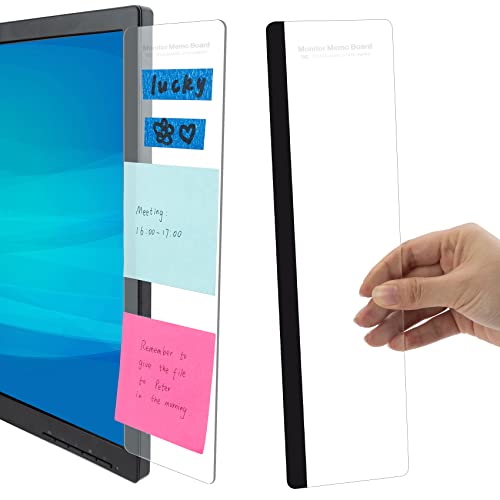
This one’s a small quality-of-life upgrade that pairs surprisingly well with a desk overhaul. These acrylic memo boards clip onto the side of your monitor bezel, giving you a spot to pin sticky notes, reminders, or quick-reference info without cluttering your desk surface or sticking notes directly to your screen.
The 2-pack lets you put one on each side of your monitor — or use one for to-do items and one for reference notes. The transparent acrylic is unobtrusive, and the clip mechanism fits most monitor bezels without adhesive.
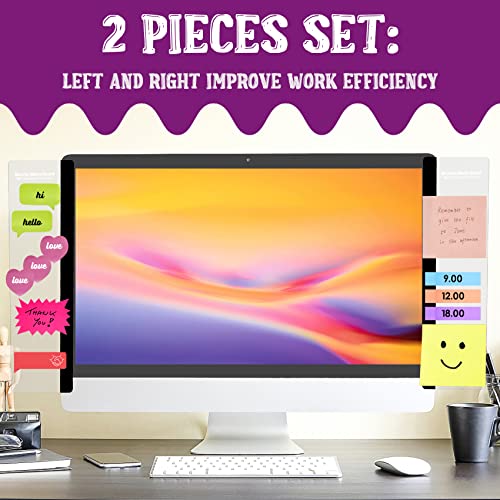
Verified reviewers love the concept and find it genuinely useful for keeping task lists visible during video calls. The most common complaint is that the clip doesn’t fit ultra-thin bezel monitors (bezels under about 5mm). A few reviewers also note that the acrylic can feel slightly flimsy, though it holds sticky notes without issue.
Best for: Anyone who relies on sticky notes and wants them visible without cluttering the desk or obscuring the screen. Similar to how we covered small upgrades that make a big difference in daily routines, this is a low-cost addition with outsized impact.
Quick-Reference Comparison
Final Verdict: Should You Buy the Steelcase Series 1?
The Steelcase Series 1 is a genuinely good ergonomic chair — but it’s not a universal fit. If you’re between 5’4″ and 5’10”, work primarily on carpet, and are comfortable with fixed armrests (or willing to pay for the adjustable-arm upgrade), it delivers Steelcase build quality and a 12-year warranty that budget chairs simply can’t match.
However, if you’re tall, work on hard floors, or need fully adjustable arms out of the box, you’ll want to either upgrade the configuration or look at alternatives like the Steelcase Leap (significantly more expensive) or the HON Ignition 2.0 (a more affordable competitor with adjustable arms standard).
The four-point checklist above isn’t meant to scare you away — it’s meant to ensure you order the right Series 1 configuration for your body and workspace. A little homework now saves a lot of hassle later. And while you’re at it, the cable-management and desk-organization accessories above can turn a chair upgrade into a full workspace refresh without breaking the bank. For more pre-purchase checklists like this one, check out our buying guide for renewed Dyson vacuums — same format, different product, equally important gotchas.
How We Research
We have not personally tested, owned, or sat in the Steelcase Series 1 or any of the accessories reviewed above. Our process involves synthesizing publicly available manufacturer specifications, official product documentation, and verified customer and expert reviews from sources including Amazon, ergonomics publications, and office-furniture review sites. We cross-reference common praise and complaints across multiple review platforms to identify patterns — not outliers. When we reference specific dimensions or features, we’re drawing from Steelcase’s published spec sheets and product pages. This approach lets us provide honest, well-sourced guidance without fabricating hands-on experience we don’t have.


Leave a Reply