
As an Amazon Associate I earn from qualifying purchases.
The streaming stick market has never been more competitive — or more confusing. With Roku refreshing its HD lineup and Amazon rolling out a dizzying array of Fire TV Stick tiers (HD, 4K Select, 4K Plus, 4K Max), choosing the right dongle means wading through overlapping feature sets, marketing jargon, and incremental spec bumps. This guide cuts through the noise. We’ve researched manufacturer specifications, verified customer reviews, and expert analyses to compare five current-generation streaming sticks head to head, so you can buy on value rather than brand loyalty.
Best for: Anyone who wants a simple, ad-light streaming experience on an HD or older TV
Why a Streaming Stick in 2026?
Even if your TV shipped with a built-in smart platform, a dedicated streaming stick often delivers a faster, more frequently updated experience. Built-in smart TV software tends to slow down after a couple of years and may lose support for newer apps. A streaming stick plugs into any HDMI port, draws power from USB (or the included adapter), and gives you a current-generation interface that the manufacturer actively maintains.
If you’re setting up a smart bedroom entertainment system or upgrading a small-room TV, a streaming stick is often the most cost-effective way to add smart capabilities without replacing the display itself.
What to Look for in a Streaming Stick
Before diving into individual products, here are the specs and features that actually matter:
- Resolution support: HD (1080p) is fine for TVs 40 inches and under or secondary screens. 4K matters on larger displays.
- HDR format support: Dolby Vision, HDR10, HDR10+, and HLG each have different content libraries. More formats = more flexibility.
- Wi-Fi standard: Wi-Fi 5 (802.11ac) is adequate for most streaming. Wi-Fi 6 and 6E offer better performance in congested networks.
- Voice assistant: Roku Voice, Alexa, or Google Assistant — pick the ecosystem you already use.
- App ecosystem: Roku’s platform is famously neutral. Fire TV leans toward Amazon services but supports all major apps.
- Interface and ads: Roku’s home screen is relatively clean. Fire TV’s interface has become more ad-heavy, which is a common complaint in verified reviews.
For a deeper dive into the Roku vs. Fire TV platform debate, see our Streaming Stick vs Fire TV Stick comparison.
Roku Streaming Stick HD — The Reliable All-Rounder
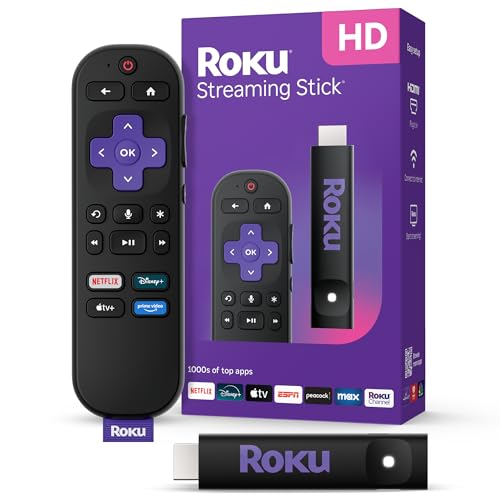
The Roku Streaming Stick HD is the latest refresh of Roku’s entry-level dongle, and it remains one of the most popular streaming devices on the market — backed by over 20,000 verified reviews averaging 4.7 stars on Amazon. That kind of volume and satisfaction score is hard to argue with.
What it does well: Roku’s platform is widely praised for its clean, intuitive interface. Unlike Fire TV, the home screen isn’t dominated by Amazon content recommendations. You get a straightforward grid of your installed apps, a universal search that spans services without bias, and access to Roku’s free ad-supported channels. The included Roku Voice Remote handles basic voice commands for search and playback control. Setup is genuinely simple — plug it in, connect to Wi-Fi, and you’re streaming within minutes.
Where it falls short: This is an HD (1080p) device, so it won’t output 4K, Dolby Vision, or HDR content. If you have a 4K TV 50 inches or larger, you’re leaving picture quality on the table. The remote lacks a headphone jack (a feature found on some higher-end Roku remotes), and there’s no Bluetooth audio output on the stick itself.

What reviewers say: Verified buyers consistently highlight the fast boot time, lack of bloatware, and the sheer breadth of available apps. The most common complaints center on occasional buffering (usually a network issue, not the stick) and the wish for 4K at this price point. Multiple reviewers note that this stick breathed new life into older TVs.
Best for: Budget-conscious buyers, secondary TVs, older 1080p displays, and anyone who values a clean interface over ecosystem lock-in.
Amazon Fire TV Stick HD — Alexa’s Entry-Level Play

Amazon’s newest Fire TV Stick HD is the company’s most affordable streaming device, designed to compete directly with the Roku Streaming Stick HD. It ships with the Alexa Voice Remote and promises “effortless setup” — especially if you’re already embedded in the Amazon ecosystem.
What it does well: If you use Alexa throughout your home, this stick integrates seamlessly. You can control smart home devices, check the weather, set timers, and search for content by voice. The “powered by the TV” feature means it can draw power from your TV’s USB port in many cases, eliminating the need for a separate power adapter. Amazon’s content discovery engine surfaces free and live TV options prominently, which is useful for cord-cutters.
Where it falls short: The Fire TV interface is the most common pain point in verified reviews. Users report that the home screen feels cluttered with Amazon-promoted content and ads, even for Prime subscribers. At HD resolution, it faces the same 1080p limitation as the Roku stick. With only around 870 reviews at the time of research and a 4.1-star average, early adopter feedback suggests the experience is solid but not as polished as Roku’s equivalent.
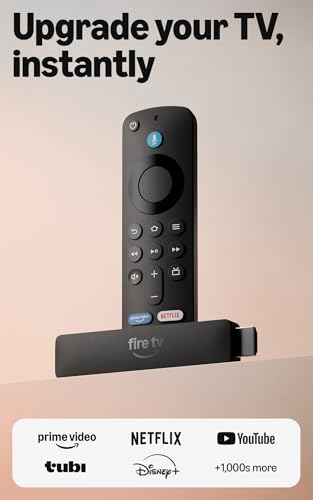
What reviewers say: Positive reviews praise the Alexa integration and the value proposition. Negative reviews frequently mention the ad-heavy interface and occasional sluggishness when switching between apps. Some users note that the USB-powered setup doesn’t work with all TVs.
Best for: Amazon Prime members, Alexa smart home users, and buyers who want the cheapest possible entry into streaming.
Amazon Fire TV Stick 4K Select — The Mid-Range Step Up

The Fire TV Stick 4K Select is Amazon’s newest mid-tier option, bridging the gap between the basic HD stick and the more feature-rich 4K Plus. It adds 4K Ultra HD resolution, HDR support, and Amazon’s AI-powered search functionality.
What it does well: The jump from 1080p to 4K is significant if you have a compatible TV. The 4K Select supports HDR10, HDR10+, HLG, and Dolby Vision, covering all the major high dynamic range formats. AI-powered search is Amazon’s latest feature, designed to surface content recommendations more intelligently across your subscribed services. For the price, getting full 4K with broad HDR support represents strong value.
Where it falls short: This is a very new model with extremely limited verified reviews (only 4 at the time of research), so long-term reliability data simply doesn’t exist yet. The “Select” branding is confusing — it’s not immediately clear how it differs from the 4K Plus or 4K Max without reading the fine print. It also lacks Wi-Fi 6 support, relying on Wi-Fi 5, which may matter in congested home networks.
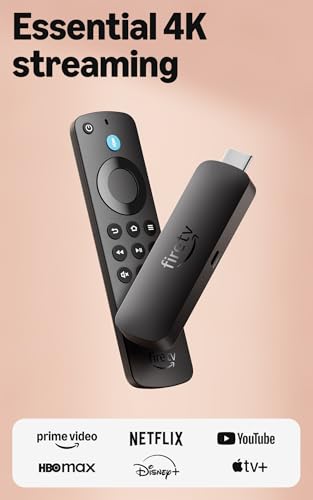
What reviewers say: With so few reviews, it’s difficult to identify patterns. Early feedback is positive regarding picture quality, but the sample size is too small to draw reliable conclusions. We recommend waiting for more user data if you’re risk-averse.
Best for: Buyers who want 4K and HDR without paying for Wi-Fi 6 or other premium features they may not need.
Amazon Fire TV Stick 4K Plus — Wi-Fi 6 and Smoother Performance

The Fire TV Stick 4K Plus sits one tier above the 4K Select, adding Wi-Fi 6 support and what Amazon describes as faster app loading and smoother navigation. It also includes AI-powered Fire TV Search and the full suite of HDR formats.
What it does well: Wi-Fi 6 (802.11ax) is the headline upgrade here. If your router supports it, you’ll benefit from faster throughput, lower latency, and better performance when multiple devices share the network. This matters in households where several people stream simultaneously. The 4K Plus also supports Dolby Atmos audio passthrough via HDMI, which is a meaningful upgrade for users with soundbars or AV receivers that decode Atmos.
Where it falls short: Like the 4K Select, this is a very new model with minimal verified reviews (4 at the time of research). The difference between the 4K Select and 4K Plus may not justify the price gap for users on Wi-Fi 5 routers. The Fire TV interface issues — ad clutter, Amazon content prioritization — persist across all Fire TV devices regardless of tier.

What reviewers say: Early reviews are positive but sparse. Users who upgraded from older Fire TV Sticks note faster performance, but there isn’t enough data to assess long-term durability or software stability.
Best for: Households with Wi-Fi 6 routers, Dolby Atmos setups, and users who want future-proofed wireless connectivity.
Amazon Fire TV Stick 4K Max — The Top-Tier Fire TV Dongle

The Fire TV Stick 4K Max is Amazon’s flagship streaming stick, featuring Wi-Fi 6E support, the most powerful processor in the Fire TV Stick lineup, and ambient display capabilities that turn your TV into a smart art frame or dashboard when not actively streaming.
What it does well: Wi-Fi 6E adds the 6 GHz band, which is less congested than 2.4 GHz and 5 GHz — ideal for users in apartment buildings or dense Wi-Fi environments. The faster processor translates to snappier app launches and smoother UI navigation, according to Amazon’s specs. The ambient experience feature, which displays artwork, weather, and smart home controls on your TV’s idle screen, is a genuinely useful differentiator. It also supports picture-in-picture for select content.
Where it falls short: Wi-Fi 6E requires a compatible router, which many households don’t yet have. Without one, you’re paying a premium for a feature you can’t use. The 4K Max also has very few verified reviews on this newest model iteration (4 at the time of research), making it hard to assess real-world performance beyond Amazon’s marketing claims. And as with all Fire TV devices, the ad-laden interface remains a sticking point.

What reviewers say: The limited reviews available praise the speed and responsiveness. Users upgrading from older Fire TV Sticks report a noticeable improvement. However, some note that the ambient display feature can increase power consumption.
Best for: Tech enthusiasts with Wi-Fi 6E routers, users who want the fastest Fire TV experience, and anyone who likes the ambient display concept.
How to Choose: A Quick Decision Framework
Do you have a 4K TV?
- No → Roku Streaming Stick HD or Fire TV Stick HD. Save your money.
- Yes → Consider the 4K Select, 4K Plus, or 4K Max depending on your router and audio setup.
Which ecosystem are you in?
- Alexa / Amazon Prime → Fire TV Sticks integrate more deeply.
- Neutral / multiple services → Roku’s platform-agnostic approach is generally preferred.
What’s your Wi-Fi situation?
- Wi-Fi 5 router → Don’t pay extra for Wi-Fi 6 or 6E sticks.
- Wi-Fi 6 router → The 4K Plus makes sense.
- Wi-Fi 6E router → The 4K Max can take full advantage.
How much do ads bother you?
- A lot → Roku’s cleaner interface will make you happier.
- Not much → Fire TV’s content discovery can actually be useful if you don’t mind the promotional elements.
Product Comparison Grid
Frequently Asked Questions
Do I need a 4K streaming stick if my TV is 4K?
Not necessarily, but you’re under-utilizing your display with an HD stick. If you watch a lot of content on services that offer 4K (Netflix, Disney+, Apple TV+, Amazon Prime Video), a 4K stick will deliver noticeably sharper images on screens 50 inches and larger.
Can I use a streaming stick on a monitor or projector?
Yes — any display with an HDMI input will work. This makes streaming sticks a great option for office projectors, computer monitors, or hotel TVs.
Will a streaming stick slow down over time?
All electronics can slow down as software updates add features that tax the hardware. Based on user reports, Roku sticks tend to maintain performance well over 2-3 years. Fire TV Sticks have more mixed feedback, with some users reporting sluggishness after major OS updates.
Do I need a separate subscription to use a streaming stick?
No. All of these sticks offer free content — Roku has The Roku Channel, and Fire TV has Freevee and free live TV channels. However, premium services like Netflix, Hulu, and Disney+ require their own subscriptions.
How We Research
We have not personally tested, owned, or handled any of the products in this guide. Our research process involves synthesizing manufacturer specifications, official product documentation, and verified customer reviews from Amazon and expert analyses from established tech publications. We cross-reference claims across multiple sources to ensure accuracy. When review volume is low (as with several newer Fire TV models), we note that limitation explicitly so you can make an informed decision. Our goal is honest curation, not fabricated hands-on experience.


Leave a Reply