
As an Amazon Associate I earn from qualifying purchases.
Thermal imaging cameras have dropped from five-figure professional tools to surprisingly accessible handheld devices — but that accessibility has created a minefield of confusing specs, inflated resolution claims, and battery-life disappointments. Whether you’re hunting air leaks in your home, troubleshooting electrical panels, or inspecting HVAC systems, buying the wrong thermal camera means either overpaying for features you don’t need or — worse — getting a device that can’t actually resolve the detail you’re after. This guide walks you through the five critical checkpoints every buyer should evaluate before committing, then reviews five popular models that illustrate exactly how these specs play out in the real world.
Best for: Home inspectors, HVAC technicians, and serious DIYers who need real detail
The 5 Things You Must Check Before Buying
1. Native IR Resolution vs. “Super Resolution” (TISR) — The Biggest Gotcha
This is where most buyers get burned. Manufacturers advertise headline resolution numbers like “512×384” or “240×240,” but those are often software-enhanced figures — not the native sensor resolution. The actual infrared sensor might capture at 256×192 or even 128×128 pixels, with algorithms interpolating the rest.
Why does this matter? Native resolution determines how much real thermal detail the sensor captures. Software upscaling (often called TISR — Thermal Image Super Resolution) can make images look smoother, but it cannot invent thermal data that the sensor never recorded. If you need to spot a hairline crack in insulation or identify a specific failing component on a circuit board, native resolution is what counts.
Rule of thumb: Always look past the headline number. Find the native IR sensor resolution in the detailed specs. For general home inspection, 160×120 native is the bare minimum; 256×192 is the sweet spot for prosumer use.
2. Temperature Range and Accuracy — Match the Job
Most consumer-grade thermal cameras cover roughly -4°F to 1022°F (-20°C to 550°C), which handles everything from frozen-pipe detection to electrical panel inspection. But accuracy varies. A spec of ±2°C (±3.6°F) is standard; anything worse than that limits your ability to make meaningful comparisons between two surfaces.
Also check whether the camera offers multiple measurement modes — spot measurement, area min/max, and isotherms. If you’re doing energy audits, isotherms (color-coding a specific temperature band) are invaluable. Not every budget camera includes them.
3. Battery Life — The Trade-Off Nobody Talks About
Battery life on thermal cameras ranges wildly, from under 3 hours to over 14 hours. The trade-off is usually resolution and screen size: higher-resolution sensors and larger displays drain batteries faster. If you’re doing a full-day inspection of a commercial building, a camera that dies after 2.5 hours is a dealbreaker — and carrying spare batteries adds cost and bulk.
Look for cameras with replaceable or USB-C rechargeable batteries. Some models use proprietary battery packs that are expensive to replace. Others charge via standard USB-C, which means you can top up from a power bank in the field. This is a detail that’s easy to overlook until you’re standing on a roof with a dead camera.
4. Display Quality and Image Capture
You’ll be making real-time decisions based on what you see on screen, so display size and quality matter more than you’d think. A 2.4″ screen might be fine for quick spot checks, but if you’re scanning large areas or presenting findings to a client, a 3.5″ or larger display with good brightness is significantly more usable.
Equally important: can the camera save images and video? Can it export them via Wi-Fi or USB? If you need to generate reports, you want a camera that saves radiometric data (thermal data embedded in the image file), not just a flat screenshot. Budget models often save only visual snapshots with no embedded thermal data, which limits post-capture analysis.
This same principle of checking what’s actually under the hood applies to many product categories — we covered a similar “specs vs. reality” issue in our pre-purchase checklist for waterproof metal detectors.
5. Build Quality, Weight, and Ergonomics
Thermal cameras get used in attics, crawl spaces, on ladders, and in the rain. A flimsy plastic body or an awkward grip can turn a good sensor into a frustrating tool. Check the weight (anything under 300g is genuinely pocket-friendly), whether it has any IP rating for dust/water resistance, and whether the trigger or button layout works one-handed.
Also consider the field of view (FOV). A wider FOV (50°+) lets you scan large areas quickly; a narrower FOV gives you more detail at distance but requires more panning. For building inspection, wider is generally better. For electrical or mechanical troubleshooting at a distance, narrower can be an advantage.
5 Thermal Imaging Cameras Reviewed
Now let’s see how these five checkpoints play out across real products. Each model below is evaluated against the criteria above so you can see exactly where it excels and where it compromises.
TOPDON TC004 — 512×384 TISR, 3.5″ Screen

The TOPDON TC004 is the flagship in this lineup, and it earns that position primarily through its combination of high resolution and long battery life. The headline “512×384” resolution is a TISR-enhanced figure — the native IR sensor is 256×192, which is genuinely high for this price tier. That native resolution means you’re getting real thermal detail, not just smoothed-out interpolation.
The 3.5-inch display is the largest in this group, and reviewers consistently praise its brightness and clarity for outdoor use. Battery life is rated at 8 hours, which is enough for a full workday of inspections without scrambling for a charger. The temperature range spans -4°F to 1022°F, covering virtually every residential and light-commercial scenario.
On the downside, verified buyers note that the TC004 is bulkier than phone-attachment alternatives, and the software for PC analysis has a learning curve. Some reviewers mention that the menu system could be more intuitive. The camera supports image and video capture with on-device storage, and it offers multiple color palettes and measurement modes.

Who should buy this: Home inspectors, HVAC professionals, and serious DIYers who need the highest native resolution available without jumping to professional-tier pricing. If you only buy one thermal camera and want it to last through years of use, this is the one to consider.
TOPDON TC004 Mini — 15-Hour Battery, Compact Form

The TC004 Mini trades resolution for portability and marathon battery life. Its native IR sensor is 128×128, enhanced to 240×240 via TISR. That’s a significant step down from the full TC004’s 256×192 native sensor, and it means fine details — like individual wire connections in a panel — will be harder to resolve. However, for broader tasks like finding insulation gaps, locating water leaks behind walls, or checking radiant floor heating zones, 128×128 native is workable.
The standout spec here is the 15-hour battery life, which is exceptional in this category. You could inspect an entire apartment complex on a single charge. The compact form factor also makes it genuinely pocketable, which matters if you’re climbing ladders or working in tight spaces.
Reviewers generally appreciate the value proposition — you get a standalone thermal camera with a usable screen and all-day battery at a lower price point than the full TC004. Common complaints center on the lower resolution making it harder to pinpoint small anomalies, and some users wish the screen were slightly larger.

Who should buy this: Budget-conscious homeowners, property managers doing routine checks, or anyone who prioritizes battery endurance and portability over maximum image detail. It’s also a solid backup camera for professionals who already own a higher-resolution primary unit.
HF96 Thermal Camera — AI Scene Detection and Laser Pointer

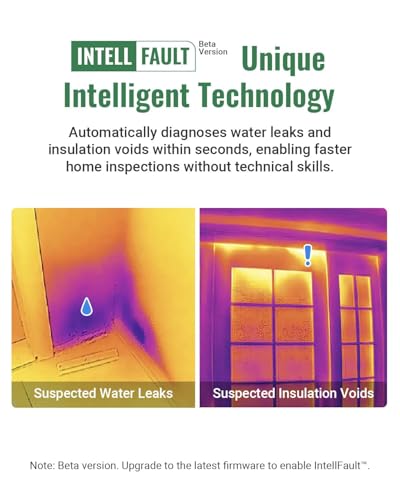
The HF96 differentiates itself with two features you won’t find on every competitor: AI-powered scene detection and a built-in laser pointer. The AI feature attempts to automatically identify what you’re scanning (electrical panel, pipe, window, etc.) and adjust display settings accordingly. The laser pointer helps you correlate the thermal image with the physical location you’re examining — a genuinely useful feature when you’re scanning a wall and need to mark exactly where the anomaly is.
Resolution is listed at 240×240 super resolution, and the temperature range matches the standard -4°F to 1022°F. The native sensor resolution should be verified in the detailed specs, as the 240×240 figure is likely an enhanced number.
Verified reviewers highlight the laser pointer as a surprisingly practical addition, especially for HVAC work where you need to mark ductwork locations. The AI scene detection gets mixed reviews — some find it helpful for quick identification, while others report it occasionally misidentifies scenes. The build quality is generally praised as solid for the price.
Who should buy this: Users who want smart features and the practical benefit of a laser pointer for marking anomaly locations. It’s a good choice for HVAC technicians and electricians who need to quickly correlate thermal findings with physical locations. Just like we advise in our smart tower fan buying checklist, smart features are only valuable if they genuinely save you time — and the laser pointer here does.
AccuMEMS GT14S — Ultra-Light at 240g with 14-Hour Runtime

At just 240 grams, the AccuMEMS GT14S is the lightest camera in this roundup by a significant margin. Combined with a claimed 14-hour runtime, it’s designed for users who need to carry a thermal camera all day without fatigue. The temperature range is the standard -4°F to 1022°F, and it includes a thermometer mode for quick spot temperature readings.
The “Live Tracking” feature mentioned in the product listing suggests real-time temperature monitoring, which is useful for watching a component heat up over time — a common diagnostic technique for electrical and mechanical troubleshooting.
Reviewer feedback on the GT14S is more limited than for the TOPDON models, which is worth noting — fewer reviews means less community validation. Those who have reviewed it praise the featherweight design and long battery life. Some note that the display could be brighter for outdoor use, and the brand is less established than competitors like FLIR or TOPDON, which may affect long-term software support and firmware updates.

Who should buy this: Users who prioritize ultra-light weight and all-day battery above all else. It’s a compelling option for property managers, home inspectors who walk extensive routes, or anyone with wrist/hand fatigue concerns. Be aware that the smaller review base means less community troubleshooting support.
Klein Tools TI250 — Trusted Brand, Entry-Level Specs
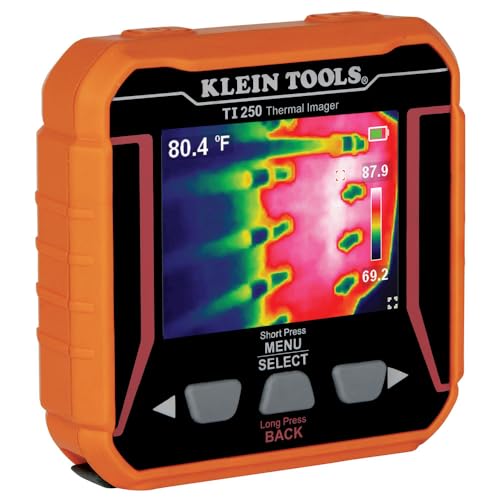
Klein Tools is a name that electricians and tradespeople trust implicitly, and the TI250 carries that brand credibility into the thermal imaging space. However, it’s important to evaluate the specs honestly: the TI250 displays “over 19,200 pixels,” which works out to roughly 160×120 — the lowest resolution in this roundup. It offers three color palettes and high/low temperature markers.
The TI250 is a rechargeable unit, which is convenient, but Klein doesn’t advertise marathon battery life as a headline feature, and reviewers report that runtime is modest compared to the TOPDON and AccuMEMS models. The display is functional but smaller than the TC004’s 3.5-inch screen.
Where the TI250 shines is in build quality and brand support. Klein Tools has an extensive service network, and the camera is built to the rugged standards tradespeople expect. Verified reviewers consistently praise its durability and straightforward operation — there’s no complex menu system to navigate. Common complaints focus on the limited resolution making it difficult to capture fine detail, and the lack of advanced features like Wi-Fi transfer or radiometric image saving.

Who should buy this: Electricians and tradespeople who already trust Klein Tools and need a simple, rugged thermal camera for quick spot checks — identifying hot breakers, finding overloaded circuits, or locating radiant heat sources. If you need detailed thermal analysis or report-ready images, look at the higher-resolution options above. Similar to how we approach pre-purchase checklists for other tools, brand trust matters — but it shouldn’t override spec requirements.
Quick Comparison: How Each Camera Stacks Up
Common Buyer Regrets (and How to Avoid Them)
Based on patterns across verified customer reviews for thermal cameras in this price range, here are the most frequent regrets:
- “I thought the resolution would be higher.” This is overwhelmingly the #1 complaint. Buyers see a headline like “512×384” and expect FLIR-level detail, then discover the native sensor is much lower. Always check native IR resolution.
- “The battery died mid-inspection.” Buyers who don’t check battery specs often end up with cameras that last 2-3 hours. If you do multi-hour inspections, prioritize models with 8+ hour ratings.
- “I can’t export the thermal data.” Some budget cameras save only flat JPEG screenshots. If you need to adjust temperature ranges or generate professional reports after the fact, you need radiometric data export.
- “It’s bigger than I expected.” Standalone thermal cameras are larger than phone-attachment thermal modules. Check dimensions and weight before buying if portability is critical.
- “The software is clunky.” PC companion software for thermal cameras is notoriously unpolished across most brands. Set expectations accordingly and check whether the camera’s on-device analysis tools are sufficient for your needs.
Final Advice
The best thermal camera is the one that matches your actual use case — not the one with the most impressive-sounding headline specs. For professional inspectors, the TOPDON TC004’s 256×192 native sensor and 8-hour battery make it the most capable option here. For homeowners doing occasional checks, the TC004 Mini or AccuMEMS GT14S offer excellent battery life at lower cost. And for tradespeople who want bulletproof simplicity from a brand they already trust, the Klein Tools TI250 delivers exactly that — just don’t expect it to resolve fine detail.
Use the five-point checklist above, and you’ll avoid the most common (and most expensive) thermal camera buying mistakes.
How We Research
We have not personally tested or owned any of the products reviewed in this article. Our analysis is based on a thorough synthesis of manufacturer specifications, official product documentation, and patterns found across verified customer and expert reviews from multiple sources. We cross-reference advertised specs against reviewer-reported real-world performance to identify discrepancies and common issues. This honest research approach ensures our recommendations reflect what buyers actually experience, not fabricated hands-on impressions.


Leave a Reply