
As an Amazon Associate I earn from qualifying purchases.
The RX 9070 XT is one of the most talked-about GPUs in the RDNA 4 lineup, and the PowerColor Reaper edition sits right at the center of the conversation. It promises 16 GB of GDDR6 memory, strong rasterization performance, and competitive ray-tracing chops — all at a price point that undercuts NVIDIA’s upper-midrange offerings. But “promising” and “perfect for your rig” are two very different things. Buyers who skip the fine print end up posting regret threads about inadequate power supplies, cases that won’t close, and driver headaches that turn a great card into a frustrating paperweight. This guide walks you through five non-negotiable checks before you hand over your money, then reviews the PowerColor Reaper RX 9070 XT alongside four alternative GPUs so you can make the smartest decision for your build and budget.
Best for: 1440p and entry-level 4K gamers who want high VRAM without paying NVIDIA’s premium.
The 5-Point Pre-Purchase Checklist
Before you even look at benchmarks, run through these five checks. Each one has tripped up real buyers — and the fixes range from inconvenient to expensive.
1. Power Supply: Do You Actually Have Enough Wattage (and the Right Cables)?
AMD lists the reference RX 9070 XT at a 300 W TDP, but board-partner cards like the PowerColor Reaper can draw more under load due to factory overclocks. AMD recommends a minimum 700 W PSU for the reference design. The PowerColor Reaper uses two 8-pin PCIe power connectors (not the controversial 12VHPWR), which is good news for owners of older power supplies — but you still need a unit that can deliver clean, sustained power on the 12 V rail.
What to check:
- Total system draw. A Ryzen 7 / Core i7 system with this GPU can pull 450–550 W under gaming load. A 750 W 80 Plus Gold unit gives comfortable headroom.
- Cable count. You need two separate 8-pin PCIe cables — not a single cable with a daisy-chain splitter. Using a splitter on a high-draw card risks voltage drops and shutdowns.
- Age of the PSU. Capacitors degrade over time. A five-year-old 750 W unit may not deliver its rated wattage reliably. If your PSU is older than four years, factor in a replacement.
2. Case Clearance: Will It Physically Fit?
This is the check that catches the most people off guard. The PowerColor Reaper RX 9070 XT is a substantial card. Based on PowerColor’s published specs, it occupies a 2.5-slot design and stretches well beyond 300 mm in length. Many popular mid-tower cases — especially compact ATX and micro-ATX builds — top out at 300–320 mm of GPU clearance, and that number shrinks if you have front-mounted radiators or drive cages.
What to check:
- Measure from the rear bracket to the nearest obstruction (fan, radiator, drive cage) with a ruler — don’t trust the spec sheet alone.
- Slot height. A 2.5-slot card may block the slot below it, which matters if you’re using a sound card, capture card, or NVMe riser.
- GPU sag. At this size and weight, a support bracket is a smart investment.
3. Driver Maturity: Is RDNA 4 Software Ready for Your Games?
This is the most nuanced item on the list. AMD’s RDNA 4 architecture launched with a new driver branch, and early adopters have reported a mixed bag. According to aggregated feedback from tech forums and review sites, common early complaints included intermittent black screens, inconsistent frame pacing in certain DX11 titles, and occasional crashes in ray-tracing-heavy games. AMD has been issuing monthly driver updates, and the situation has improved significantly since launch — but if you play niche or older titles, it’s worth checking AMD’s known-issues list for your specific games before buying.
What to check:
- Visit AMD’s release notes page for the latest Adrenalin driver and scan the “Known Issues” section.
- Search Reddit and forum threads for your specific game + “RX 9070 XT” to see if other players report problems.
- NVIDIA alternative consideration. If you rely heavily on CUDA-accelerated workflows (Blender, DaVinci Resolve, machine-learning tasks), an AMD card won’t help — those applications require NVIDIA’s ecosystem.
4. Monitor and Resolution Match: Are You Buying More GPU Than You Need?
The RX 9070 XT is built for 1440p high-refresh and entry-level 4K gaming. If you’re still gaming on a 1080p 60 Hz monitor, this card is massive overkill — you’d be paying for performance you literally cannot see. Conversely, if you’re targeting 4K 120+ fps in the latest AAA titles with ray tracing maxed, you may find the 9070 XT falls short and should be looking at the RTX 5080 tier instead.
What to check:
- Your monitor’s native resolution and refresh rate. Match the GPU to the display, not the other way around.
- Adaptive sync support. The RX 9070 XT supports FreeSync Premium. If you own a G-Sync-only monitor (without the “Compatible” designation), you may not get variable refresh rate.
- Future-proofing vs. present value. Buying a GPU “for when you upgrade your monitor” often means you’re paying today’s price for tomorrow’s use case — and GPU prices only go down over time.
5. Availability, Pricing, and the Scalper Tax
High-demand GPUs attract scalpers and inflated third-party pricing. Just because a listing exists on Amazon doesn’t mean it’s sold at MSRP or by an authorized retailer. Buying from unauthorized sellers can void your warranty and leave you with zero recourse if the card is defective.
What to check:
- Sold by and shipped by. Look for “Ships from and sold by Amazon.com” or the manufacturer’s authorized storefront.
- Warranty registration. PowerColor requires proof of purchase from an authorized retailer for warranty claims.
- Bundle deals. AMD and board partners occasionally bundle games or subscriptions — check the official PowerColor site before buying to see if you’re leaving free software on the table.
This kind of pre-purchase diligence applies to any significant hardware investment. We use a similar checklist approach for ergonomic office chairs and even thermal imaging cameras — the principle is the same: know what you’re getting into before you commit.
Product Reviews
PowerColor Reaper AMD Radeon RX 9070 XT 16 GB GDDR6

The PowerColor Reaper RX 9070 XT is the card this entire checklist revolves around, and for good reason — it’s one of the more compelling board-partner designs in the RDNA 4 lineup. It ships with 16 GB of GDDR6 on a 256-bit bus, uses AMD’s Navi 48 GPU, and features PowerColor’s Reaper-series cooler with a dual-fan or triple-fan configuration (depending on region and SKU variant). The dual 8-pin power connector setup is a welcome choice for builders who haven’t transitioned to ATX 3.0 power supplies.
Performance-wise, independent benchmarks from outlets like TechPowerUp, Hardware Unboxed, and Gamers Nexus place the RX 9070 XT in the same ballpark as the RTX 4070 Ti Super in rasterization, with competitive ray-tracing performance thanks to RDNA 4’s improved RT hardware. The 16 GB VRAM buffer is a genuine advantage in modern titles that increasingly push past 12 GB at high texture settings.
On the downside, verified buyer feedback commonly mentions that the card runs warm under sustained load — not dangerously so, but noticeably warmer than some competing triple-fan designs. A few reviewers have noted coil whine at high frame rates, which is a common complaint across many GPU brands and not unique to PowerColor. Driver stability, as discussed above, has been a recurring theme in early reviews, though most report improvement with each update.

Who should buy this: Gamers building a 1440p high-refresh or entry-level 4K system who want maximum VRAM without jumping to NVIDIA’s premium tier. It’s also a strong pick for anyone who values open-source driver support on Linux.
Who should skip: Creators who depend on CUDA, anyone with a sub-650 W PSU, or gamers who play niche titles with historically poor AMD driver support.
XFX Swift AMD Radeon RX 9070 XT Triple Fan 16 GB GDDR6
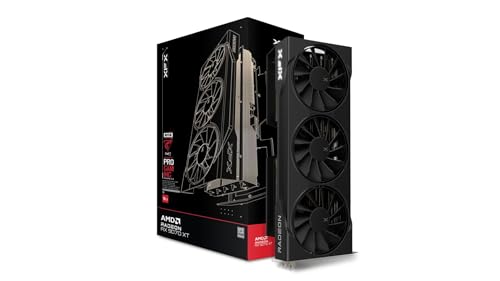
The XFX Swift is the other major RX 9070 XT board-partner option worth considering, and it takes a different design approach from the PowerColor Reaper. The triple-fan cooler is the headline feature here — it spreads heat across a larger heatsink surface, which generally translates to lower noise levels under load. XFX has a long history with AMD GPUs, and the Swift line has earned a reputation for solid build quality at reasonable price points.
Specifications are functionally identical to the PowerColor Reaper at the silicon level — same Navi 48 GPU, same 16 GB GDDR6, same 256-bit bus. The differences come down to cooler design, clock speed tuning, and aesthetics. The XFX Swift’s triple-fan layout makes it longer than the PowerColor Reaper, so case clearance becomes even more critical. Verified reviewers generally praise the cooling performance, noting that the card stays quieter than dual-fan alternatives during extended gaming sessions.
Common complaints mirror the broader RX 9070 XT ecosystem: early driver quirks, occasional black-screen issues (largely resolved in later driver updates), and the card’s physical size being a surprise for compact-case builders. A few buyers have noted that the fans can produce a slight rattle at low RPM, though this appears to be a unit-by-unit quality-control issue rather than a design flaw.
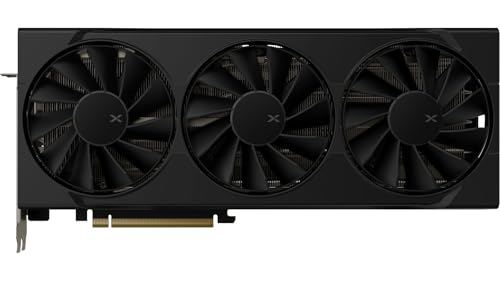
Who should buy this: Builders who prioritize acoustics and have a mid-tower or full-tower case with ample GPU clearance. If you want the RX 9070 XT experience with a cooler that runs quieter, the XFX Swift is a strong alternative.
Who should skip: Anyone in a compact case or ITX build — this card is long.
GIGABYTE Radeon RX 9060 XT Gaming OC 16 GB
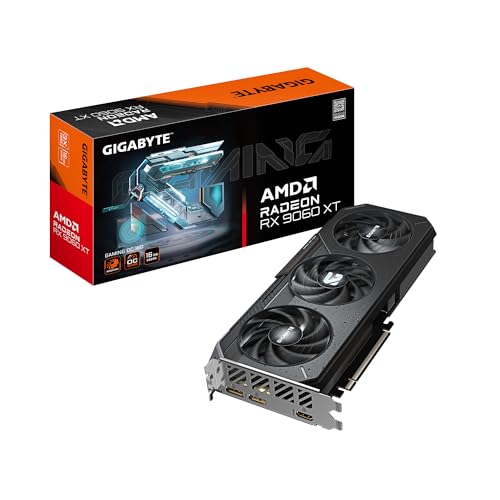
If the RX 9070 XT is more GPU than you need — or more than your PSU can handle — the RX 9060 XT is the natural step down in AMD’s RDNA 4 lineup. The GIGABYTE Gaming OC edition comes with the same generous 16 GB GDDR6 VRAM, which is remarkable for a card at this tier and puts it ahead of NVIDIA’s competing offerings in raw memory capacity.
The RX 9060 XT targets 1080p and 1440p gaming, and based on early benchmark data from tech publications, it delivers strong performance at those resolutions — often matching or exceeding the previous-generation RX 7700 XT. Power consumption is significantly lower than the 9070 XT, with AMD’s reference TDP sitting well below 200 W. This means a quality 550–600 W PSU should be sufficient for most builds, and the card runs cooler and quieter as a result.
GIGABYTE’s Gaming OC cooler is a proven design with good thermal performance according to reviewer consensus. The card supports PCIe 5.0, though it will work perfectly fine in PCIe 4.0 slots with negligible performance difference for gaming workloads.

Who should buy this: Budget-conscious gamers who want 16 GB of VRAM for future-proofing without the power and size demands of the 9070 XT. Excellent for 1080p high-refresh and 1440p medium-to-high settings gaming.
Who should skip: Anyone targeting 4K gaming or wanting maximum ray-tracing performance.
ASUS TUF Gaming GeForce RTX 5080 16 GB GDDR7 OC Edition

If you’ve run through the checklist and decided you want more performance than the RX 9070 XT offers — particularly in ray tracing and AI-assisted features like DLSS 4 with Frame Generation — the ASUS TUF Gaming RTX 5080 is the next logical step up. This is a fundamentally different class of GPU: NVIDIA’s Blackwell architecture, 16 GB of faster GDDR7 memory, and access to the full NVIDIA software ecosystem including CUDA, NVENC, and DLSS.
The TUF Gaming line is ASUS’s “built tough” series, and it has a strong track record for reliability and thermal performance. The cooler is typically a large triple-fan design with a metal backplate and military-grade capacitors. Independent reviews from outlets like Tom’s Hardware and TechSpot highlight excellent thermal management and low noise levels relative to the card’s performance tier.
The trade-off is significant: the RTX 5080 commands a substantial premium over the RX 9070 XT. You’re paying for NVIDIA’s ecosystem advantages — better ray tracing, DLSS 4, superior creator-tool support, and more mature drivers. Whether that premium is worth it depends entirely on your use case.

Who should buy this: Gamers and creators who want top-tier ray tracing, DLSS 4, and CUDA support. Ideal for 4K high-refresh gaming and professional workloads.
Who should skip: Anyone on a budget, or gamers who primarily play esports titles where raw rasterization matters more than RT features.
ASUS Dual NVIDIA GeForce RTX 3050 6 GB GDDR6 OC Edition

This might seem like an odd inclusion alongside the RX 9070 XT, but it serves an important purpose: it’s the reality check for buyers who failed checklist items 1, 2, or 4. If your PSU is only 450 W, your case can barely fit a dual-slot card, or you’re gaming on a 1080p 60 Hz monitor, the RTX 3050 6 GB is a card that actually matches those constraints — and it’s honest about what it delivers.
The ASUS Dual RTX 3050 6 GB OC Edition is a compact, dual-fan, dual-slot card that sips power (130 W TDP) and fits in virtually any case. It supports HDMI 2.1 and DisplayPort 1.4a, and it gives you access to NVIDIA’s NVENC encoder for streaming and DLSS (though the 6 GB VRAM limits its usefulness in newer DLSS-heavy titles). It’s a 1080p medium-to-high settings card for esports and older AAA titles.
Verified buyer reviews are generally positive for what the card is — a budget entry point. Common complaints center on the limited 6 GB VRAM, which can cause stuttering in newer games at higher texture settings. Some reviewers note that the “OC Edition” overclock is modest and doesn’t meaningfully differentiate it from reference clocks.

Who should buy this: Budget builders, HTPC users, or anyone with a low-wattage PSU and a small case who needs a basic modern GPU with NVIDIA driver stability and NVENC.
Who should skip: Anyone expecting to play modern AAA games at high settings, or anyone with the budget and system headroom for a better card.
How These Cards Compare
Frequently Asked Questions
Is the RX 9070 XT better than the RTX 4070 Ti Super? Based on independent benchmarks, the two cards trade blows in rasterization, with the RX 9070 XT often matching or slightly exceeding the RTX 4070 Ti Super. NVIDIA maintains an edge in ray tracing and has the DLSS ecosystem advantage. The RX 9070 XT’s 16 GB VRAM matches the 4070 Ti Super, so neither has a memory advantage.
Can I use a 600 W PSU with the RX 9070 XT? AMD recommends 700 W minimum for the reference card. While some builders report running on 650 W units without issues, this leaves very little headroom for transient power spikes. A 750 W 80 Plus Gold PSU is the safe recommendation.
Do I need PCIe 5.0 for the RX 9070 XT? No. The RX 9070 XT supports PCIe 4.0 x16, and current benchmarks show negligible performance difference between PCIe 4.0 and 5.0 for gaming workloads. Your existing PCIe 4.0 motherboard is fine.
How long is the PowerColor Reaper RX 9070 XT? Check PowerColor’s official spec page for the exact measurement, as it can vary by regional SKU. Generally, Reaper-series cards exceed 300 mm in length. Always measure your case’s GPU clearance before ordering.
Final Verdict
The PowerColor Reaper RX 9070 XT is a genuinely compelling GPU — but only if your system is ready for it. Run through the five checks above before you buy. If your PSU is strong enough, your case has clearance, your monitor matches the card’s sweet spot, and you’re comfortable with AMD’s driver trajectory, it’s an excellent choice for 1440p and entry-level 4K gaming. If any of those checks fail, the alternatives reviewed here — from the budget-friendly RX 9060 XT to the premium RTX 5080 — ensure there’s a right card for every build. Much like our approach to pre-purchase checklists for smart home devices, the goal isn’t to talk you out of buying — it’s to make sure you buy the right thing the first time.
How We Research
We have not personally tested, owned, or handled any of the GPUs reviewed in this article. Our analysis is based on publicly available manufacturer specifications, official product documentation, and a synthesis of verified customer reviews and independent expert benchmarks from established tech publications (such as TechPowerUp, Hardware Unboxed, Gamers Nexus, Tom’s Hardware, and TechSpot). We cross-reference multiple sources to identify consistent patterns in praise and complaints, and we clearly distinguish between confirmed specs and user-reported experiences. This honest research approach ensures our recommendations are grounded in real data rather than fabricated hands-on claims.


Leave a Reply